File Management
5-5
computer. If the electrocardiograph is connected to an off-line computer, they can
share the same IP number.
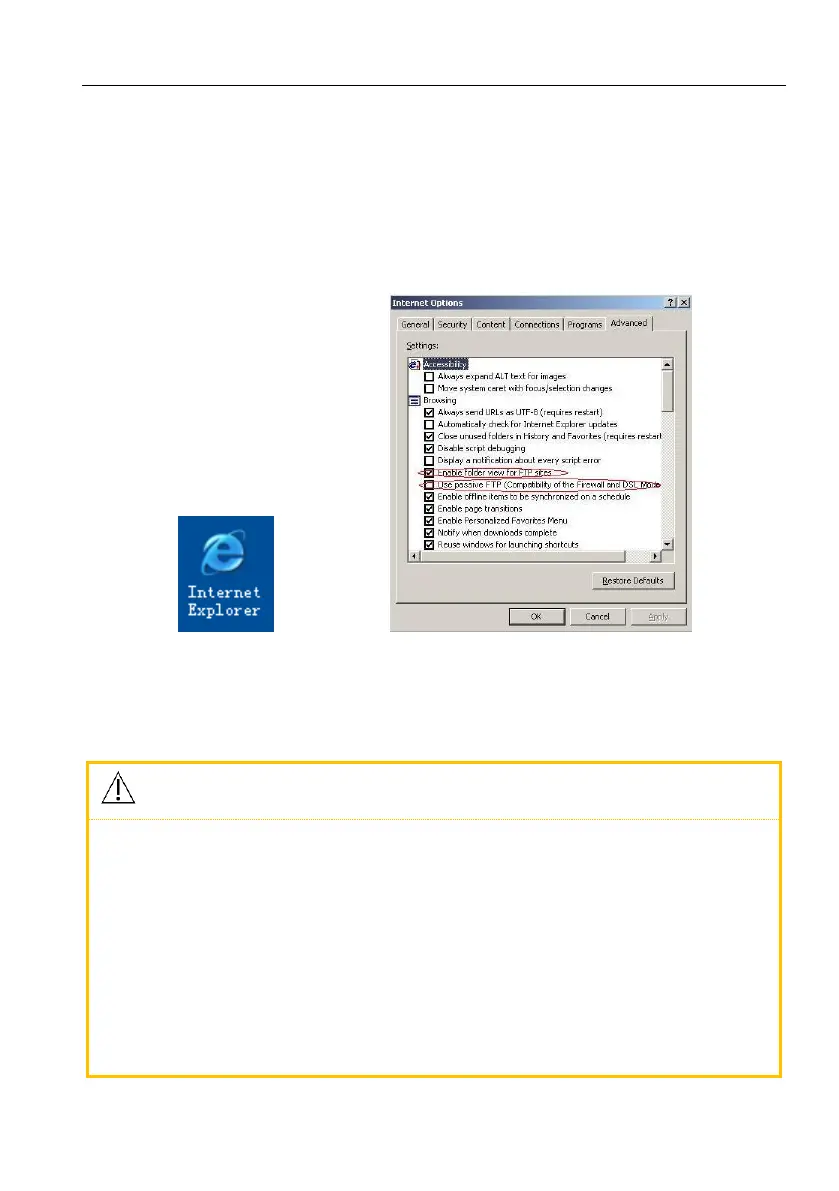
4) Set the FTP view protocol: Internet Explorer (double click, Figure 5-4) →
Tools → Internet Options → Advanced → Browse → uncheck “Use Passive FTP
(Compatibility of the Firewall and DSL Modem)” → check “Enable Folder
View for FTP Websites” (Figure 5-5 in red) → Save.
Figure 5-4 IE Browser Figure5-5 FTP protocol option
5) Double click “My Computer”, input ftp://root:comen@200.200.200.217and
press [Enter] to view the patient files displayed in file list screen.
The IP address in ftp://root:comen@200.200.200.217 is the same as
the local IP address of the electrocardiograph. If the local IP address
of the electrocardiograph is 200.200.200.217, please input
ftp://root:comen@192.168.2.217 in “My Computer”. This IP address
should not be the same as that of any other computer connected to
LAN or WAN, or the system could be halted.
The patient files copied from the USB flash disk and from computer
should be stored in two files with different file names, or there could



 To Next Page