53
- close the door 16.
- press ON and enter the access code.
- press MENU from STAND BY mode, select Menu Cycle (number 1) and press ENTER.
- use the ↑↓ arrows to select the Vacuum test cycle and press ENTER to return to STAND BY.
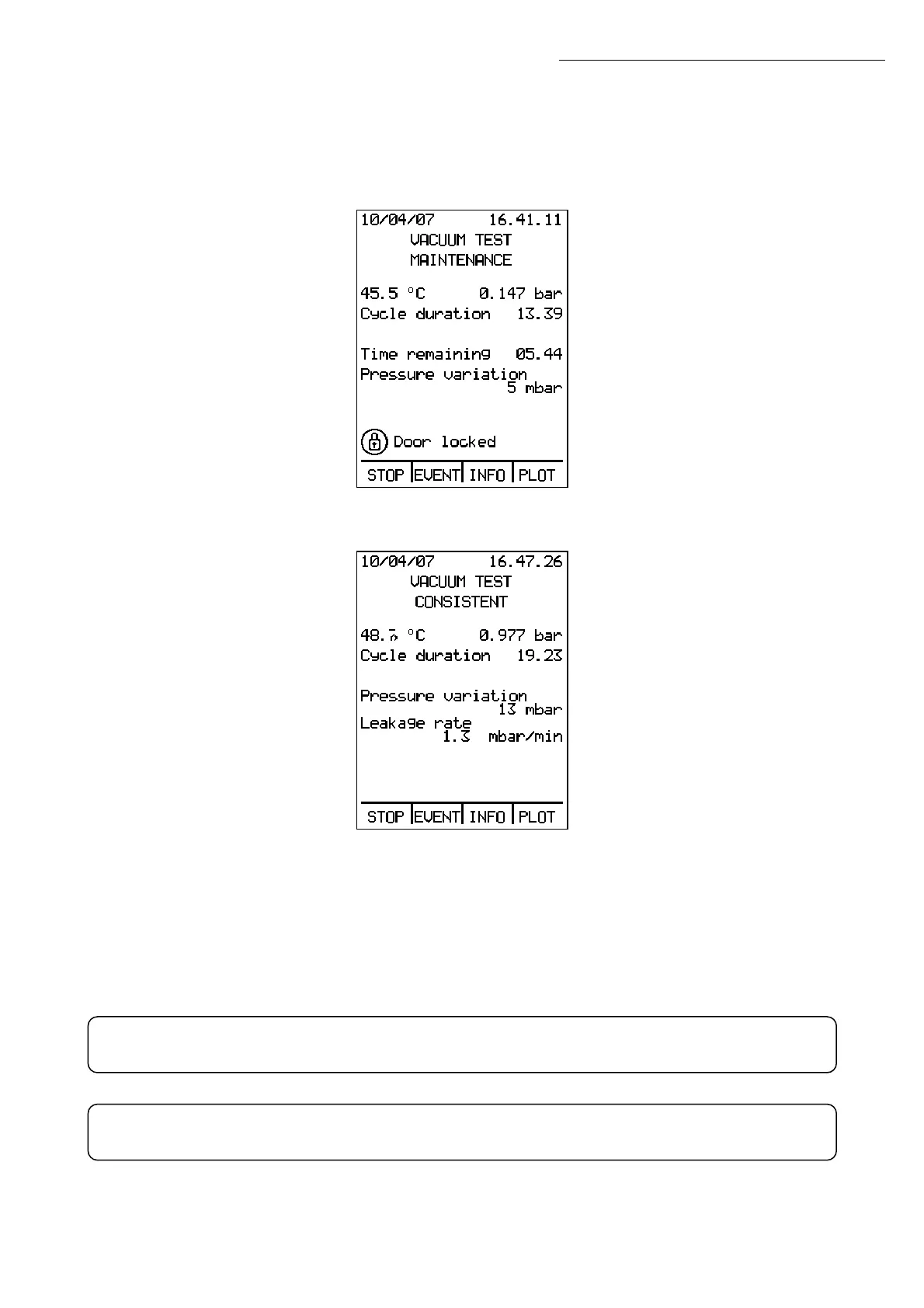
- press START from STAND BY:
- wait for the test to finish, shown on the display by the words “VACUUM TEST CONSISTENT”:
- press STOP, enter the personal access code and open the door 16.
If “REPEAT TEST” appears on the display, the test will be interrupted automatically.
Before repeating the test, open the door 16, let the chamber 09 cool completely, and
check that it is perfectly dry.
Whenever you want to run the VACUUM TEST with a chamber temperature above 40°C,
the display will show a message reading “Cooling pause”, and the cycle will begin only
when the temperature drops below 40°C.
WARNING: for this reason, selecting the Vacuum test disables preheating when
the door is closed and the handle clicks.
If the message “VACUUM TEST NOT CONSISTENT” ever appears after running the
vacuum test, contact a TECHNICAL SERVICE CENTER.
Operation


 To Next Page