4K 8x8 HDBaseT Matrix Switcher
Comm-Tec S.r.l. 12 www.comm-tec.it
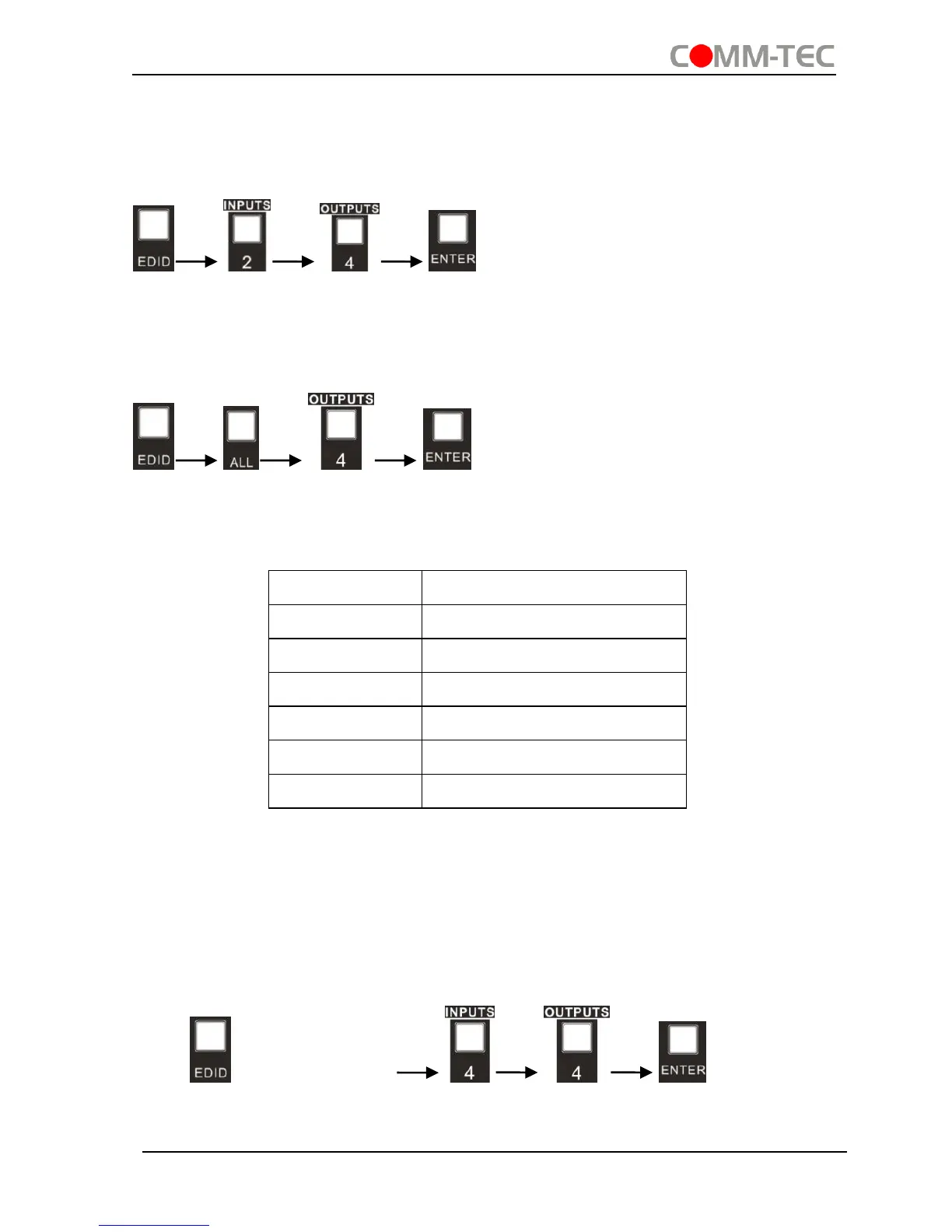
One input port learns the EDID data of one output port
Operation: Press “EDID”, “INPUTS”+“OUTPUTS”+“ENTER”.
Example: Input 2 learns EDID data from output 4
All input ports learn EDID data from one output port
Operation: Press “EDID”, “ALL”+“OUTPUTS”+“ENTER”
Example: All input ports learn EDID data from output 4
EDID invoking:
There are six types of embedded EDID data. The chart below illustrates the detailed
information of the embedded EDID data:
Format: Press and hold “EDID” for 3 seconds, “INPUTS”+“OUTPUTS”+“ENTER”.
Operations:
Set EDID data for one input
Operation: Press “EDID” (hold for 3 seconds to enter in EDID setting status),
“INPUTS”+“OUTPUTS”+“ENTER”.
Example: Set the EDID data of INPUT 4 to the forth type of embedded EDID data:
Press (hold for 3 seconds) .


 To Next Page