4K 8x8 HDBaseT Matrix Switcher
Comm-Tec S.r.l. 6 www.comm-tec.it
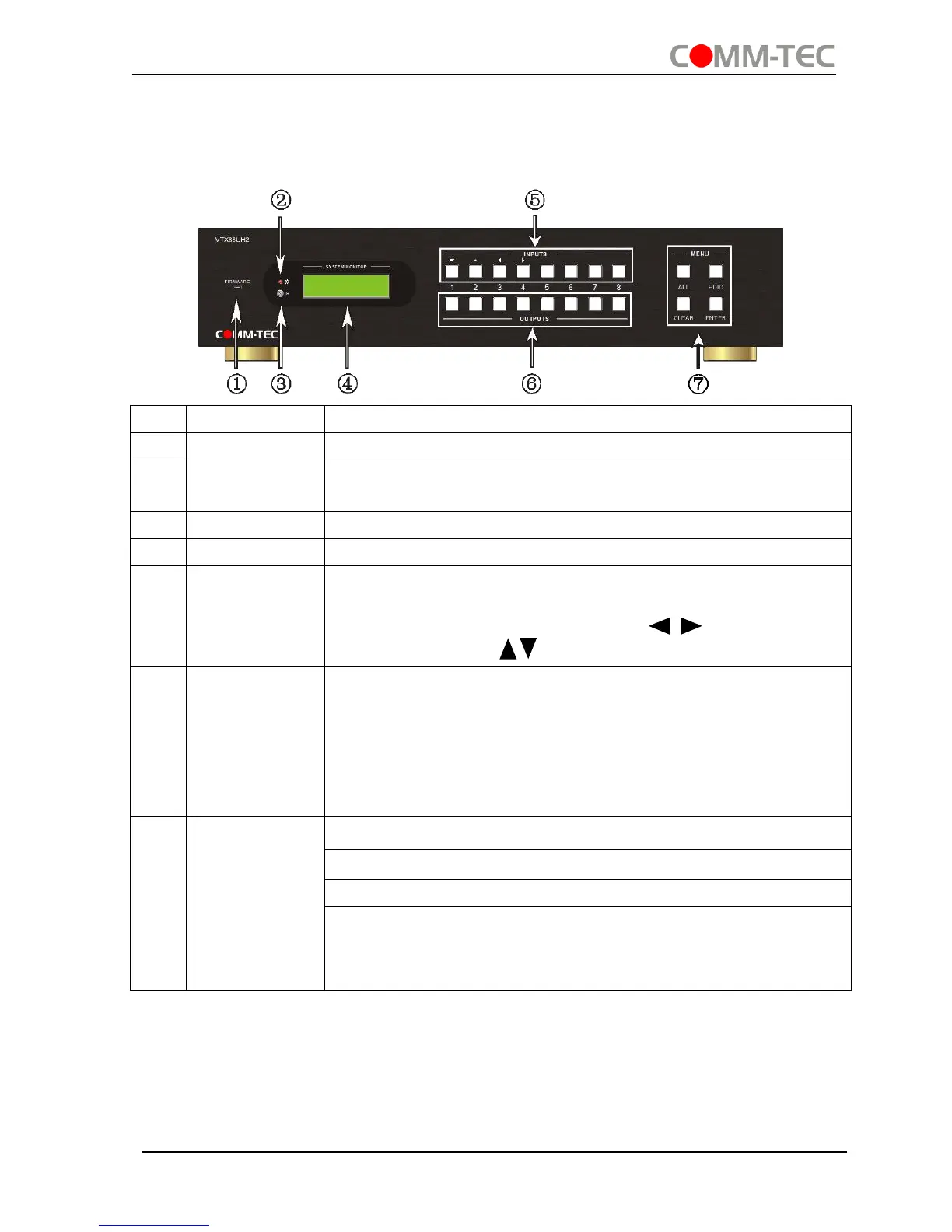
2. Product Appearance of the 4K HDBaseT 8x8 Matrix
Switcher
2.1 Front Panel
Micro USB port for firmware updating
Illuminate red when power on; light yellow in standby mode
In-built IR sensor, receive IR signals sent from IR remote.
Display real-time operation status.
Normal mode: input selection buttons ranging from 1~8.
Inquiry mode (buttons 1~4): Press “ENTER” for more than
3 seconds to enter this mode. Dial to select
different menus, to select different options.
OUTPUTS
buttons/
EDID
Management
buttons
Normal mode: output selection buttons ranging from 1~8
EDID Invoking mode: press and hold EDID button for 3
seconds or more to enter this mode, buttons 1~6
correspond to the 6 embedded EDID data separately.
Press any of the 6 buttons to invoke embedded EDID
data.
ALL: Select all inputs/ outputs
EDID: EDID management button
CLEAR: Withdraw an operation before it comes into effect
ENTER:
Confirm operation
Press for 3 seconds to enter in Inquiry mode.


 To Next Page