4K 8x8 HDBaseT Matrix Switcher
Comm-Tec S.r.l. 18 www.comm-tec.it
x2: Corresponding to the IR IN port at the 8 far-end HDBT receivers
Example: Send command “3R2.” to emit IR signal received from IR Receiver
connected to the 2nd HDBT receiver via IR OUT 3.
4.3 RS232 Control
4.3.1 Connection with RS232 Communication Port
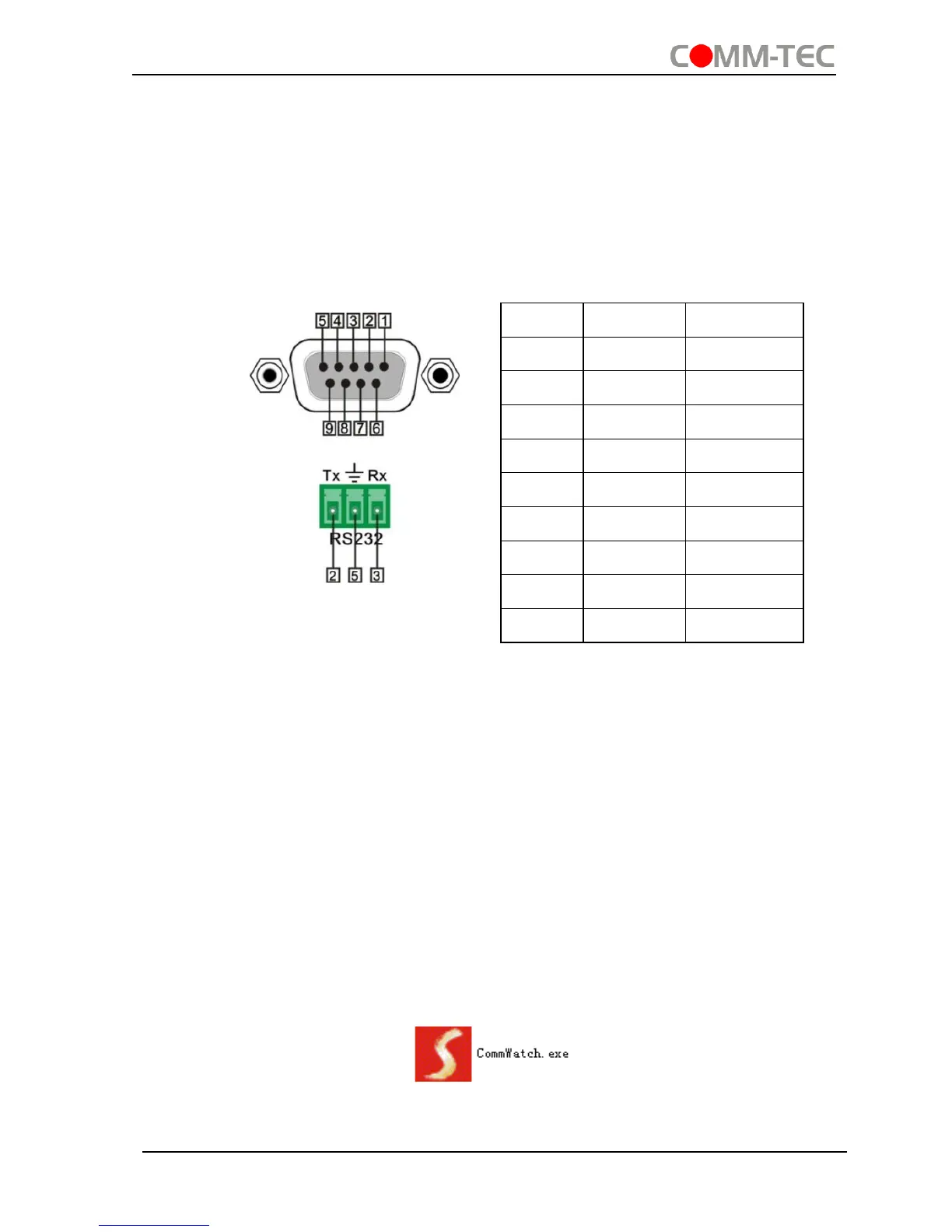
4K HDBaseT 8x8 Matrix Switcher boasts 3-pin pluggable terminal block for serial
control. The definition of its pins is listed in the table below.
Connect 4K HDBaseT 8x8 Matrix Switcher to the control device (e.g. a PC) with RS232
cable and set the parameters in the right manner, the control device is capable to
control 4K HDBaseT 8x8 Matrix Switcher via designed software.
4.3.2 Installation/uninstallation of RS232 Control Software
Installation Copy the control software file to the computer connected with 4K
HDBaseT 8x8 Matrix Switcher.
Uninstallation Delete all the control software files in corresponding file path.
4.3.3 Basic Settings
Firstly, connect 4K HDBaseT 8x8 Matrix Switcher with an input device and an output
device. Then, connect it with a computer which is installed with RS232 control software.
Double-click the software icon to run this software.
Here we take the software CommWatch.exe as example. The icon is showed as
below:
The interface of the control software is showed as below:


 To Next Page