Compact Scaler Switcher
Comm-Tec S.r.l. 11 www.comm-tec.it
4.4. Window Size Setting
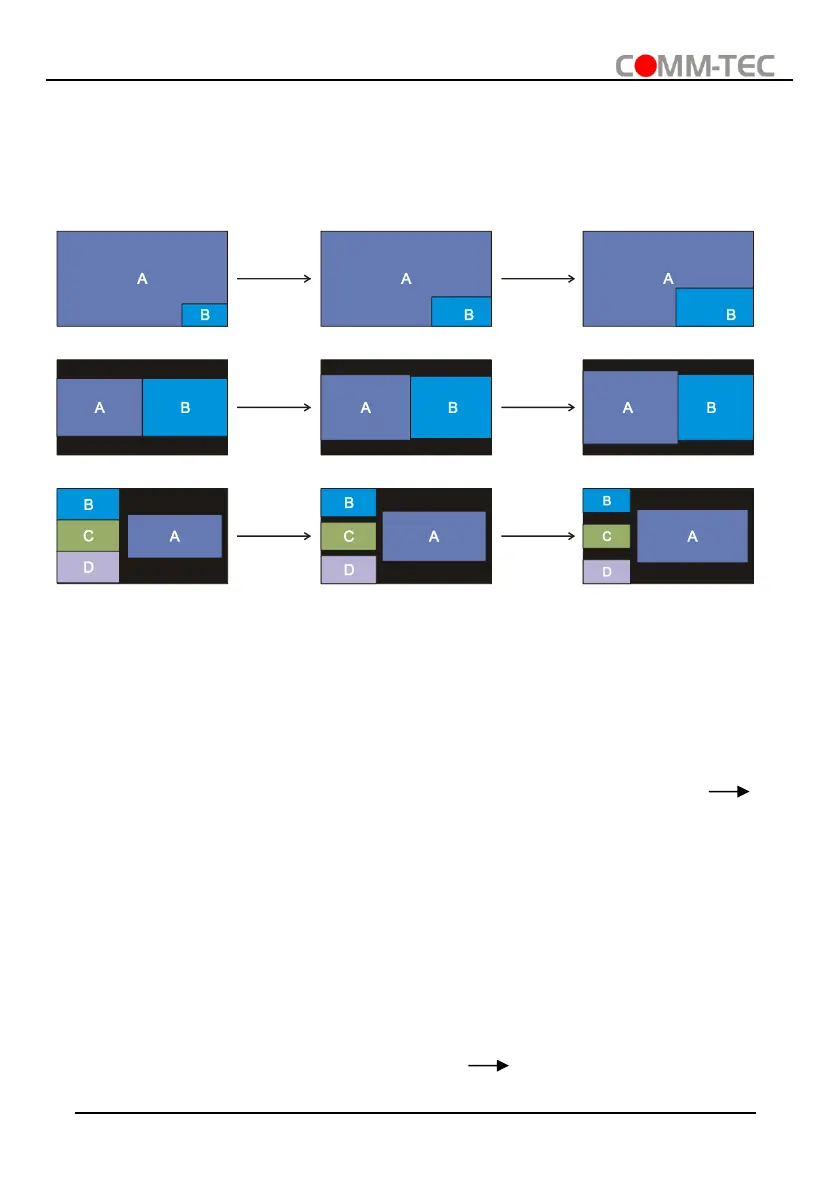
The window A/B/C/D size can be adjusted by repeatedly pressing the RESIZE button, the
button LED lights once when press its button once. Please refer the GUI Multi-view Tab for
more details.
Example: PIP (Picture in Picture)
Example: Bisection
Example: One large and three small
4.5. Video Signal Switching
⚫ In the Multi-view mode
Operation: Inputs# + Windows#
Example:
Swi
tch Input 1 to Windows B:
Press INPUT 1 (The input 1 LED illuminates blue, the windows A~D LEDs flash.)
Press Windows B (The windows A, C and D LEDs go out, then input 1 and windows B
LED flash three times, last, input 1 LED goes out and windows A~D LEDs illuminate blue.)
⚫ In the Full Screen mode
1) Manual Switching
Operation: Inputs# + Windows#
Example:
Swi
tch Input 2 to Windows A:
Press INPUT 2 (The input 2 LED illuminates blue.) Press Windows A (The input 2
and windows A LEDs illuminate blue).



 To Next Page