Compact Scaler Switcher
Comm-Tec S.r.l. 7 www.comm-tec.it
3. Panel Description
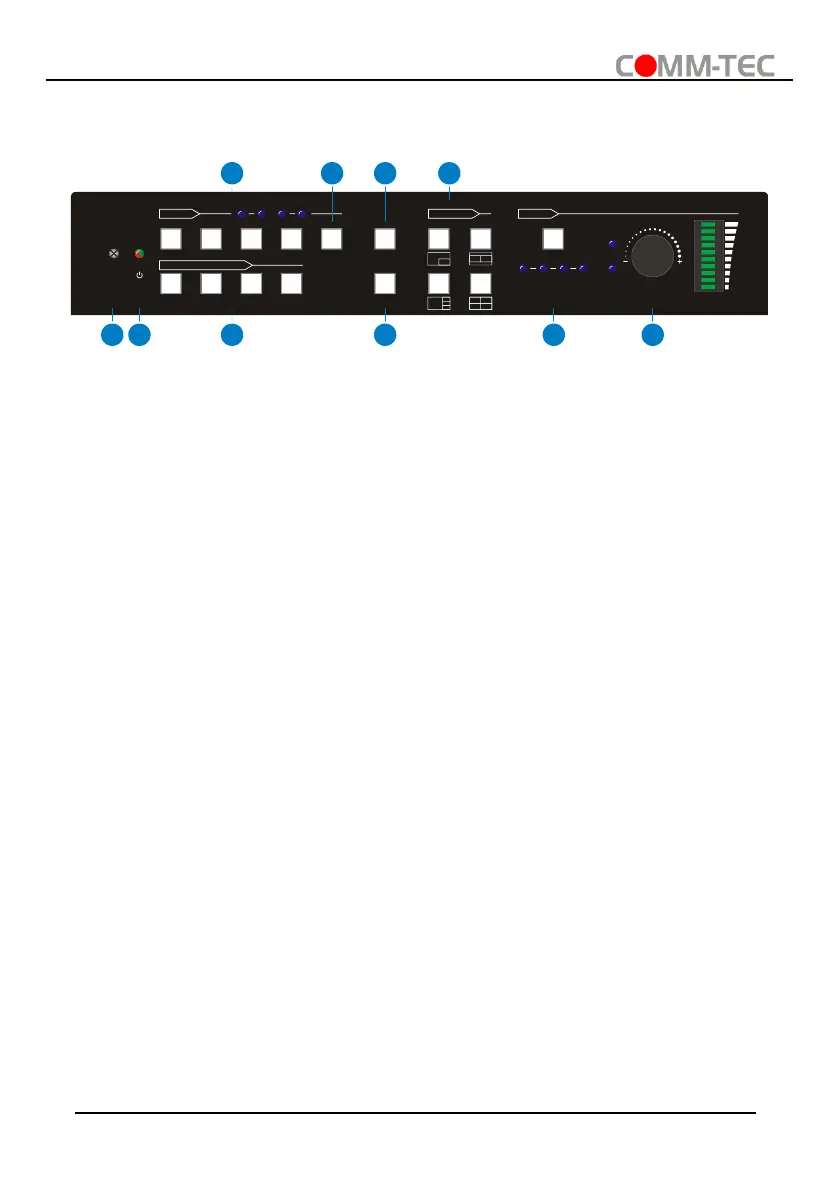
3.1. Switcher Front Panel
① IR LED: Built-in IR sensor, receives IR signal sent from IR remote.
② POWER LED: Illuminates red when switcher is in standby mode or illuminates green
when device is powered on.
③ INPUT BUTTONS (1~4): Input source selectors.
⚫ HDMI/DP LED: Indicates HDMI or DP source for the third input channel.
⚫ HDMI/USB-C LED: Indicates HDMI or USB-C source for the fourth input channel.
④ AUTO BUTTON: Auto switching mode selector.
⑤ SWAP: Cycle swap the video source of window display in anticlockwise.
⑥ MULTIVIEW: Total four buttons for choosing Multi-view mode.
⑦ SELECT/FULL SCREENS (A~B): Four buttons for window selection and full screen
setting.
⑧ RESIZE: Adjust the windows size.
⑨ AUDIO SOURCE: Select the audio source, and the correspond LED (1~4) will
illuminate blue. When select the LINE audio, the button illuminates blue.
⑩ VOLUME: Variable audio control
⚫ Press the volume knob to select microphone or source audio control.
⚫ Rotate the knob to increase or decrease the volume of the selected audio.
⚫ Press and hold the knob at least 3 seconds to mute the selected audio, rotate the
knob to unmute.



 To Next Page