14
MS-DOS User's Reference
directory
directory
file
The root directory
Your working
directory
Root directory
directory
directory
file
directory
file
The
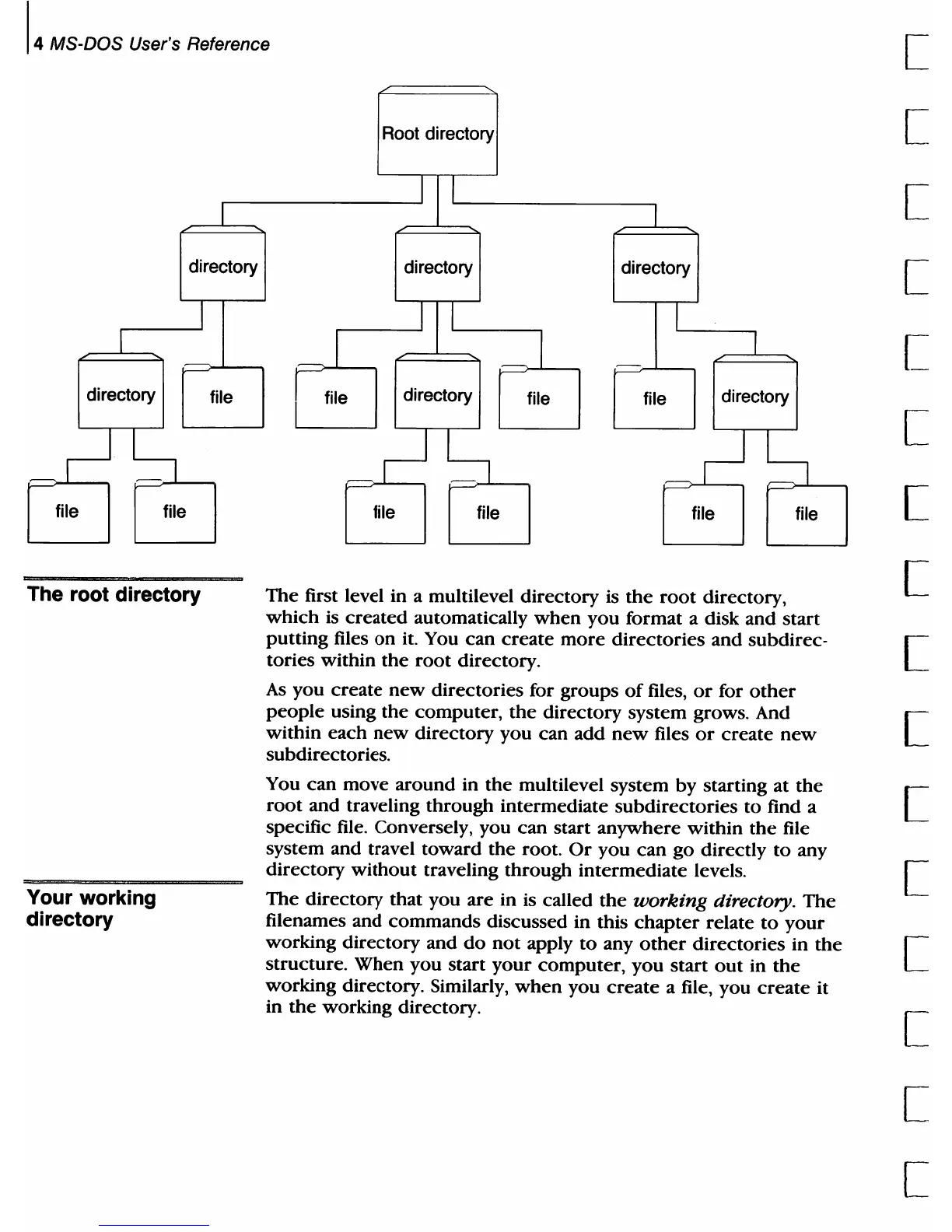
first level in a multilevel directory is
the
root
directory,
which
is
created
automatically
when
you
format a disk
and
start
putting
files
on
it. You
can
create
more
directories
and
subdirec-
tories within
the
root
directory.
As
you
create
new
directories for groups
of
files,
or
for
other
people
using
the
computer,
the
directory
system grows. And
within
each
new
directory
you can add
new
files
or
create
new
subdirectories.
You
can
move
around
in
the
multilevel system by starting at
the
root
and traveling
through
intermediate subdirectories
to
find a
specific file. Conversely, you can start anywhere within
the
file
system and travel toward
the
root.
Or
you
can
go directly
to
any
directory
without
traveling through intermediate levels.
The
directory
that you
are
in is called
the
working
directory.
The
filenames and
commands
discussed in this
chapter
relate
to
your
working directory and
do
not
apply
to
any
other
directories in
the
structure. When you start
your
computer,
you
start
out
in
the
working directory. Similarly,
when
you
create
a file, you
create
it
in
the
working directory.
[
[
[
[
[
[
[
[
[
[
[
[
[
[
[
[



 To Next Page