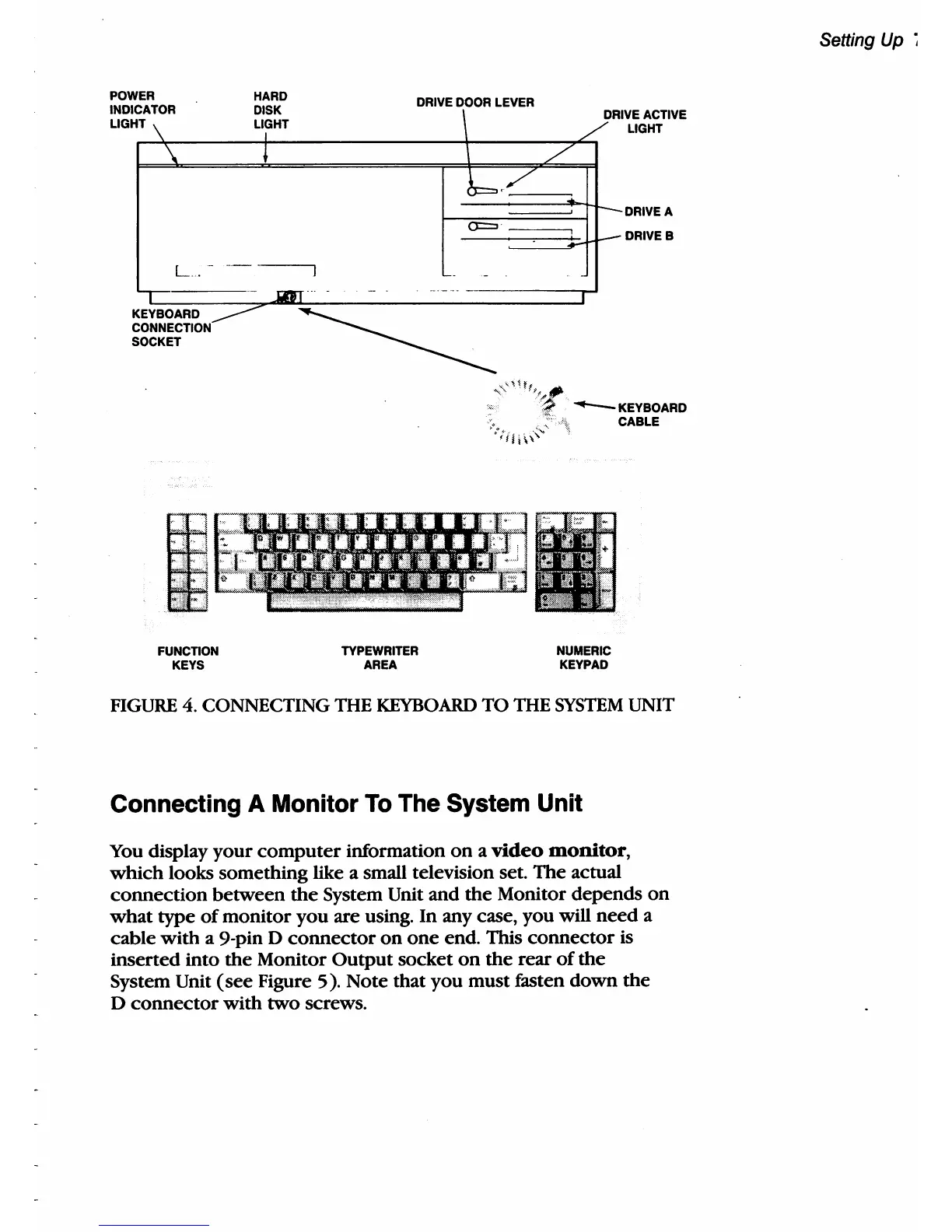
POWER
INDICATOR
L1G
HT\
\
L
...
-
HARD
DISK
L1~HT
,
-------,
-'IJT .
KEYBOARD
_____
CONNECTION
SOCKET
FUNCTION
KEYS
DRIVE
DOOR
LEVER
TYPEWRITER
AREA
_.
\
DRI
/'"
b.~
a='
-
-
-
-
-
NUMERIC
KEYPAD
VEACTIVE
LIGHT
DRIVE
A
DRIVEB
FIGURE 4. CONNECTING
mE
KEYBOARD
TO
mE
SYSTEM
UNIT
Connecting
A
Monitor
To
The
System
Unit
You
display your computer information
on
a
video
monitor,
which looks something like a small television set. The actual
connection between
the
System Unit and the Monitor depends
on
what type
of
monitor you are using. In any case, you
will
need a
cable with a 9-pin D connector on one end.
This connector
is
inserted into
the
Monitor Output socket
on
the rear
of
the
System Unit (see Figure 5). Note that you must fasten down the
D connector with two screws.
Setting Up
~



 To Next Page