Chapter 3: Install and connect your telephony modem
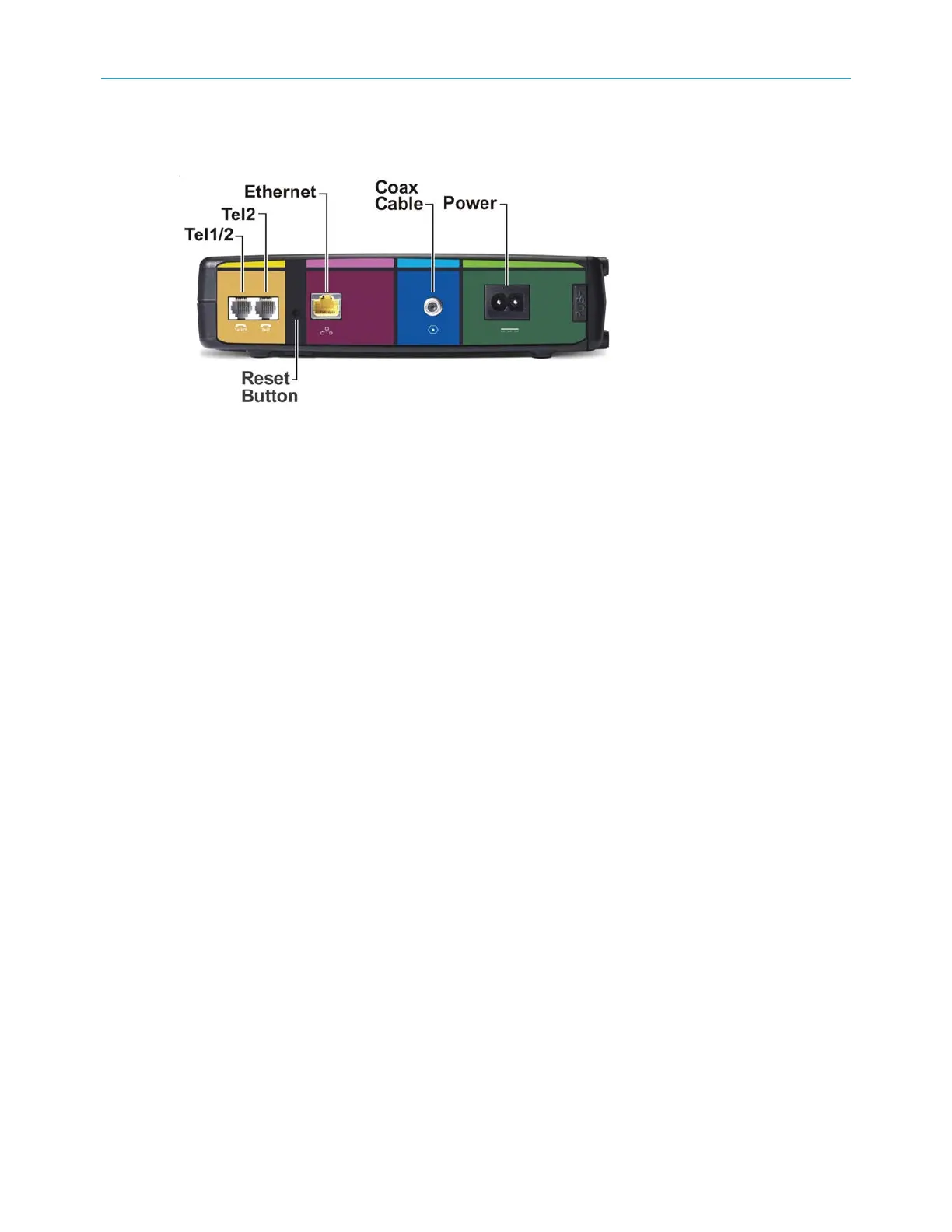
Rear panel
The rear panel of your telephony modem has the following connectors and controls:
■
Tel 1/2: connector for the first phone line (or both lines of a 2-line phone).
■
Tel 2: connector for the second phone line.
■
Ethernet: connector for use with a computer LAN port.
■
Coax Cable: connector for the coaxial cable.
■
Power: connector for the power cord.
■
Reset button:reboot (or restart) your telephony modem.
Use a pointed non-metallic object to press this button.
Selecting an installation location
There are several factors to consider when choosing a location to install your telephony
modem:
■
Is an AC outlet available nearby? For best results, the outlet should not be switched and
should be close enough to your telephony modem that extension cords are not required.
■
Is a cable jack available? For best performance, keep the number of splitters between
the jack and cable drop to a minimum. Each splitter attenuates (reduces) the signal
available to the telephony modem. A large number of splitters can slow down the
Internet connection and even affect your telephone service.
■
Can you easily run cables between the telephony modem's location and the phones?
■
If you are connecting devices to an Ethernet port, can you easily run cables between the
telephony modem's location and those devices?
■
If you want to mount the telephony modem on a wall, does the location provide a solid
surface for secure attachment? For best results when mounting the telephony modem
on drywall, position the telephony modem so at least one of the screws are fastened to
a stud. This may prevent the telephony modem from pulling out of the wall in the future.
■
If you want to install the telephony modem on a desktop, is there enough space on
either side to keep the vents clear? Blocking the vents may cause overheating.
SURFboard
®
SBV3202 DOCSIS 3.0 telephony modem for Xfinity
®
customers User Guide STANDARD Revision x.3 24













 To Next Page