Chapter 3: Install and connect your telephony modem
5. Proceed to Connecting your telephony modem (page 27) (see below).
Desktop mounting instructions
1. Position your telephony modem so that:
■
air flows freely around it
■
the back faces the nearest wall
■
it will not fall to the floor if bumped or moved
■
the ventilation holes on the sides of the unit are not blocked
2. Proceed to Connecting your telephony modem (page 27) below.
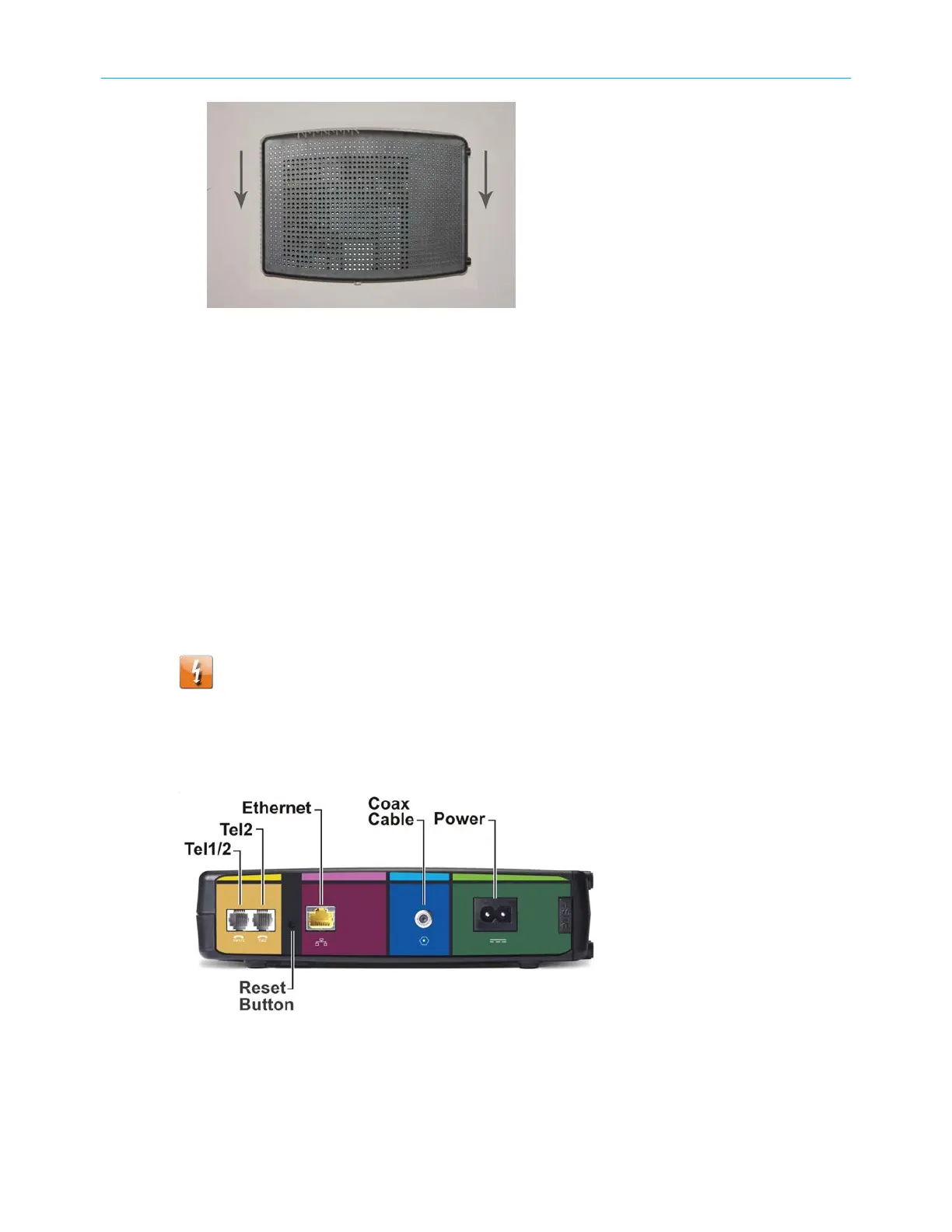
Connecting your telephony modem
Warning: Risk of injury or equipment damage Connecting your telephony modem
to your home's existing telephone wiring should only be performed by a professional
installer. Physical connections to the previous telephone provider must be removed
and the wiring must be checked; there must not be any voltage. Cancellation of
telephone service is not adequate. Failure to do so may result in loss of service and/
or permanent damage to your telephony modem.
1. Connect one end of the coax cable to the cable outlet or splitter, and the other end to
your telephony modem Cable connector.
2. Tighten the connections by hand, then tighten an additional 1/8 turn with a wrench.
SURFboard
®
SBV3202 DOCSIS 3.0 telephony modem for Xfinity
®
customers User Guide STANDARD Revision x.3 27













 To Next Page