11. SETTING THE COMMON SCHEDULE
This function has 11 items that can be programmed. You may not necessary have
to program all of them.
(1) Item define:
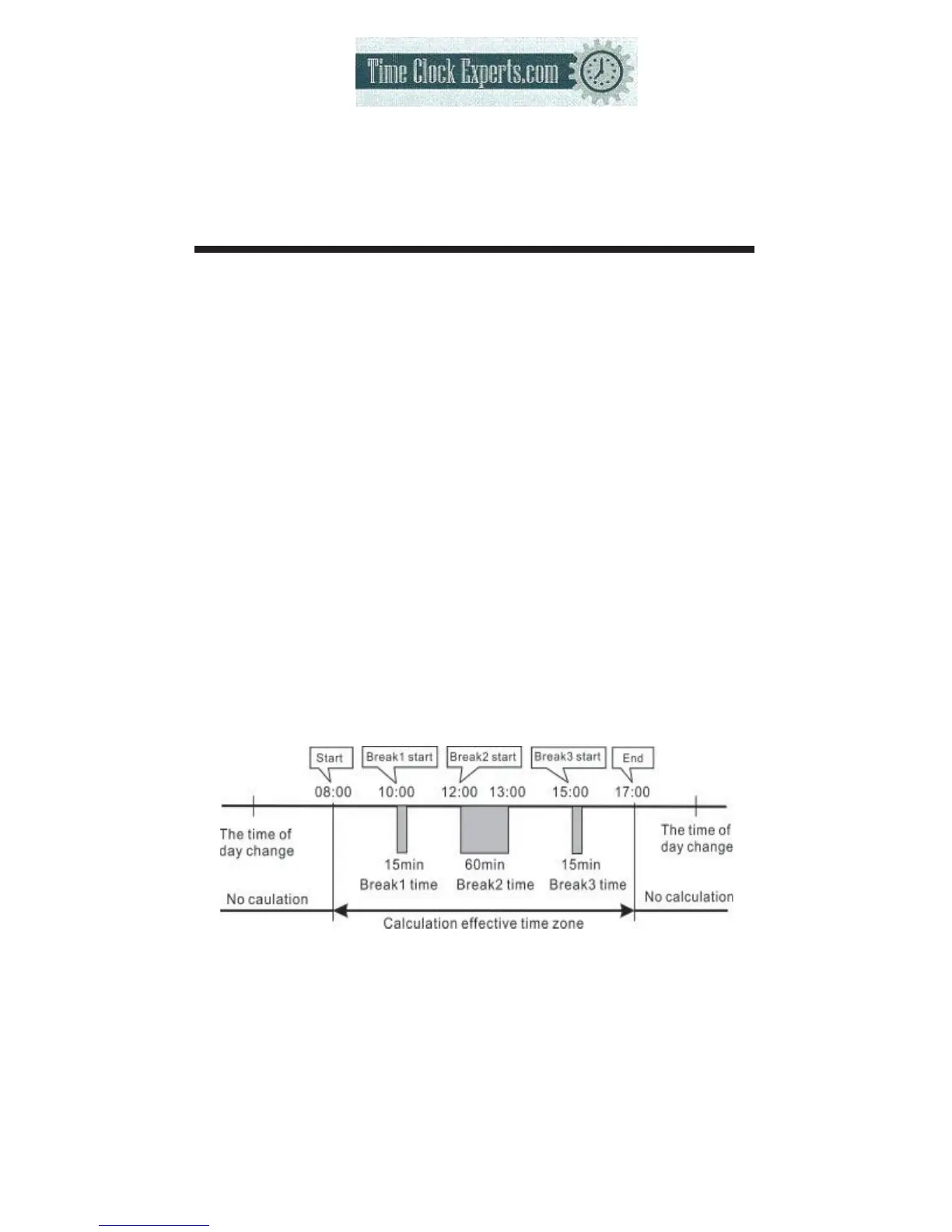
Item1 (start): The daily work time start counting.
Item2 (* start): Setting time to start printing special mark (*) for late in or early out.
Item3 (* end): Setting time to cancel printing special mark (*) for late in or early out.
Item4 (end): End time for counting daily work.
Item5 (Max. in value): If you have not set a schedule, you can set the daily work
maximum counting hour.
Item6 (Break1 Start): Setting the break1 start time.
Item7 (Break1 End): Setting the break1 end time.
Item8 (Break2 Start): Setting the break2 start time.
Item9 (Break2 End): Setting the break2 end time.
Item10 (Break3 Start): Setting the break3 start time.
Item11 (Break3 End): Setting the break3 end time.
*If you have set a break time(s), the break time(s) will be deducted from the
daily work time.
*If you have set Item5, the setting data of Item1 and Item4 will be deleted.
*If you have set Item1 or Item4, the setting data of Item5 will be deleted.
(2) Example: Setting the schedule as the following fig. :
16
TO PLACE AN ORDER CALL: 866-487-4751
OR VISIT: WWW.TIMECLOCKEXPERTS.COM


 To Next Page