2. FEATURES
● This unit has two work type that can be selected (employee and part-time).
● This unit has the ability to calculate elapsed time between IN/OUT
punches.
There are two calculation mode, (punch and hourly) that can be selected.
● In Employee mode, you can punch IN/OUT as many times as required per
day.
● Automatic IN/OUT column shift when you punch.
● In Employee mode, you can select one of three pay period:
Monthly/ Weekly/ Bi-Weekly.
● Two types of schedules can be programmed:
Common schedule/ Extra schedule.
● A maximum of 50 cards can be automatically registered.
● Special mark printing can be set to make it easy to trackemployee’s, late in
or early out.
● The language of English, Spanish, Germany, French, Italian, Portuguese
can be selected to print the day of the week.
● Security for power failure
(1) Optional battery pack ensures full printing operation after power failure.
(2) When the battery voltage drops too low for a print to be produced, the LCD
display goes out. Both time and programs are retained by a lithium battery
for approx. 36 months.
(3) After power is restored, the time recorder will automatically advance
to the present time.
● Midnight button
For nightshift workers, when punch time is over the printing line time, press the
“Midnight button” then punch the time card. The time will be entered in the
“OUT” column of the previous day.
* On pay ending day, the “Midnight button” will be of no use.
● Time display
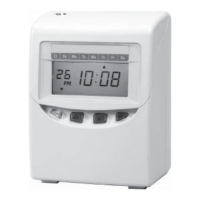
Easy-to-read, back light L.C.D. It shows date, AM/PM (when set to 12-hour
system), time, day of week and other codes.
● Automatic Day Light Saving Time
2
TO PLACE AN ORDER CALL: 866-487-4751
OR VISIT: WWW.TIMECLOCKEXPERTS.COM


 To Next Page