13. SETTING THE ROUNDING PUNCH
In this function, you can select the types of rounding and set the rounding unit.
*If you need to change the setting, make sure the time recorder has no punch
recorded, otherwise the error code “E-49” will appeared. You must make all card
resetting or reset all (Please refer card resetting and reset).
Types of rounding:
Types of rounding Punch Hours
Code 01 02
Rounding unit:
Rounding unit
1min. 3min. 5min. 6min. 10min. 12min. 15min. 20min. 30min. 60min.
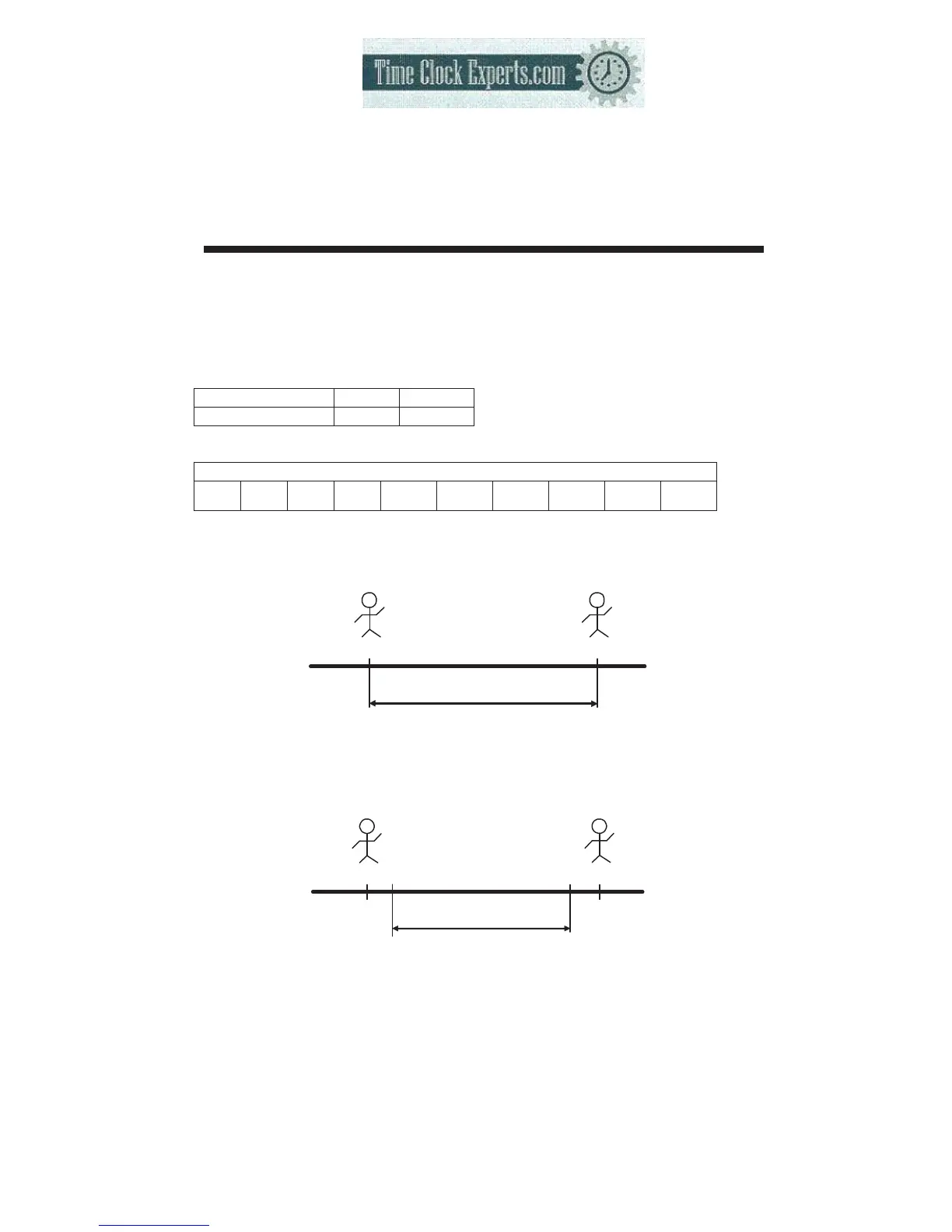
Types of rounding: “Punch” and “Rounding unit” is 20 minutes.
Working hours 3:00
IN
OUT
09:08
12:10
Start counting
Off counting
Types of rounding: “Hours” and “Rounding unit” is 20 minutes.
Working hours 2:40
IN OUT
09:08 12:10
Start counting Off counting
09:20 12:00
35
TO PLACE AN ORDER CALL: 866-487-4751
OR VISIT: WWW.TIMECLOCKEXPERTS.COM


 To Next Page