Deleting the Daylight Saving Time setting
To delete the daylight saving time setting, change the displayed starting “month”
setting to “--”.
Example: To delete the daylight saving time setting.
40
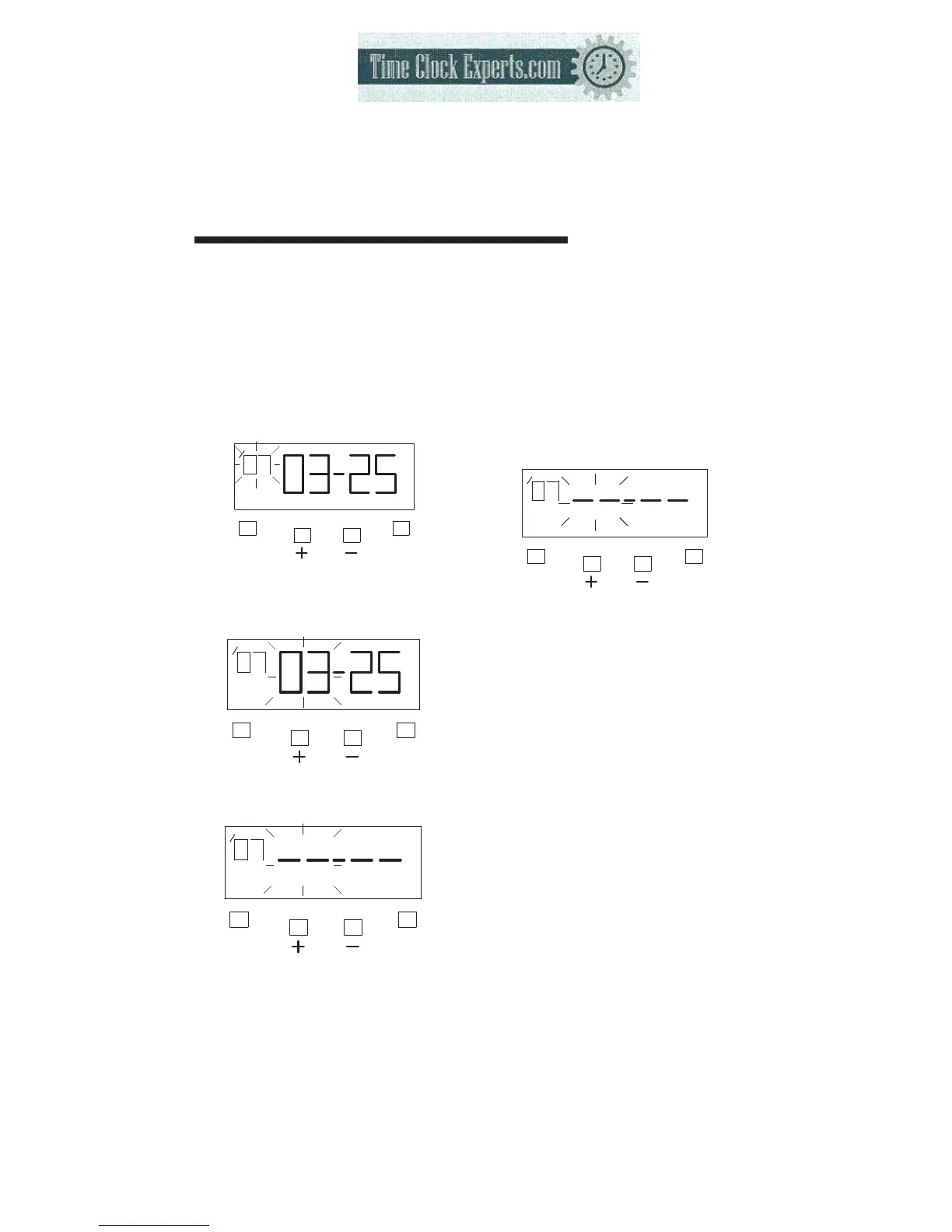
(1) Press the [F] button and position
the “▲” next to the “DAYLIGHT
SAVING TIME” mark (The flashing
means it can be changed).
DAYLIGHT
SAVING
TIME
F
E
SU
(2) Press the [E] button, and then the
flashing changes from “Year” to
“Month”
DAYLIGHT
SAVING
TIME
F
E
SU
(3) Press the [+] or [-] button to set the
“Month” and “Date” at “-- --”.
DAYLIGHT
SAVING
TIME
F
E
(4) Press the [E] button twice. At
the same time, the LCD screen
the flashing changes from
“Date” to “Year” the daylight
saving time setting has been
deleted.
DAYLIGHT
SAVING
TIME
F
E
TO PLACE AN ORDER CALL: 866-487-4751
OR VISIT: WWW.TIMECLOCKEXPERTS.COM


 To Next Page