EasyManua.ls Logo

Conceptronic C4CHCCTVKIT - Alarm Port Configuration

Conceptronic C4CHCCTVKIT
81 pages
Print Icon
To Next Page IconTo Next Page
To Previous Page IconTo Previous Page
Loading...
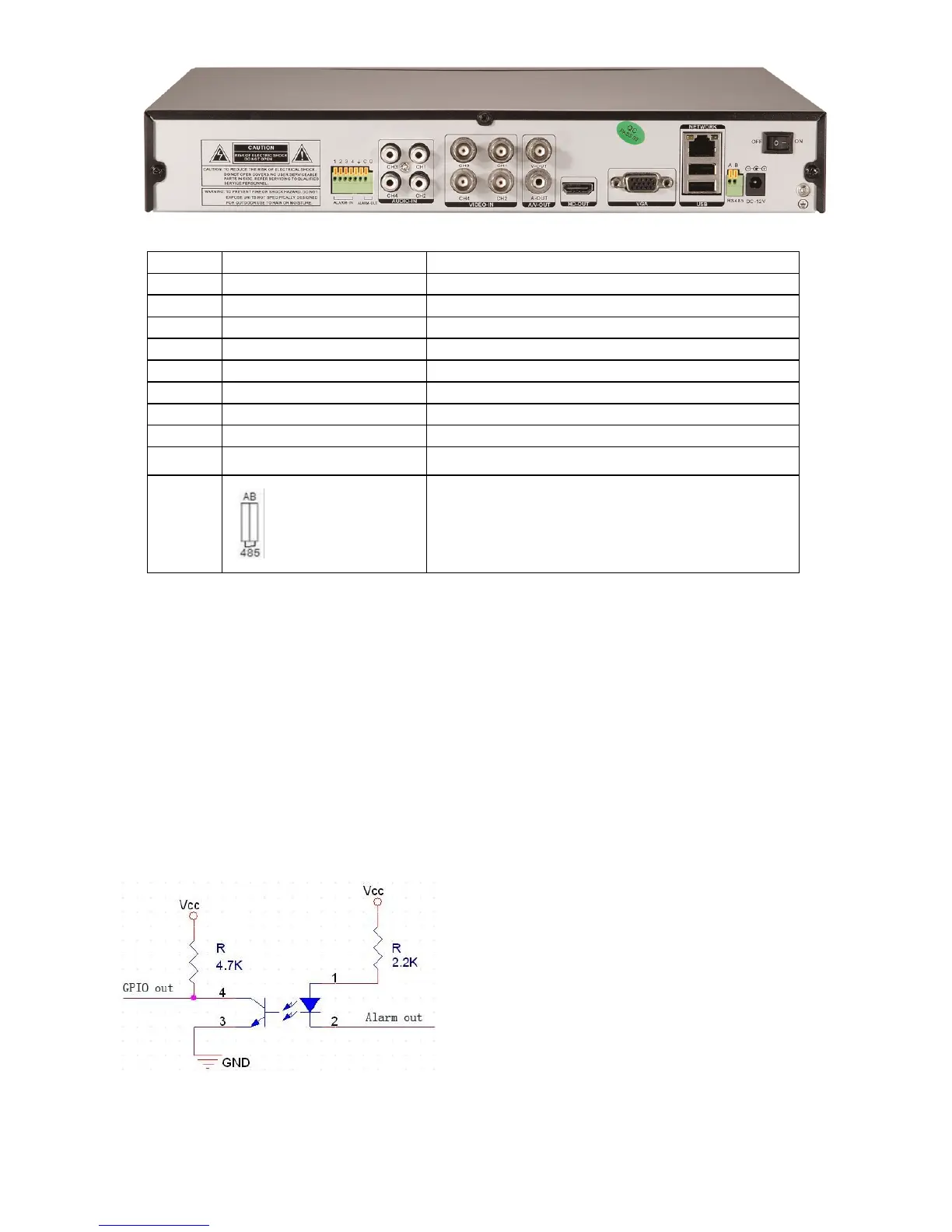
Item
Interface
Descripción
1
VIDEO
IN
4ch video input
2
AUDIO
IN
4ch audio input
3
V-OUT
1ch video output
4
A-OUT
1ch audio output
5
VGA / HDMI
2DHHHDMI
VGA / HDMI monitor
6
NETWORK
RJ45
7
USB
USB for back up and mouse control
8
ON/OFF
Power supply switcher
9
DC-12V
Power adaptor port
10
RS-485A , B
2.1.3 Alarm input port
The GND alarm detector connects to COM port under parallel connection (the power of alarm detector
supplied by external power supply)
The ground terminal of alarm detector joins up in parallel with DVR
The NC of alarm detector connects with the input end (alarm) of DVR;
When you want to reset a remote alarm (smoke detector for example), the +12V power supply of alarm detector is
supplied by the DVR.
When you select the external power supply, please share the GND with DVR;
Alarm input circuit:


Other manuals for Conceptronic C4CHCCTVKIT

Related product manuals