EasyManua.ls Logo

ConMed ExcaliburPLUS PC - Page 73

ConMed ExcaliburPLUS PC
98 pages
Print Icon
To Next Page IconTo Next Page
To Previous Page IconTo Previous Page
Loading...
Watchdog
Timer
(dIA1)
mode
solves
that
prob-
lem
by
using
the
microprocessor
as
an
on-board
programmable
pulse
generator
to
allow
selection
of
one
of
three pulse
frequencies.
One
of
the
selections
places
pulses
continuously
inside
the
normal
Watchdog
Timer
window,
while
the
oth-
ers
are
too
early
and
too
late.
It
is
also
possible
to
set
RLYENA
to
verify
operation
of
the
lockup
circuitry.
4.7.3.1
Accessing
Watchdog
Timer
Diagnostics
Since
this
mode
is
useful
only
with
the
RLYENA
flag
in
the reset
state,
“dIA”
will
not
appear
in
the
menu
once
RF
has
been
activated
in
any
of
the
power
calibration
modes.
On
the
other
hand,
if
a
faulty
WDT
is
detected
on
initial
entry
to
CAL
MODE,
Watchdog
Timer
(dIA1)
will
be
auto-
matically
entered,
bypassing
the
menu,
since
proper
calibration
may
be
impossible
if
the
WDT
is
faulty.
To
enter
Watchdog
Timer
(dIA1)
voluntarily,
enter
CAL
MODE
per
Section
4.6.1
above,
then
select
“AIA”
in
the
Cut
window
and “1”
in
the
Coag
window.
Then
press
the
“STORE”
button.
Entry
will
be
signified
by
“1”
appearing
in
the
Bipolar
Power
window.
The
menu
cannot
be
restored
from
this
mode.
When
work
is
complete,
exit
CAL
Mode
by
using
the
RST
switch
or
by
powering
down.
This
mode
has
no
effect
on
the
NOVRAM,
so
the
cali-
bration
and
CRC
are
unchanged.
4.7.3.2
dIA
1
Mode
Selection
An
indication
of
the
currently
selected
mode
appears
in
the
Bipolar
Power
window.
Modes
are
selected
by
using
the
Bipolar
Power
Adjust
keys.
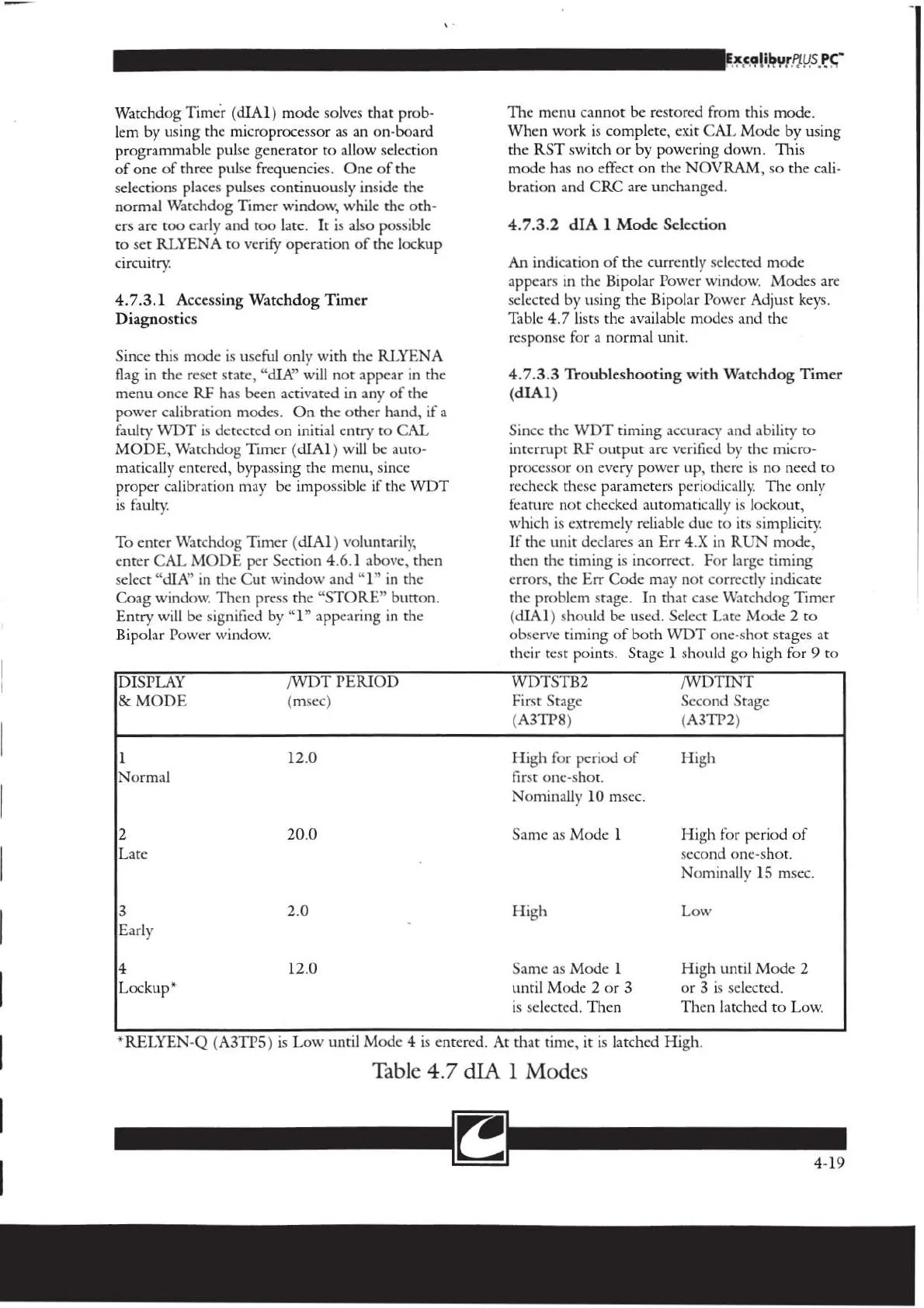
Table
4.7
lists
the
available
modes
and
the
response
for
a
normal
unit.
4.7.3.3
Troubleshooting
with
Watchdog
Timer
(dIA1)
Since
the
WDT
timing
accuracy
and
ability
to
interrupt
RF
output
are
verified
by
the
micro-
or
on
every
power
up,
there
is
no
need
to
k
these
parameters
periodically.
The
only
feature
not
checked
automatically
is
lockout,
which
is
extremely
reliable
due
to
its
simplicity:
If
the
unit
declares
an
Err
4.X
in
RUN
mode,
then
the
timing
is
incorrect.
For
large
timing
errors,
the
Err
Code
may
not
correctly
indicate
the
problem
stage.
In
that
case
Watchdog
Timer
(dIA1)
should
be
used.
Select
Late
Mode
2
to
observe
timing
of
both
WDT
one-shot
stages
at
their
test
points.
Stage
1
should
go
high
for
9
to
[DISPLAY
/WDT
PERIOD
WDTSTB2
/WDTINT
|&
MODE
(msec)
First
Stage
Second
Stage
(A3TP8)
(A3TP2)
1
12.0
High
for
period
of
High
Normal
first
one-shot.
Nominally
10
msec.
2
20.0
Same
as
Mode
1
High
for
period
of
Late
second
one-shot.
Nominally
15
msec
3
2.0
High
Low
Early
4
12.0
Same
as
Mode
1
High
until
Mode
2
Lockup*
until
Mode
2
or
3
or
3
is
selected,
is
selected.
Then
Then
latched
to
Low.
*RELYEN-Q
(A3TP5)
is
Low
until
Mode
4
is
entered.
At
that
time,
it
is
latched
High.
Table
4.7
dIA
1
Modes
re
4-19

Related product manuals