EasyManua.ls Logo

Consilium ST450EC - Display and Status-LED Messages

Consilium ST450EC
44 pages
Print Icon
To Next Page IconTo Next Page
To Previous Page IconTo Previous Page
Loading...
28
ST450EC
v1.11
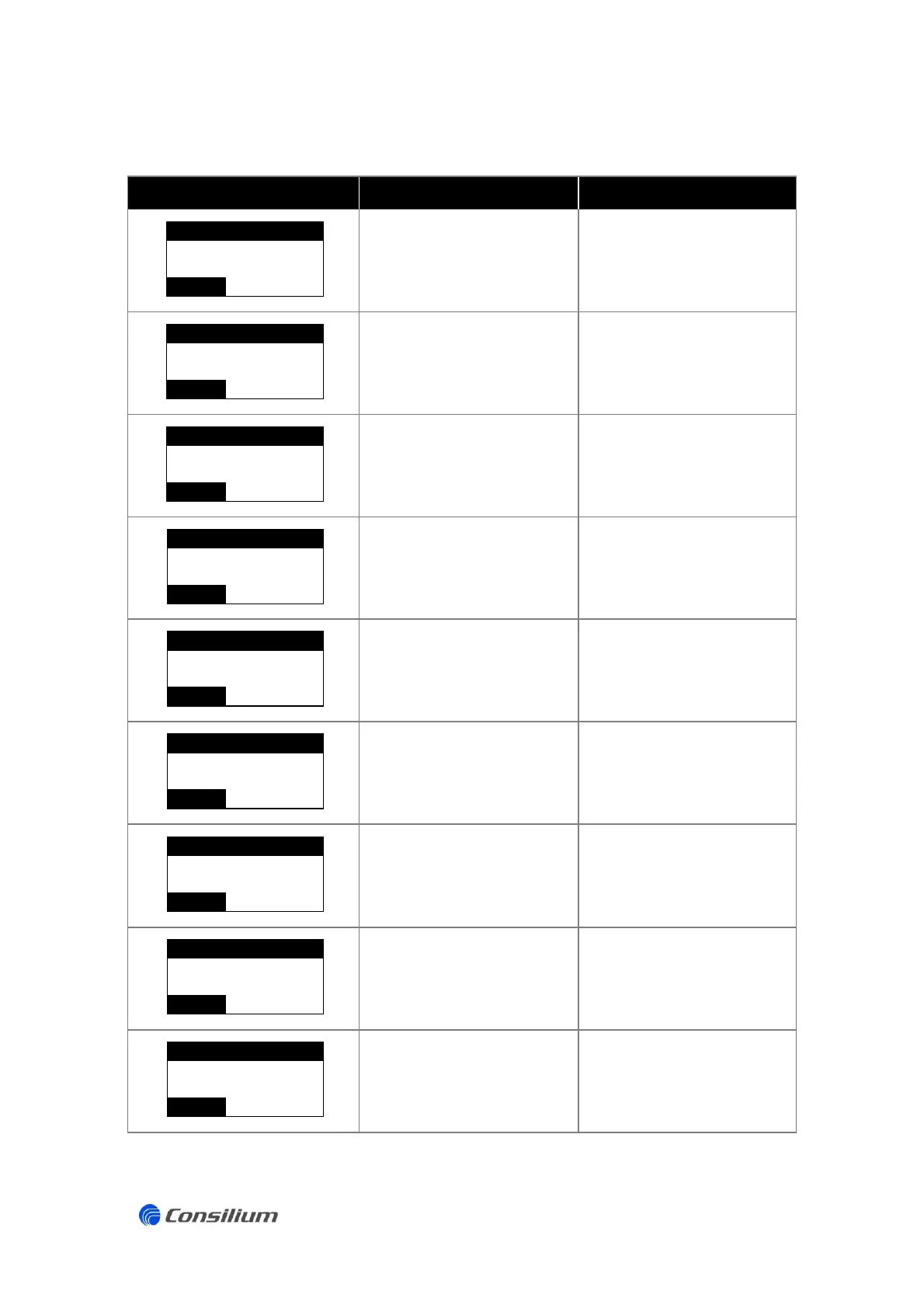
5.1 Display and status-LED messages
LCD message
Cause
Solution
SPAN calibration failed
Sensor defect
Wrong test gas
Divergent set point SPAN
Re-calibrate SPAN
Change sensor
Check test gas
Check set point SPAN CAL
ZERO calibration failed
Surrounding environment
contains gas level
Sensor defect
Re-calibrate ZERO
Use synthetic air for ZERO
calibration
Change sensor
Measurement value is too
high (overload)
No defect. The gas detector is
working properly. Ventilate
the area.
Sensor not calibrated
Calibrate sensor (ZERO and
SPAN).
Signal too low
Calibrate ZERO or replace
sensor.
Sensor is not connected
(properly)
Check the sensor and sensor
connections.
Electronic defect
Contact the Consilium Service
department.
Current source failure
Check power supply.
Sensor output failure
Iout < 1mA or > 22 mA
Check if no gas is present
Check and/or replace sensor
SPAN CAL
FAIL
GASTYPE
0.00
ppm
ZERO CAL
FAIL
0.00
ppm
GASTYPE
OVERLOAD
+30.0
ppm
ALARM
GASTYPE
NOT CAL
ERROR
GASTYPE
0.00
ppm
SF
GASTYPE
***
ppm
ERROR
SENSOR
***
ppm
ERROR
GASTYPE
E0
GASTYPE
***
ppm
ERROR
E2
GASTYPE
***
ppm
ERROR
E3
ppm
ERROR
***
GASTYPE

Related product manuals