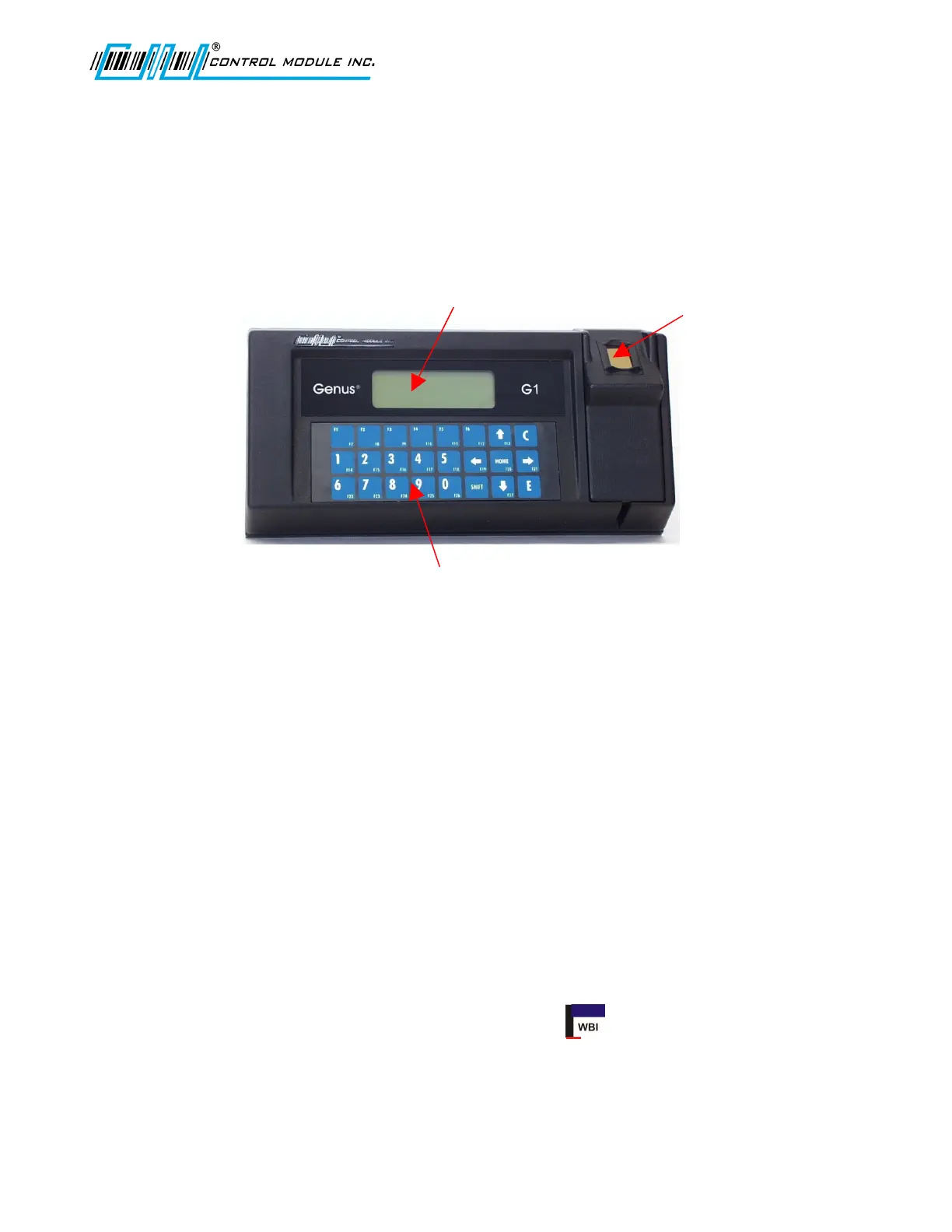
4X20 Character
Backlit LCD Display
3X8 Membrane
Keypad
Optional Readers Include:
Biometric
Barcode
Mag Track 1
Mag Track 2
Proximity
Smart card
Genus G1 MARK II Users Manual
UM3010-2
Genus G1 Terminals
Terminal features are labeled in the pictures below for reference. Explanations of terminal
features, user interface, hardware specifications and connections follow. All items discussed
in this user manual apply to both types of Genus G1 or Hardened Terminals.
Terminal Front
The User Interface
The user interface offers options for data entry into the Genus G1 MARK II Terminal
through the keypad and/or internal or external card readers. User output is via a 4 line by
20 character backlit LCD display. The terminal also has the capability to produce multiple
sound tones to help guide the user.
The Genus G1 MARK II Terminal offers provisions for additional display control aside
from the ability to write to and clear the entire display. These include the ability to clear a
single display line, position the cursor, and select the cursor type (invisible, block,
underscore, or blinking underscore).
A Web Browser Interface is integrated with the Genus G1 Mark II Terminal to allow
changes to configuration files, data viewing and development interface updates. Some
items overlap between the Offline setup and the Web Browser Interface. Individual
settings that do overlap are indicated by the WBI icon within this document.
Revision B 10-30-07 5



 To Next Page