Genus G1 MARK II Users Manual
UM3010-2
Offline Mode
The offline mode is utilized during installation and setup, when the functionality of the Genus
Terminal needs to be tested or if the communications setup requires a change.
To accomplish this, the Terminal must be placed in Offline Mode.
Entering Offline
(Online/Offline setup switch)
Entering offline mode can be accomplished in two ways, the easiest being to utilize the
Online /Offline setup switch on the back of the Terminal. However, pressing the ‘Clear’ and
‘Enter’ keys during the power-up sequence as described below will also work with the
Terminal.
The following message indicates the terminal has entered into offline mode.
(Clear and Enter Keys during Power-up)
Offline Mode for the G1 Terminal Setup Mode is entered during power-up as the Terminal
initializes. Press the and keys simultaneously from the keypad during the
second set of power-on beeps. The second set of power-on beeps occur just after the
following message.
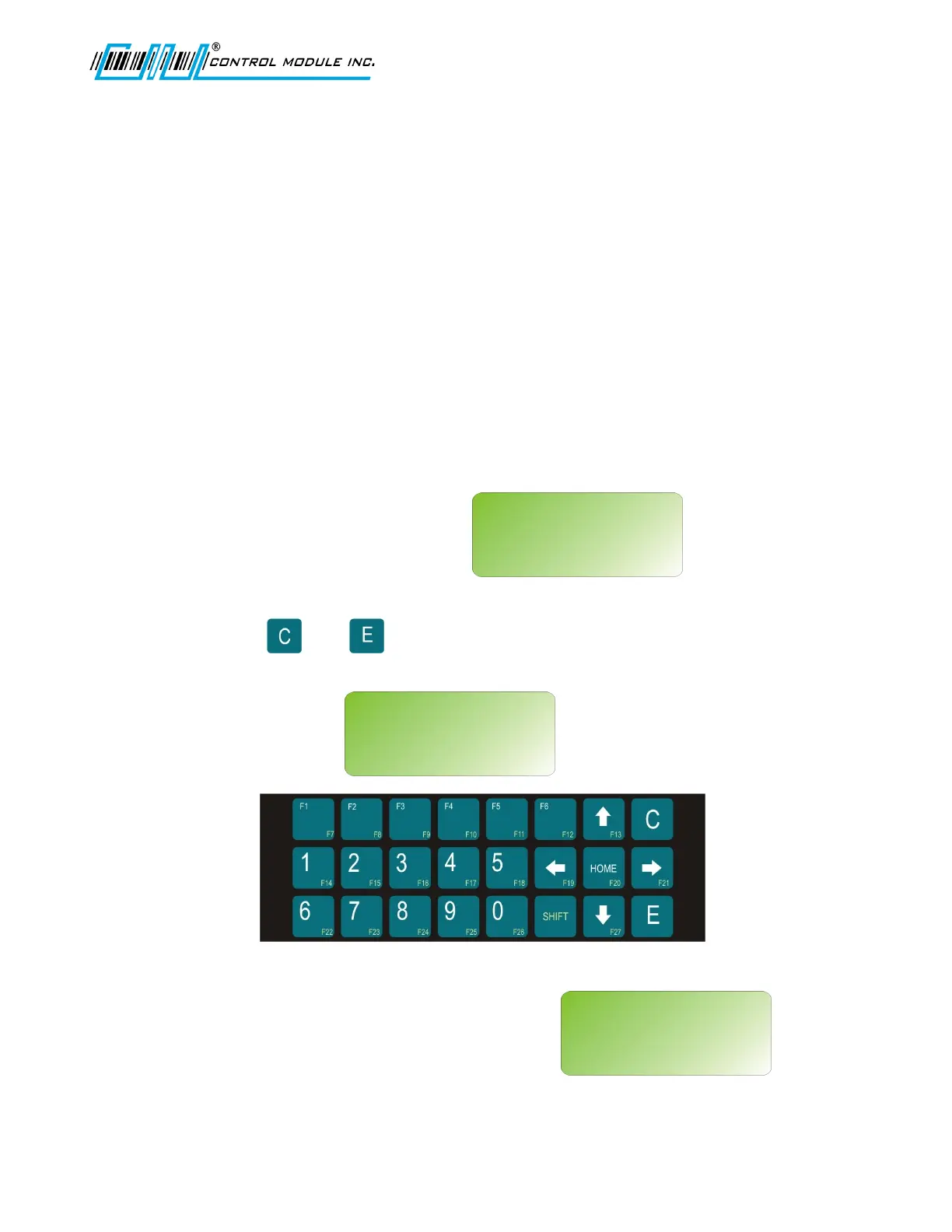
Keypad Layout:
At this point as the Terminal beeps it will transition to
the online application, unless the ‘Clear’ and ‘Enter’
keys have been pressed.
Revision B 10-30-07 15
Starting:
Setup
Initializing:
Java VM
IP: 192.168.0.62
Starting:
<user’s app>



 To Next Page