Issue Number: 3 11
3.4 Profibus-DP Cable Screen Connections
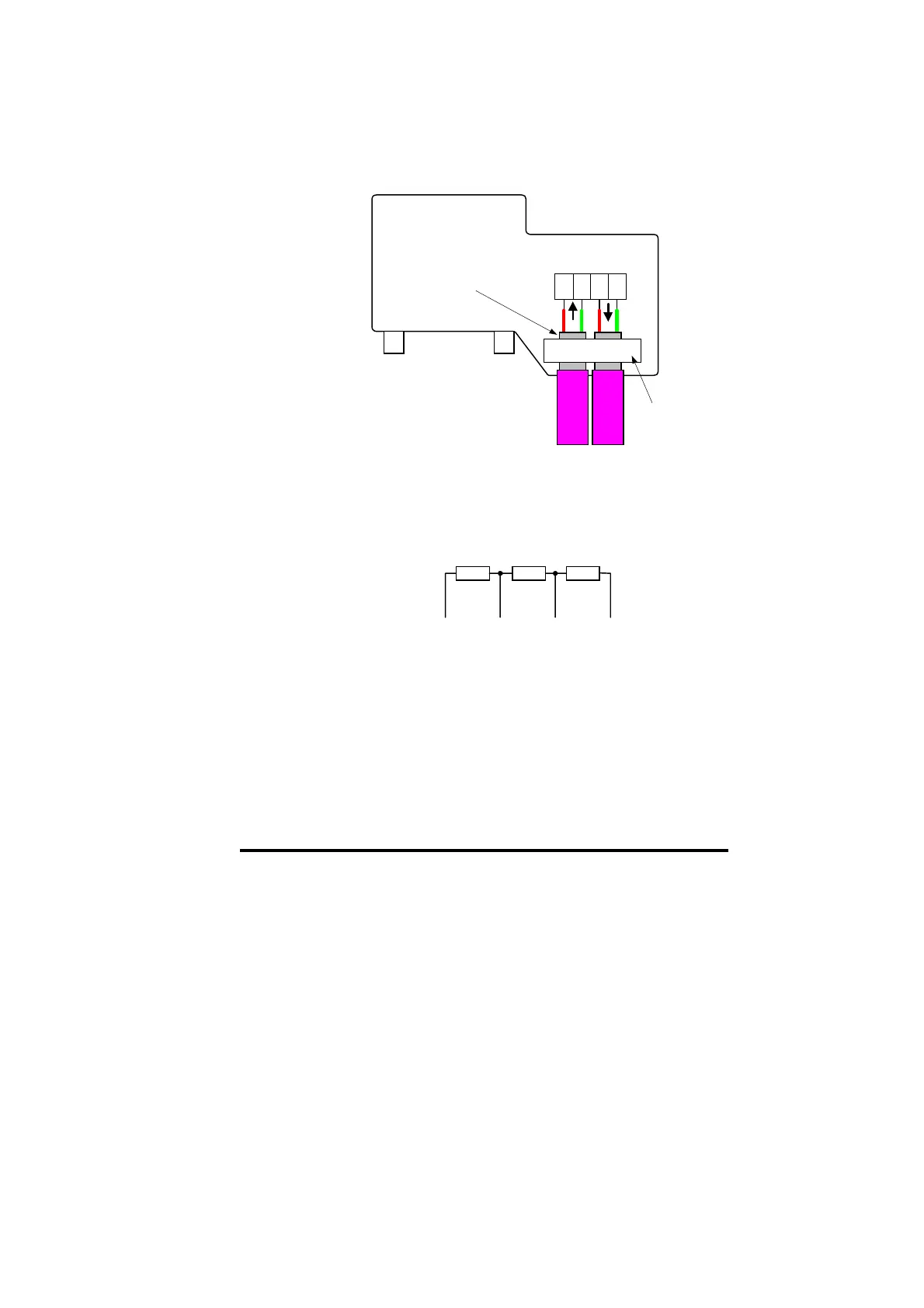
To ensure the best screen arrangement, strip the outer plastic shield off
the Profibus-DP cable, and clamp the bare screen under the screen
clamp. This will ensure that a good connection is made between the
screens of both network cables, and help prevent noise currents from
flowing into the Profibus-DP interface itself.
Ensure that the screen
clamp makes good
contact with the shield
of the cable
ERNI ERbic Profibus
Connector with vertical
cable outlet
Part No: 103658
ABAB
Cable
screen
clamp
3.5 Profibus-DP Network Termination
The termination resistor network is not fitted internally on the Unidrive
Profibus-DP interface. It is the installer’s responsibility to ensure that
both ends of each section of network cable are correctly terminated.
The termination resistor network required is shown in the diagram
below.
+5V 0V ISOBA
It is very important in high-speed communications networks that the
network communications cable is correctly terminated. Failure to
terminate the network properly may mean that the network operates
with substantially reduced noise immunity, or in the worst case, the
network doesn’t work at all.


 To Next Page