3. Installation ALSPA PROFIBUS Field Bus Coupler
Page 3-4 Technical Manual (09/06)
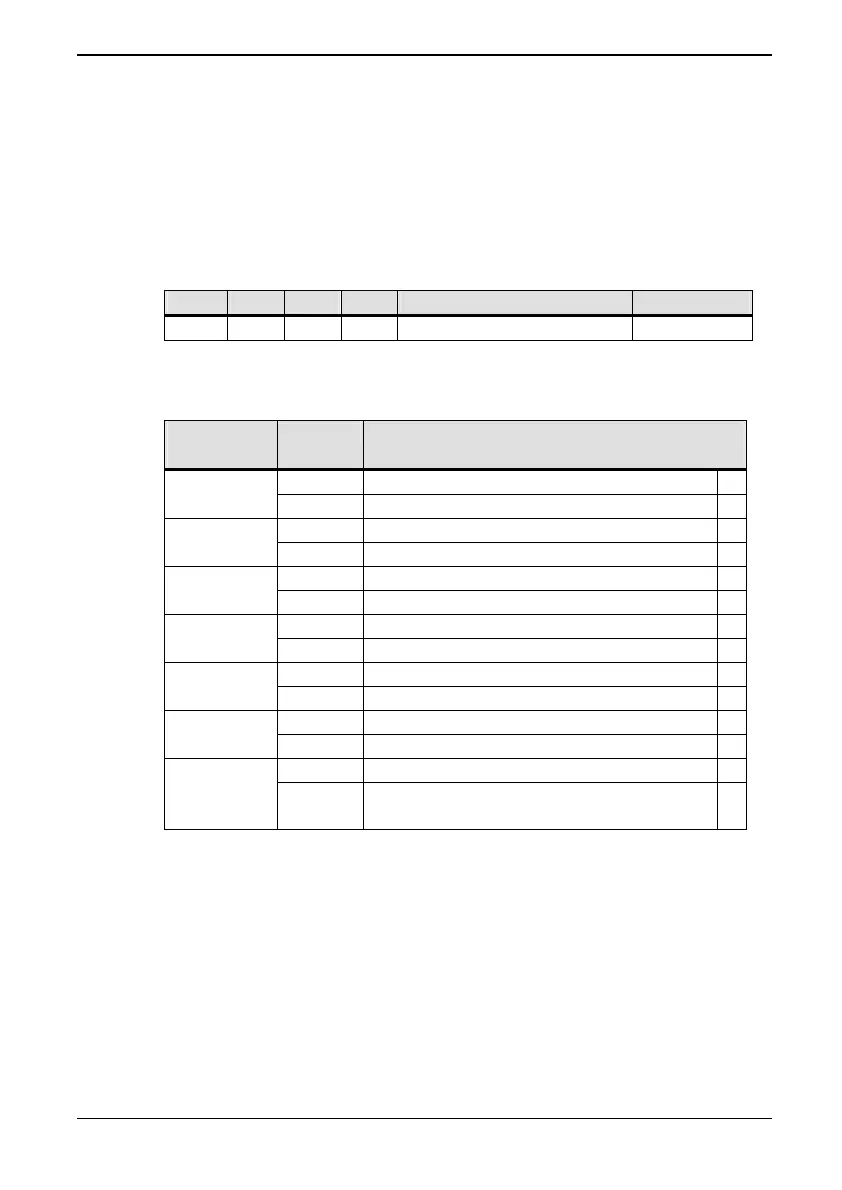
3.3.2 Switch Settings
The MVS3007-4001 PROFIBUS board has two Dual-in-Line
switches, S2 and S3, which must be configured as per Tables 3-1
and 3-2.
The switches are located as shown inside the front cover.
Table 3-1 Switch S2 meanings
S2.1 S2.2 S2.3 S2.4 Dual Port RAM Address Units
On On Off Off F000 – F3FF (Hex) MV3000e *
Table 3-2 Switch S3 meanings
Switch (S)
Jumper (X)
State Meaning
On Not used S3-1
Off PROFIBUS DP mode *
On MV3000e mode * S3-2
Off
On Not used, must be Off S3-3
Off Not used, must be Off *
On Use PPO type 2 (10 words long) S3-4
Off Use PPO type 4 (6 words long) *
On Zero references on loss of Master S3-5
Off Freeze references on loss of Master *
On Not used. S3-6 to
S3-8
Off Not used. *
1-2 Watchdog monitors drive activity *
X23
2-3 Watchdog monitors PROFIBUS
module activity
* Default settings/connections
3.4 MVS3007-4002 PROFIBUS Board Configuration
The switch settings and link connections that may be configured is
shown in
Table 3-3. The default settings and connections are
recommended for MV3000e applications and are indicated by
ast
erisks
*.



 To Next Page