3. Installation 9751 Installation Guide
Page 16 11976798
Fitting the System
Fitting the Control Unit Case
1. Remove the control unit case from its packaging.
2. Remove the front screws and slide off the case lid.
3. The upper part of the case back has a central keyway. Mark and drill a
hole for the keyway. Temporarily fix the case back to the wall. Mark the
position of two more fixing holes, remove the case back and drill the
holes.
4. Refit the case back to the wall using screws no less than 30mm x No 8,
with dome or pan heads.
Fitting a 9941 or 9943 Keypad
Note: If you are fitting more than one 9943 keypad to a control unit then make
sure that there is at least 1m distance between individual 9943 keypads.
Beware of mounting 9943’s back to back on opposite sides of a wall.
When 9943 keypads are closer than 1m to each their prox tag readers
interfere, and neither keypad can read prox tags.
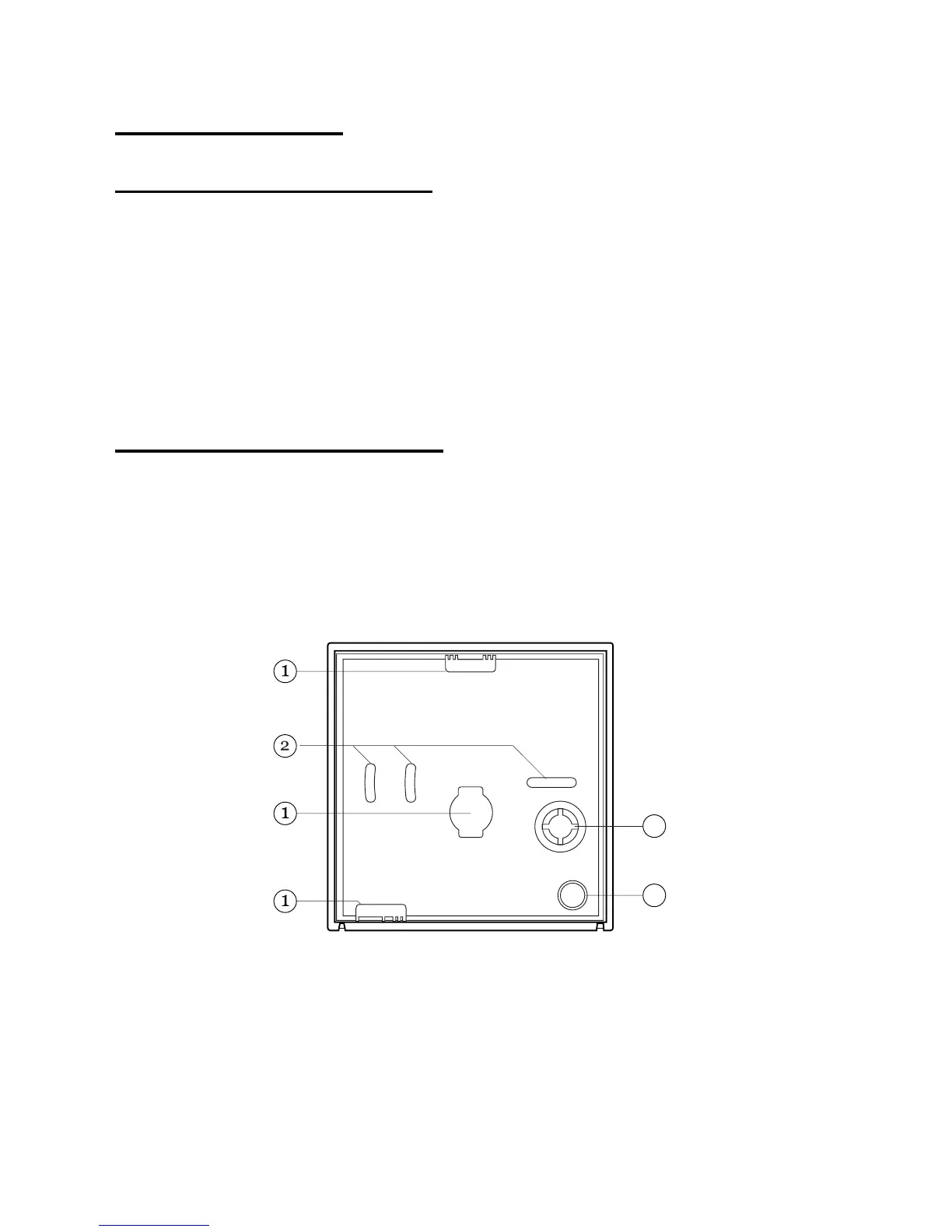
Figure 5 shows the backplate and the position of mounting holes.
3
4
1. Cable entry. 3. Back tamper aperture.
2. Fixing holes. 4. Sounder aperture.
Figure 5. Backplate of the 9941/9943 Keypad
Cooper Security recommend that you mount the keypad using No 8 or 6
screws (M4/M3.5) as follows:
1. Select which cable entry you are going to use and break out the
appropriate plastic sections.


 To Next Page