9751 Installation Guide 3. Installation
11976798 Page 25
0V 12V CLK DATA
12
14
15
11
8
10
7
9
13
5
6
3
4
2
1
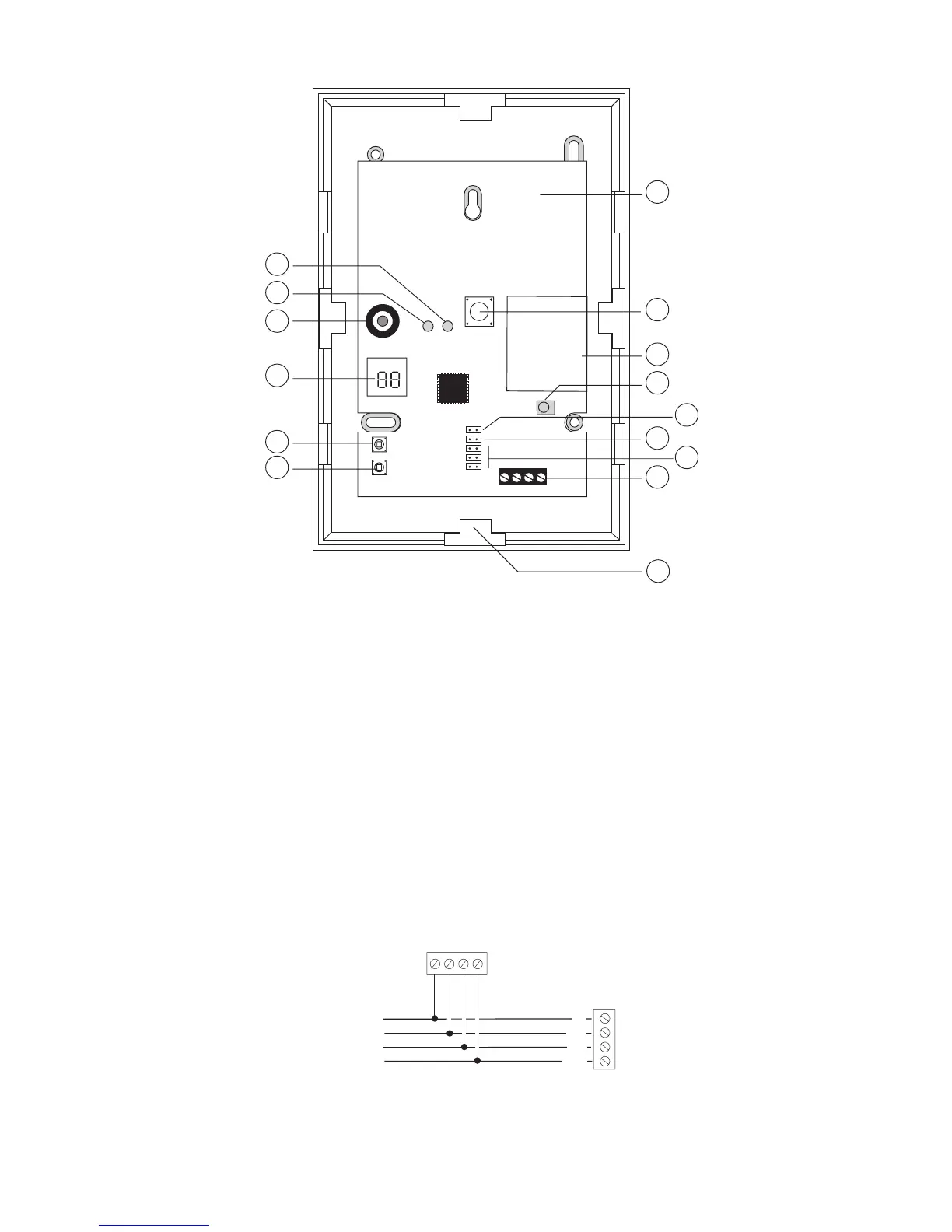
1. Red "Fail" LED 9. Radio section
2. Green "Pass" LED 10. Learn sensor
3. Sounder 11. Supervision jumper
4. 2 x 7-segment display 12. Jamming response jumper
5. Select button 13. Address jumpers
6. Delete button 14. Bus connector
7. Built-in aerial 15. Cable entry
8. Tamper switch
Figure 16. RFX08/RFX16 Radio Expander
Refer to the "Installation and Programming Guide" of each version for more
details.
Connecting an Expander
Figure 17 shows how to connect an expander to the control unit.
0V 12V CLK DATA
To other keypads
12V
0V
DATA
CLK
Expander
Control Unit
Figure 17. Connecting an Expander


 To Next Page