15
DC-ITD-PS7MAN01.A www.dodtec.com
JAN 2019 815-788-5200
6.1 Installing the Main Unit
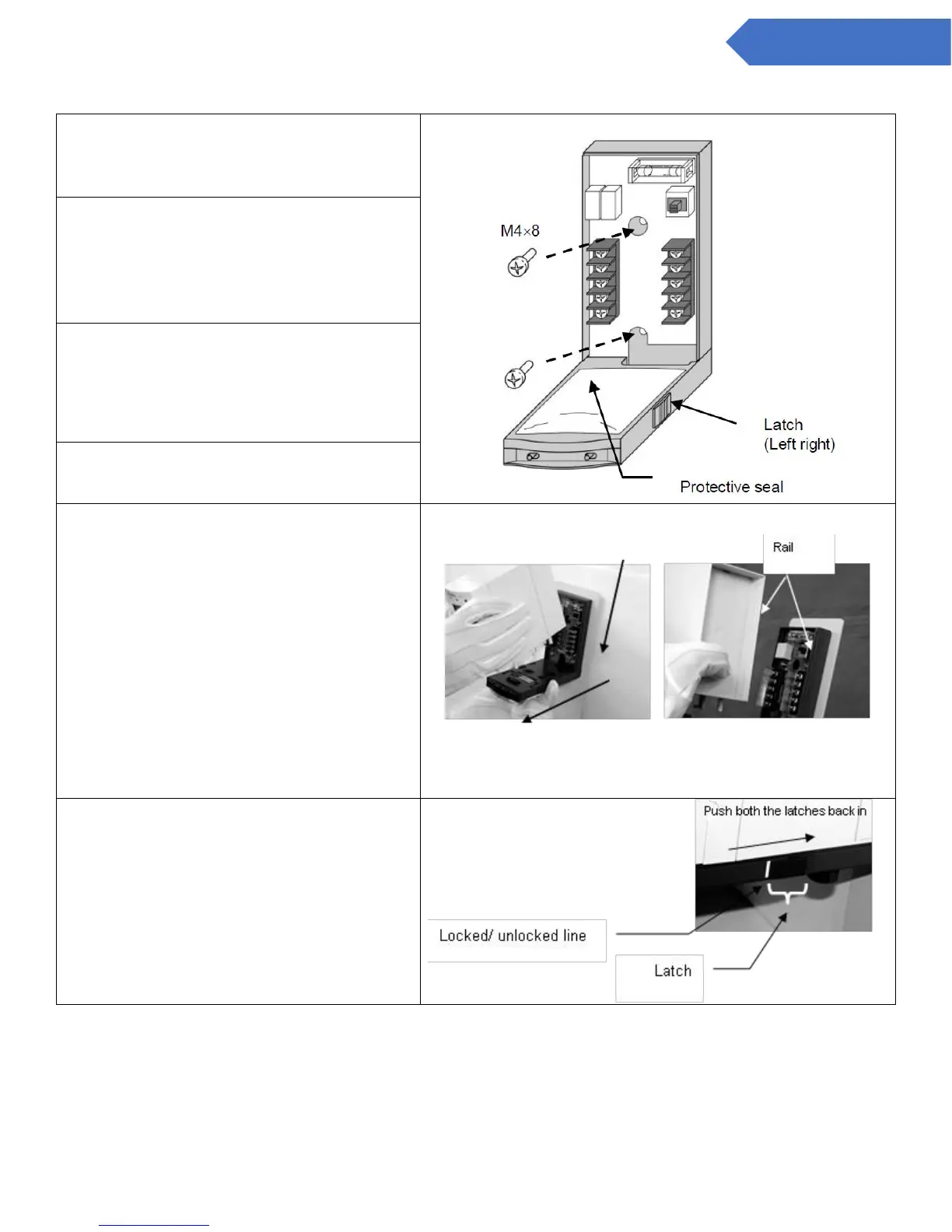
1. Determine the installation point and
attach the base unit using two M4 8
screws.
2. Run a cable through the cable entry
(the cutout hole near the bottom of
the base unit) and connect to the
terminal board. (Refer to 6.2 Wiring
Instructions.)
3. To attach the sensor unit, refer to 9.2
Attach/Replacing the Sensor Unit. To
attach it after attachment of the base
unit, proceed to step 4.
4. Remove the protective seal before
attaching the main unit.
5. Pull back the latches on both the left
and rights sides of the bottom of the
base unit, and attach the main unit
inserting from the top side first.
6. Push both the latches on the left and
right-hand sides of the base unit
back in until the locked/unlocked line
can be seen
2 Attach in line with the rails
1 Pull the latches on both sides forward


 To Next Page