52
DC-ITD-PS7MAN01.A www.dodtec.com
JAN 2019 815-788-5200
7. Remove the calibration gas, check that the detected gas concentration is under that of the alarm
value and restore to the normal mode (by switching the maintenance switch to the center).
2.2 21Vol% Adjustment
Oxygen Sensor Unit: COS-7
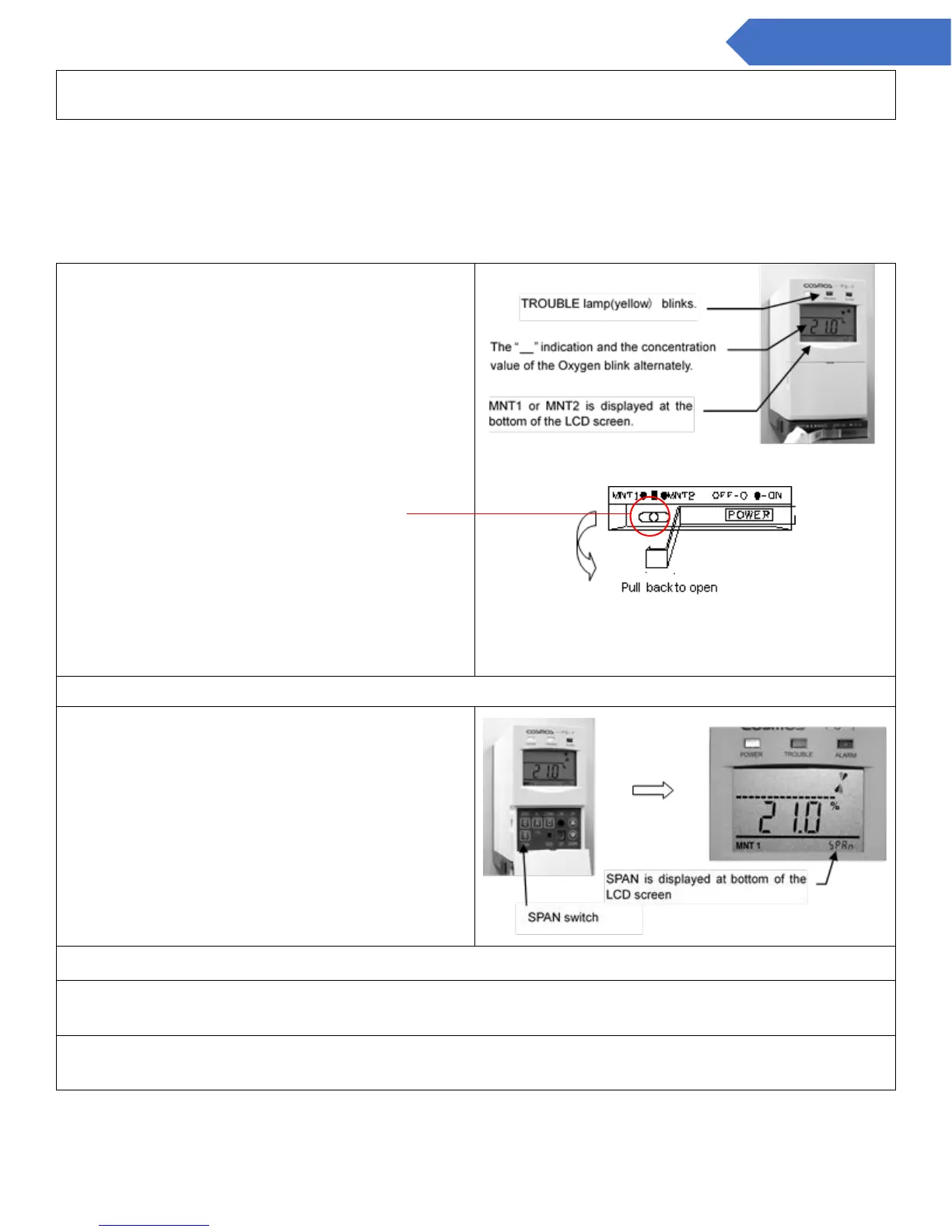
1. Set to maintenance mode (MNT1 or MNT2).
Left: Maintenance 1 (MNT 1)
Center: Normal Mode
Right: Maintenance 2 (MNT 2)
2. Release the password lock. (Refer to 1-2 Releasing the Password Lock)
4. Let the calibration gas through
5. Use the UP/DOWN switch to adjust the concentration indication on the screen to that of the
calibration gas concentration.
6. When the adjustment is completed, press the SPAN switch again. The SPAN indication in the
bottom right corner of the LCD screen will then disappear, and the 21vol% adjustment is complete.


 To Next Page