55
DC-ITD-PS7MAN01.A www.dodtec.com
JAN 2019 815-788-5200
2.4 Changing the Alarm Settings
The values of alarm settings on this unit can be changed. The method for changing them is explained here.
1. Release the password lock. (Refer to 1.2 Releasing the Password Lock.)
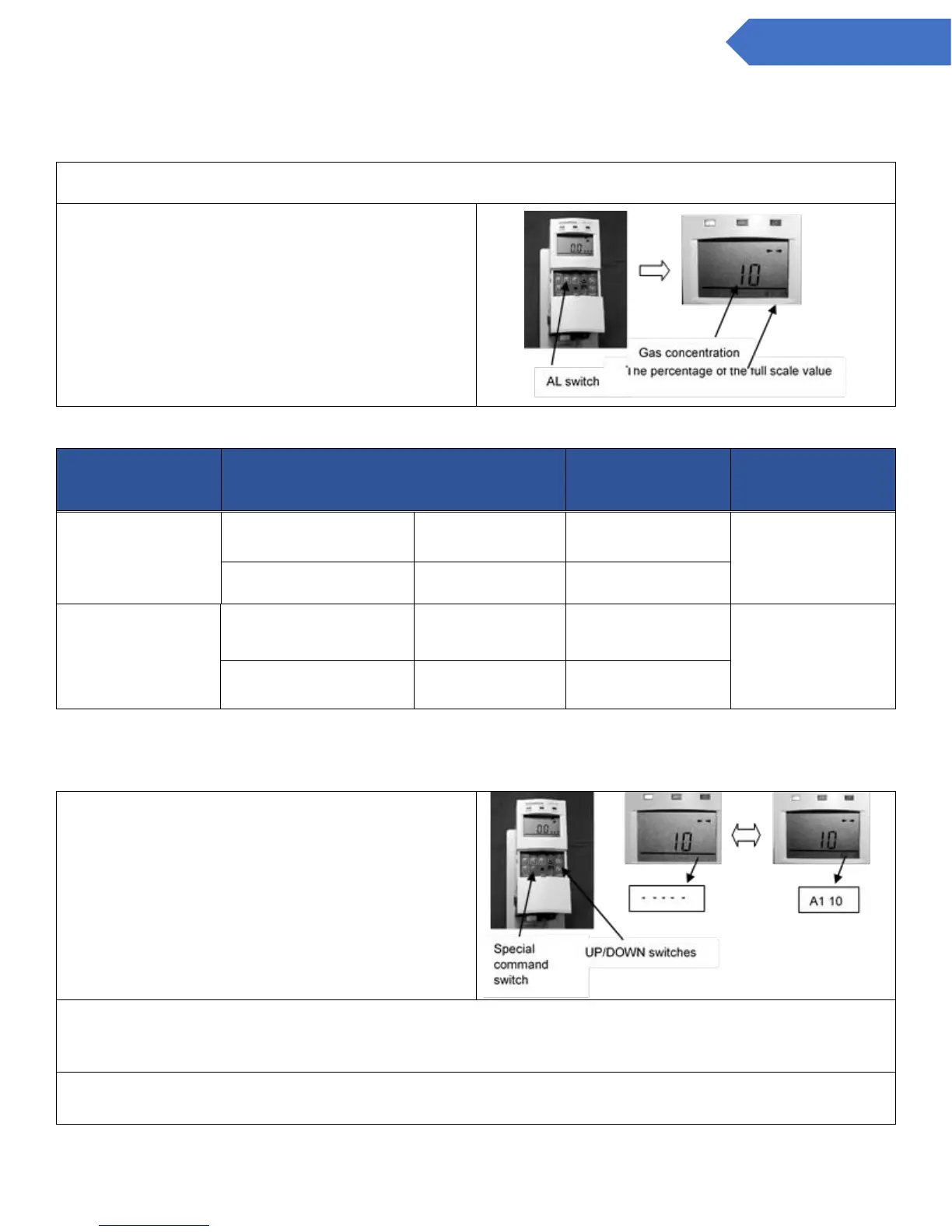
2. Press the AL switch until the alarm setting
to be changed is displayed on the LCD
display. (The bottom right of the screen, as in
the table below.) The alarm setting for the
actual gas concentration is displayed in the
middle of the screen, and the percentage of
the full-scale value is displayed in the
bottom right corner
LCD Display
Indication
(Lower right)
Explanation of the
default value
Toxic : CDS-7
Comb. : CHS-7
Toxic : CDS-7
Comb. : CHS-7
* Pressing the AL switch changes to 1st level → 2nd level→ Normal display.
* The A2 value should be greater than the A1 value in any case.
3. Press the special command switch. The
setting to be changed and the “—“ indication
will then flash alternately.
4. Change the value by using the UP/DOWN key “” and””. When you are done, press the special
command switch again, and the alternating display in the lower right corner of the LCD display will
become constant. The process is now finished.
5. When this is finished, press the UP/DOWN switches (“” or””) again to return to the normal
display.


 To Next Page