39
DC-ITD-PS7MAN01.A www.dodtec.com
JAN 2019 815-788-5200
9.2 Attach/Replacing the Sensor Unit
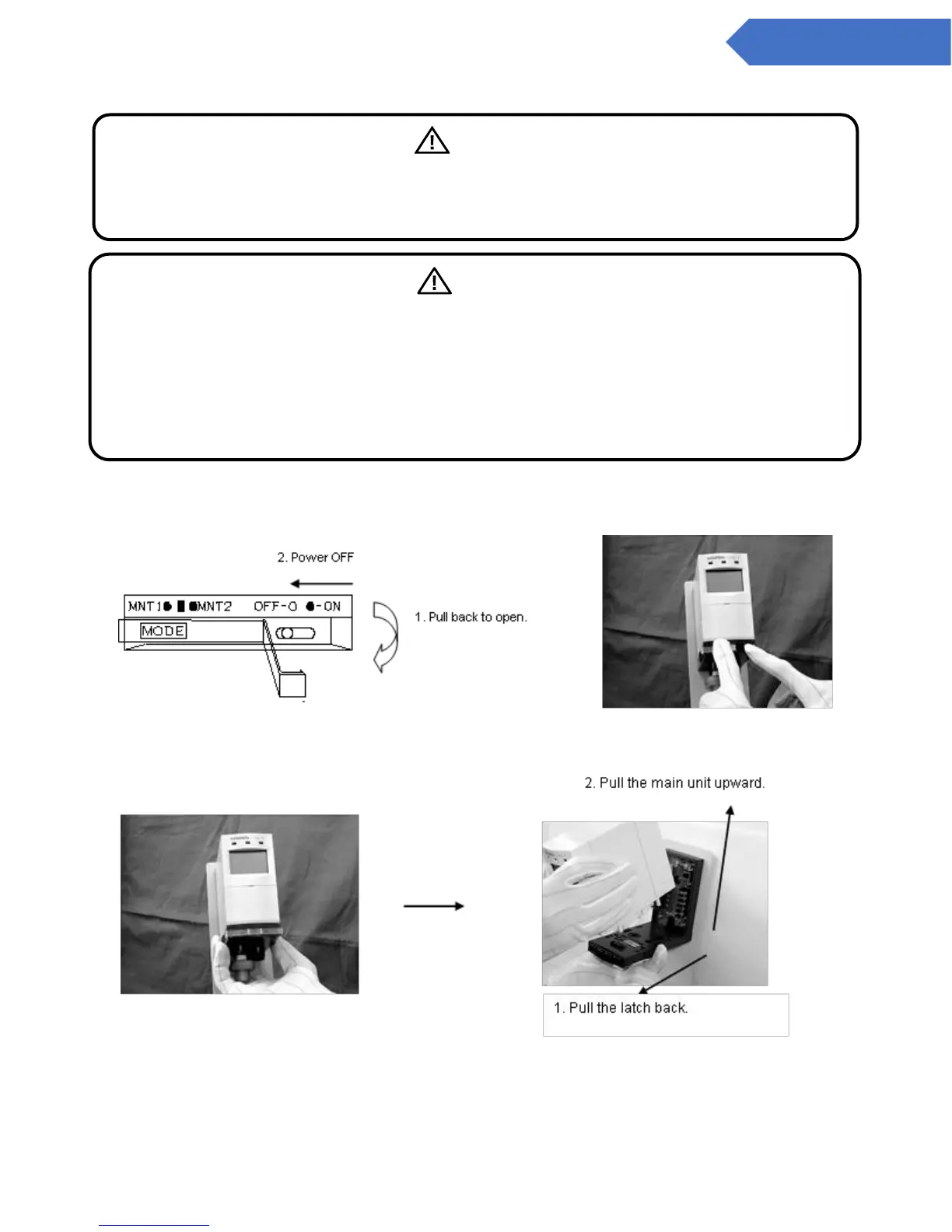
1. Turn off the power source to the main unit
2. Pull the two latches at the bottom of the base unit back, and (while they are still pulled back) release
the main unit, pulling from the top.
3. Press back while pushing on the middle of the upper section of the main body cover with your thumb
and remove the cover
Warning
Verify that the detected gas type and the full-scale value of the new sensor unit are the same
as the sensor unit being replaced. Be sure to check that its expiration date has not passed.
(There is no expiration date displayed for the Combustible Gas Sensor Unit CHS-7.)
Caution
• The sensor unit should be gas tested or replaced at 12-month intervals.
• Turn off the power source before carrying out any replacements.
However, when the power switch to the main unit is turned off to replace the sensor unit, the
trouble alarm output (open collector) is also turned off. If alarm contacts are used for
interlocking with external devices, verify that the interlock be released prior to conducting
the alarm test.


 To Next Page