OPERATOR’S MANUAL
26
SECTION 1
To change the transducer type, select the required
Transducer Type (UTA, I/S or H/O). To return to the Txd
Templates screen without change CANCEL.
To Change the Span, key in the required figure (between
the max. and min. displayed on screen) and ENTER. To
return to the Txd Templates screen without change CANCEL.
To change the Transducer Units of Measure, select the
required option from the list. To return to the Txd Templates
screen without change CANCEL.
To change the Pulses per Rev, key in the required figure
(between the max. and min. displayed on screen) . To return
to the Txd Templates screen without change CANCEL.
To change the Millivolts/Volts, key in the required figure
(between the max. and min. displayed on screen). To return
to the Txd Templates screen without change CANCEL.
To change the Bridge Resistance, key in the required figure
(between the max. and min. displayed on screen). To return
to the Txd Templates screen without change CANCEL.
The figure to the right of the Transducer type indicates the
transducer setup (1-9).
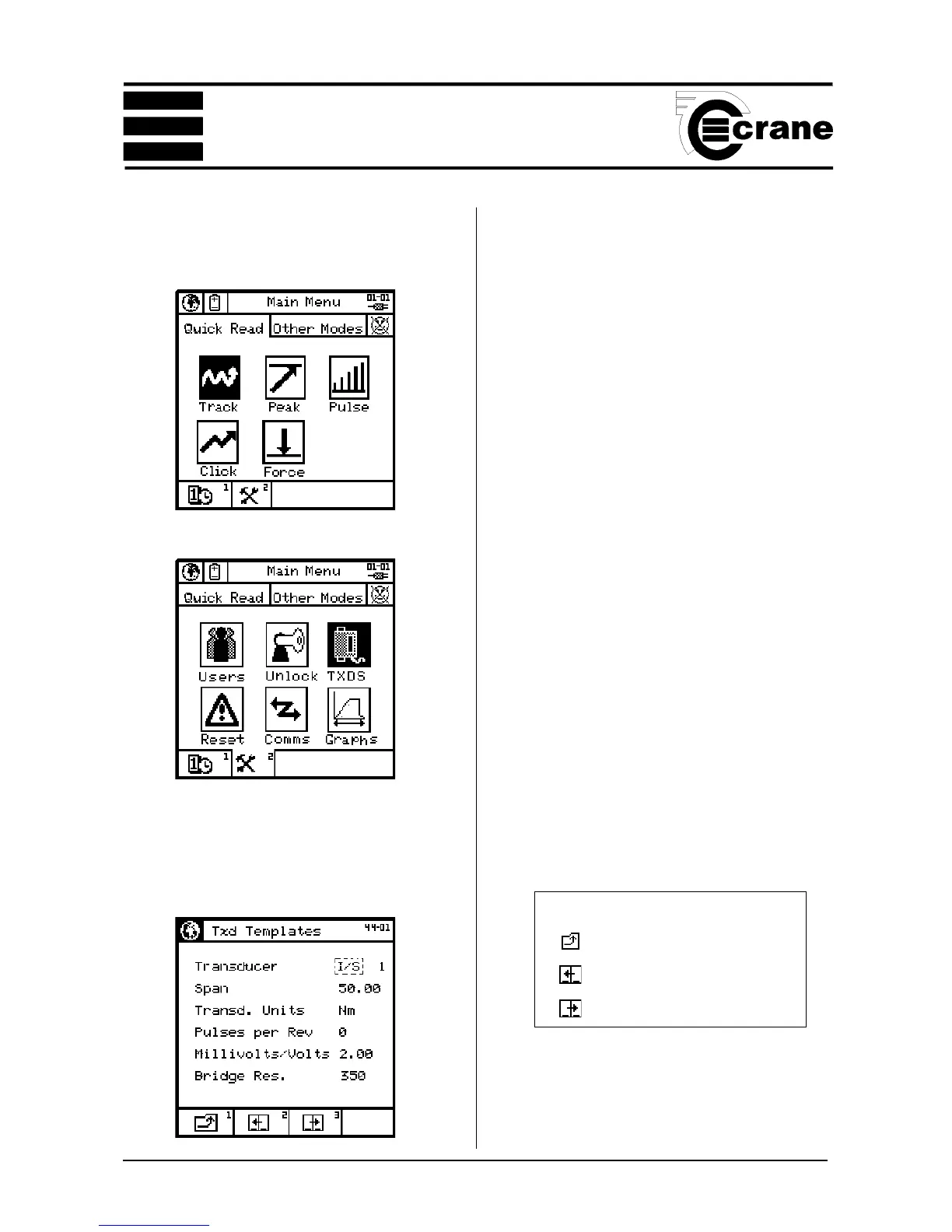
To edit the Transducer Templates.
From the Main Menu access the Tools screen
From the Tools Screen, select the TXDs Icon.
The options available will depend on the type of transducer
selected.
From the TXD Templates screen select the option(s) to be
altered and edit .
Icons used In Transducer Setup
Return to previous screen.
Previous transducer
Next transducer



 To Next Page