OPERATOR’S MANUAL
9
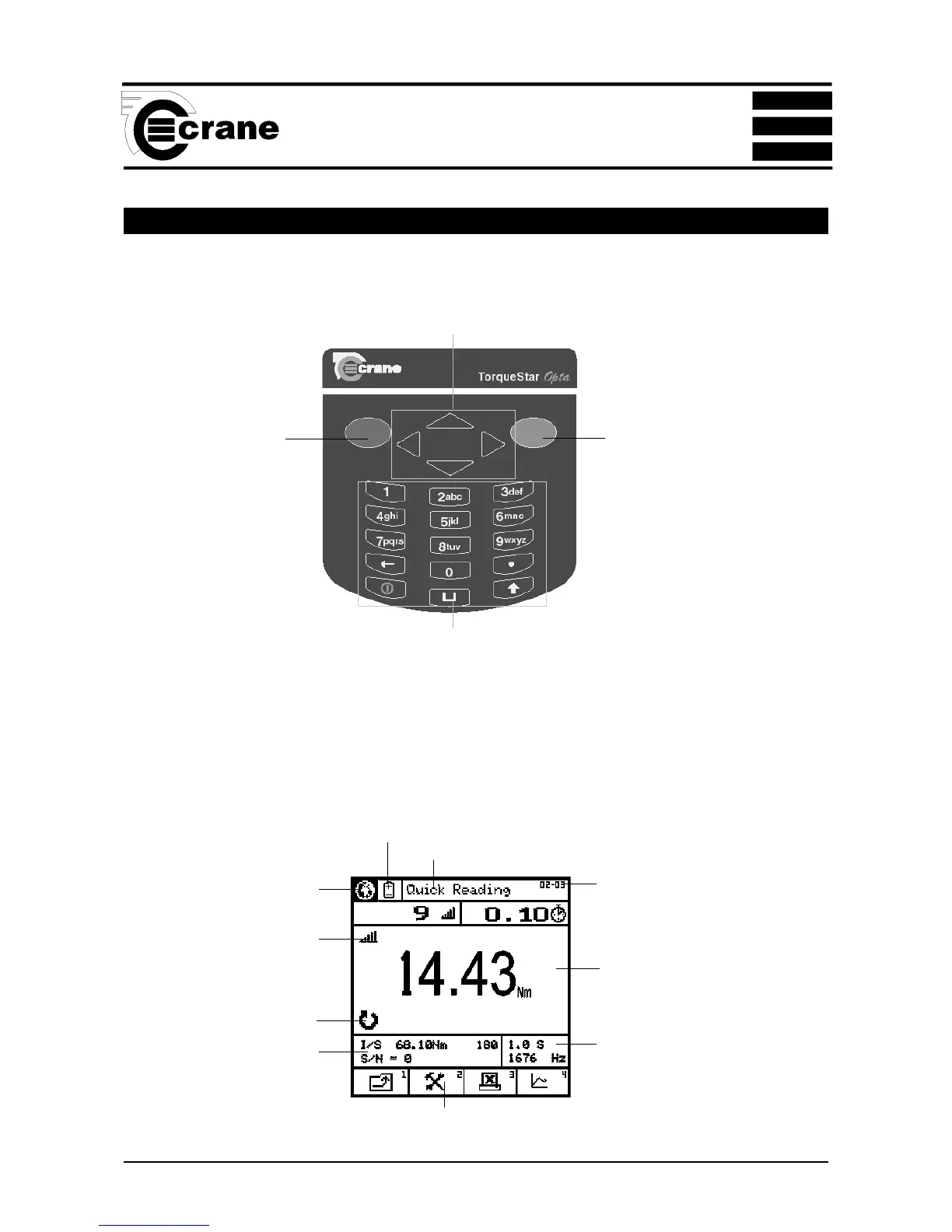
OPTA CONTROLS
Keypad
RED KEY (CANCEL)
- used for cancelling
an option .
GREEN (ENTER)
KEY - used for
confirming a
selection or
accepting an option
etc. Similar to the
Return key on a
computer.
ARROW (CURSOR) KEYS
- used to navigate around the
Opta screen and to move
between fields for editing etc.
ALPHA/NUMERIC KEYS
- used to input numbers or text or to select the numbered functions from the task bar at the bottom of the
screen. For text input, the keys work as a mobile phone keypad. Press the key a number of times until the
correct character is displayed. I.E. to type the letter C, press key 2 3 times.
Screen
TASK BAR
Items here are numbered. Press the equivalent number on the keypad to select.
Main display area for torque readings.
Information varies according to the
mode selected.
Menu icons also displayed here.
Mode selected displayed here
Direction of rotation displayed
here
Transducer information
displayed here
Select here to change language
Select here to change Power
options
Current screen or menu
Menu and subscreen
number
Cycle End Time and Frequency
response displayed here
SECTION 1



 To Next Page