Configuration Guide – DOC. 7991A CCS-UC-1: Secure SIP Endpoint with Cisco UCM 11.0
7
Configuring the TLS SIP Parameters
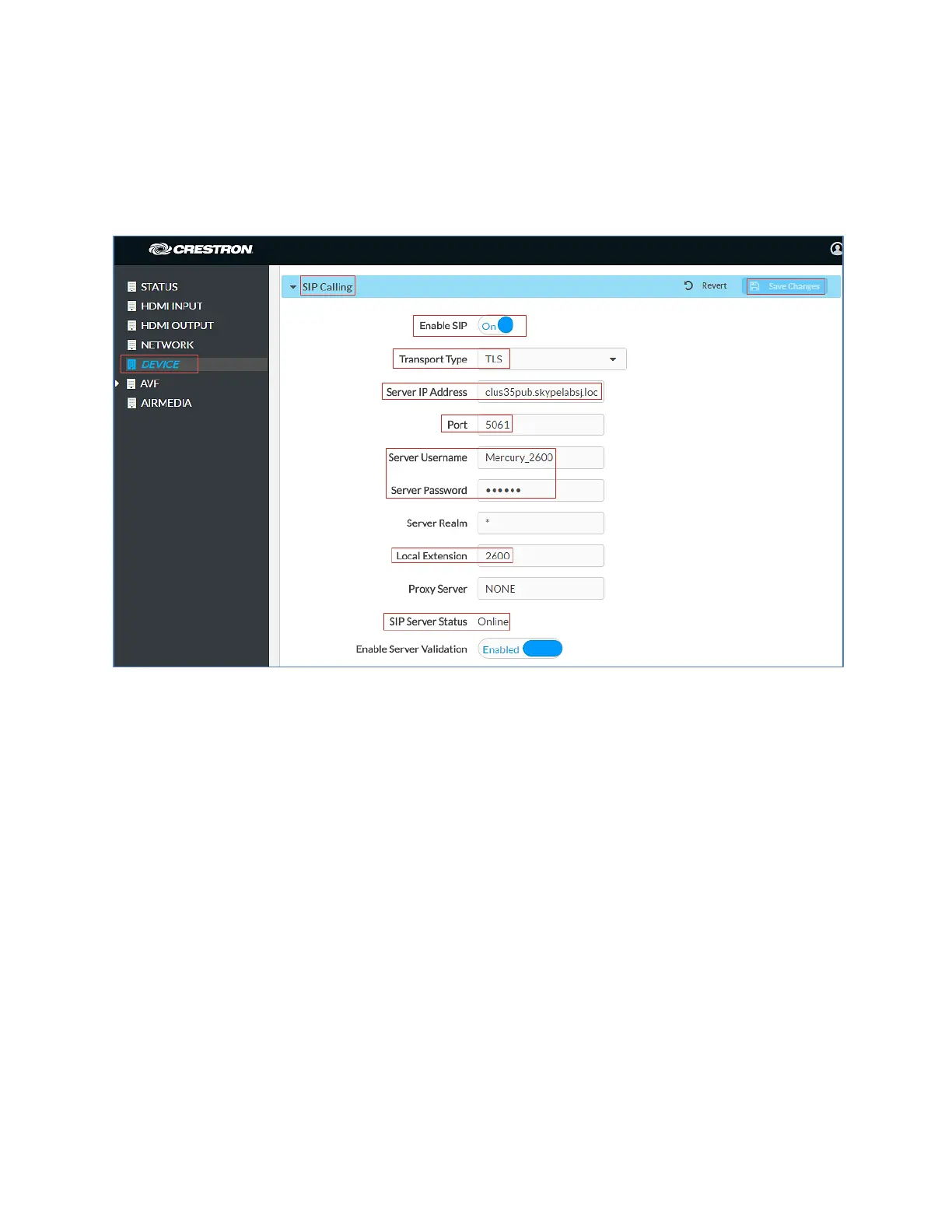
To configure the TLS SIP parameters, follow this procedure:
1. On the web GUI, navigate to
>
.
Crestron Mercury: Device Configuration: SIP Parameters
2. Enable the check box for
.
3. Configure the
: Enter the FQDN of the primary Cisco UCM node.
clus35pub.skypelabsj.local was used in this example.
4. Configure the
: 5061, used in this example.
5. Configure the
: Enter the end user configured on Cisco UCM for
this device. Crestron Mercury_2600 was used in this example.
6. Configure the
: Enter the password as configured on Cisco UCM
for this end user.
7. Configure the
: Enter the directory number that was configured for
this device on Cisco UCM. 2600 was used in this example.
8. Leave all other fields at their default values.
9. Click
.
Once the device successfully registers with the Cisco UCM, the
updates
its status to show Online.
Add Certificates
For a successful TLS handshake between the Crestron Mercury device and the Cisco UCM,
the following certificates need to be added to the Crestron Mercury:















 To Next Page