40 • TSR-310: Handheld Touch Screen Remote Supplemental Guide – DOC. 8226D
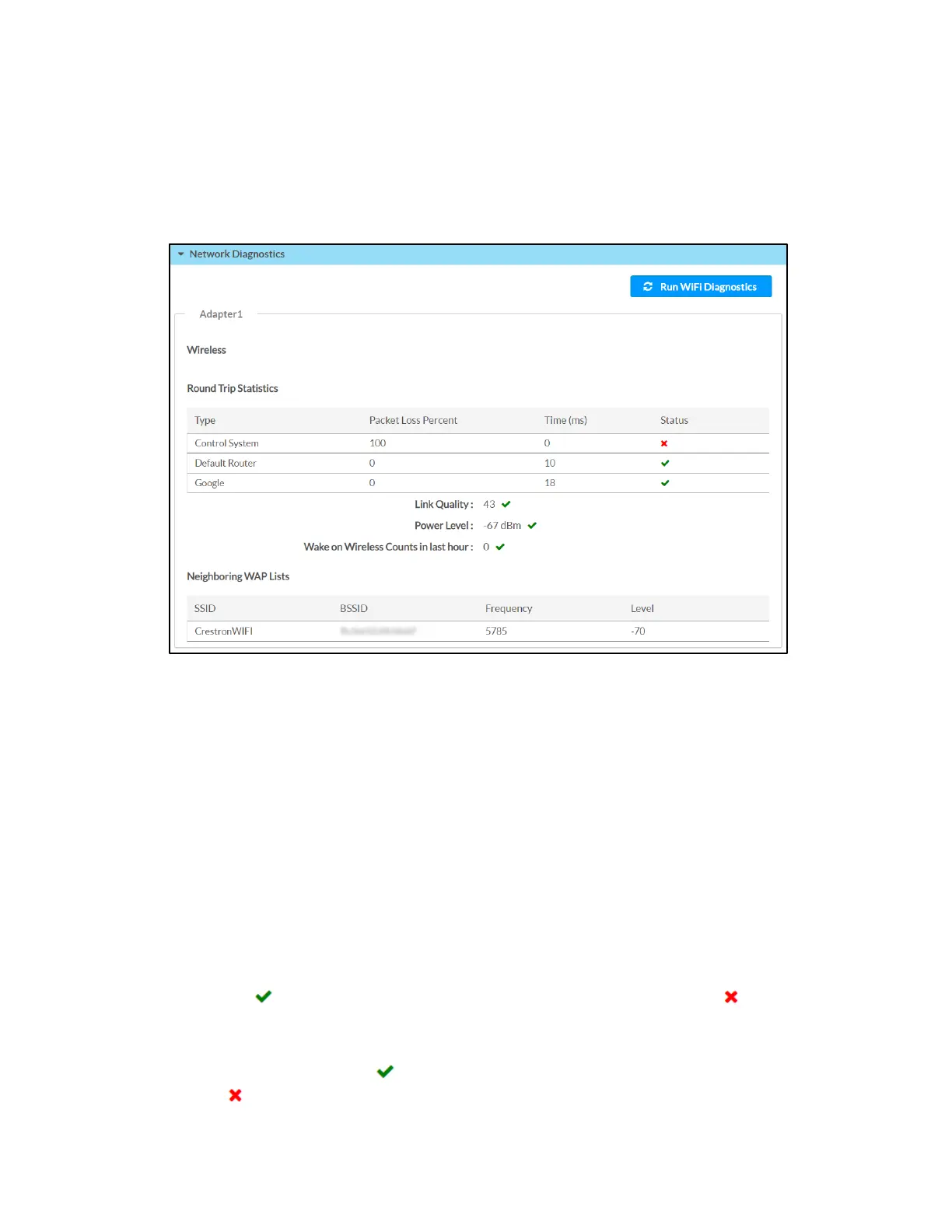
Network Diagnostics
Click Network Diagnostics to view the status of the wireless connection and to run
network diagnostic tests.
Status - Network Diagnostics
Click Run Wi-Fi Diagnostics at the top of the page to run a diagnostic test for the Wi-Fi
connection. Once the diagnostic test has completed, the configuration utility refreshes
to display the current values for the connection data.
The following Network Diagnostics > Adapter > Wireless information is displayed:
• Round Trip Statistics: The round trip connection statistics for each of the listed
wireless connections:
- Type: The wireless connection type
- Packet Loss Percent: The percentage of data packets that are lost during the
round trip data transmission (0 to 100%)
- Time (ms): The duration it takes for the wireless signal to be sent and
received in milliseconds
- Status: The quality of the round trip connection (A green check icon
indicates that the connection is optimal, while a red x icon
indicates
that the connection is suboptimal or not active.)
• Link Quality: The qualitative value of the signal strength and signal interference
(A green check icon
indicates that the link quality is optimal, while a red x icon
indicates that the link quality is suboptimal.)



 To Next Page