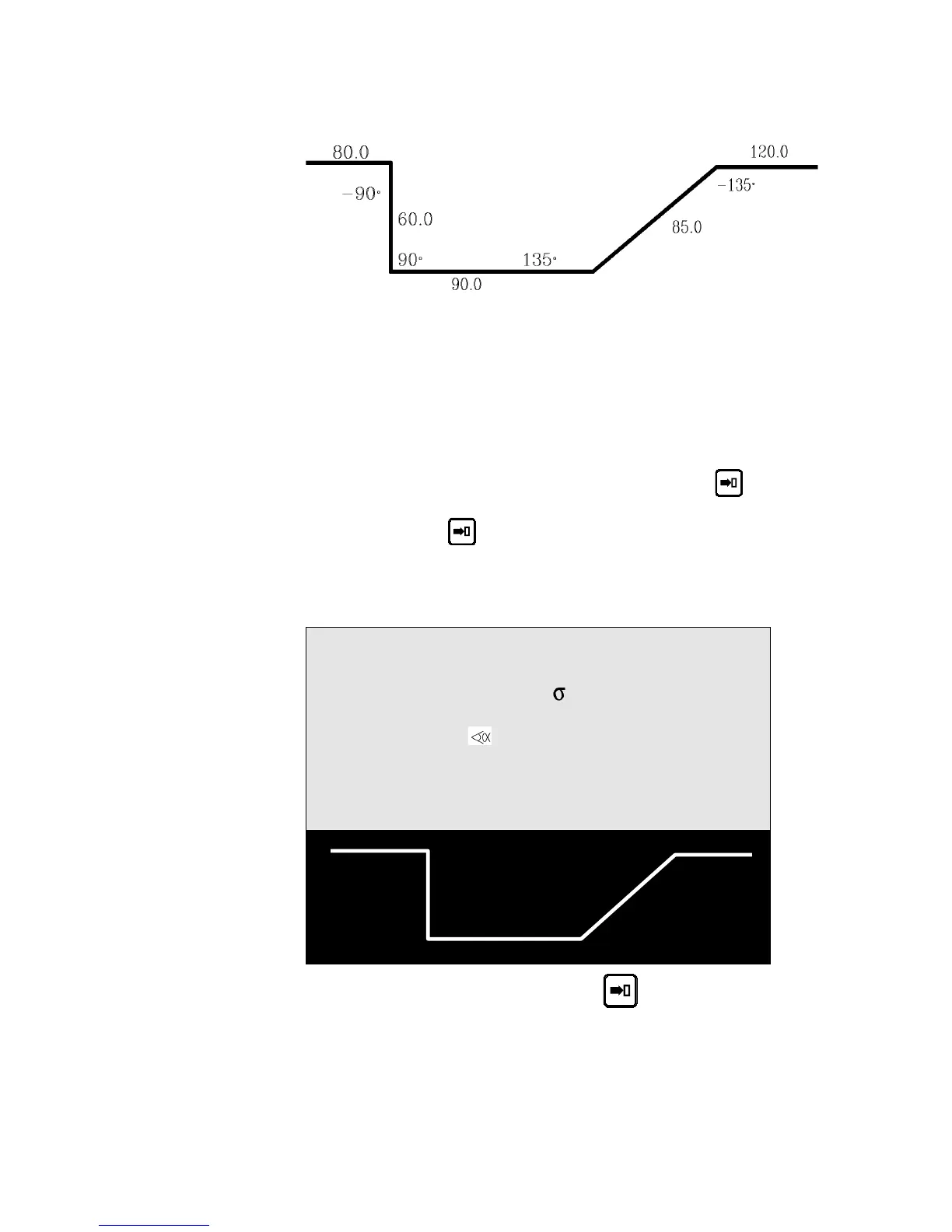
5. The product in our example is defined as follows:
Thickness: 2 mm
Sigma: 45 Kg/mm²
Material: Steel
Bending length: 250 mm
6. Fill in the fields on the screen according to the model below, taking in
to account the following particularities:
CODE: Optional field.
p/d When the cursor is over the P or the M field, press
to
display the tool list. Select the tool you wish to use and
press
to go back to the PRODUCT L-alpha page.
Then fill in the table columns.
Your screen should present as follows (but with the punch and die
numbers corresponding to your tools):
P 0 P+ ___ N 1 I/mm
CODE EXAMPLE-01 CAL_/__.__
p/d 1/ 1 St:1 Al:_ SS:_
Th: 2.00 Kg/mm² 45.000
Lmat 250.000 Dev L ____.__
-N- -L- - - -p/d- -ri- CR
1 80.00 -90.0° __/__ ____.__ __
2 60.00 90.0° __/__ ____.__ __
3 90.00 135.0° __/__ ____.__ __
4 85.00 -135.0° __/__ ____.__ __
7. After introducing the last length, press the key.
The system calculates the radius of each bend as well as the unfolded
length of the product and displays these values on the screen.
PAGE 44 USER GUIDE DNC 600S



 To Next Page