Cyrus Pre
2
DAC User Instrucons
8
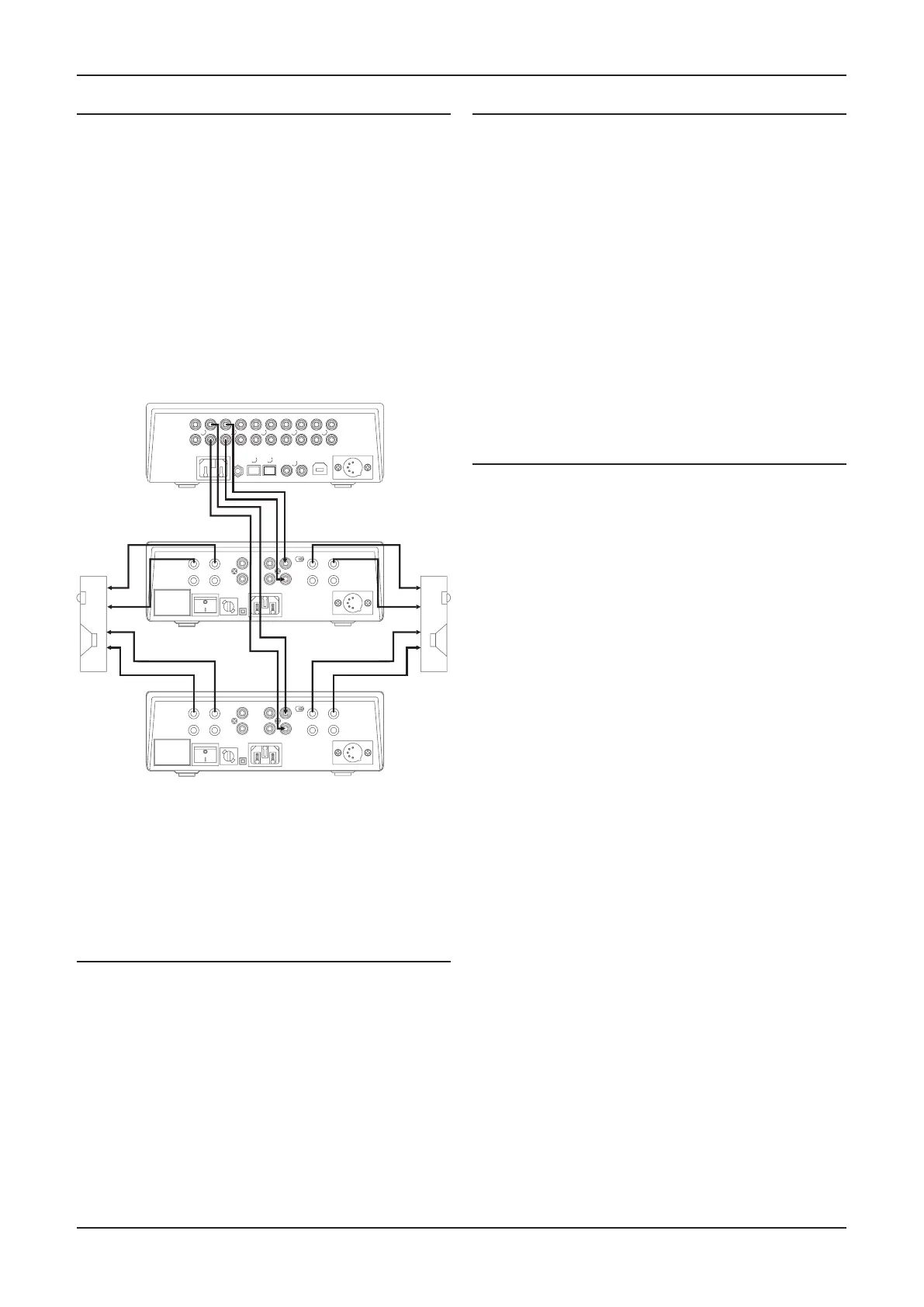
Bi-amping
The twin pre-amplier outputs may be used in conjuncon
with added power amplier(s) to signicantly upgrade your
loudspeaker system through Bi-amping. The Cyrus range of
power ampliers is recommended for this applicaon.
NOTE: A bi-amp system can only be set up with speakers
that have bi-wire connecons (separate bass and treble
connecons).
Connecng power ampliers
Two power ampliers will be required to partner a Cyrus
Pre
2
DAC pre-amplier in a bi-amplied system.
Both stereo and high power monobloc Cyrus power
ampliers are available to partner your amplier.
Connecng a Cyrus Surround Sound decoder
If your system includes a Cyrus mul-channel surround
sound decoder, it may be connected through your stereo
amplier to share the main front speakers of your system.
In this case, connect a stereo phono interconnect from the
front channel outputs of the surround decoder to one of the
Analogue Inputs of the amplier. For this system to funcon
correctly both the amplier and the Cyrus surround decoder
must be included in an MC-BUS connecon loop and the
‘Cyrus AV’ input name must be set for the input used (see
‘MC-BUS’ secon and ‘Input names’ in the ‘Setup menu’
secon).
When set up in this way, the amplier will automacally
check for the presence of the decoder when the ‘Cyrus
AV’ input is selected, then lock its volume seng to an
appropriate level.
Connecng a Surround Sound decoder (other
brand)
If your system includes a mul-channel surround sound
decoder (but not a Cyrus model), it may be connected
through your amplier to drive the front channel speakers.
In this case, connect a stereo phono interconnect from the
front channel outputs of the surround decoder to one of the
Analogue Inputs of the amplier. For this system to funcon
correctly, the ‘AV Direct’ input name must be set for the
input used (see ‘Input names’ in the ‘Setup menu’ secon).
When set up in this way, the amplier will automacally lock
its volume seng to a xed level to match the output of the
surround decoder.
CAUTION: The ‘AV Direct’ input name should only be used
for surround decoders that include a volume control, as the
volume control of your amplier will be xed at a very high
level.
NOTE:- Refer to the wiring plan of a bi-amplied system.
Take care to connect each of the amplier output channels
to the correct power amplier and loudspeaker.
Connecng Headphones
The headphones socket 1& is a standard 3.5mm stereo jack
socket for connecon to a pair of headphones. Headphones
may be permanently connected to the amplier and selected
when required with the front panel switch.
Right
bass
Left
bass
Right
treble
Left
treble
+
+
-
-
-
-
+
+
Power amplifier 1
Power amplifier 2
Connecting a bi-amplified speaker system
to a pre-amplifier



 To Next Page