Cyrus Pre
2
DAC User Instrucons
18
Cyrus CD player commands
• Press the CYRUS key
• Press the
key to set the remote control to CD
mode.
The key will light red. You can now control both a Cyrus
CD player and amplier. The
key will ash red when
commands are being sent in CD mode.
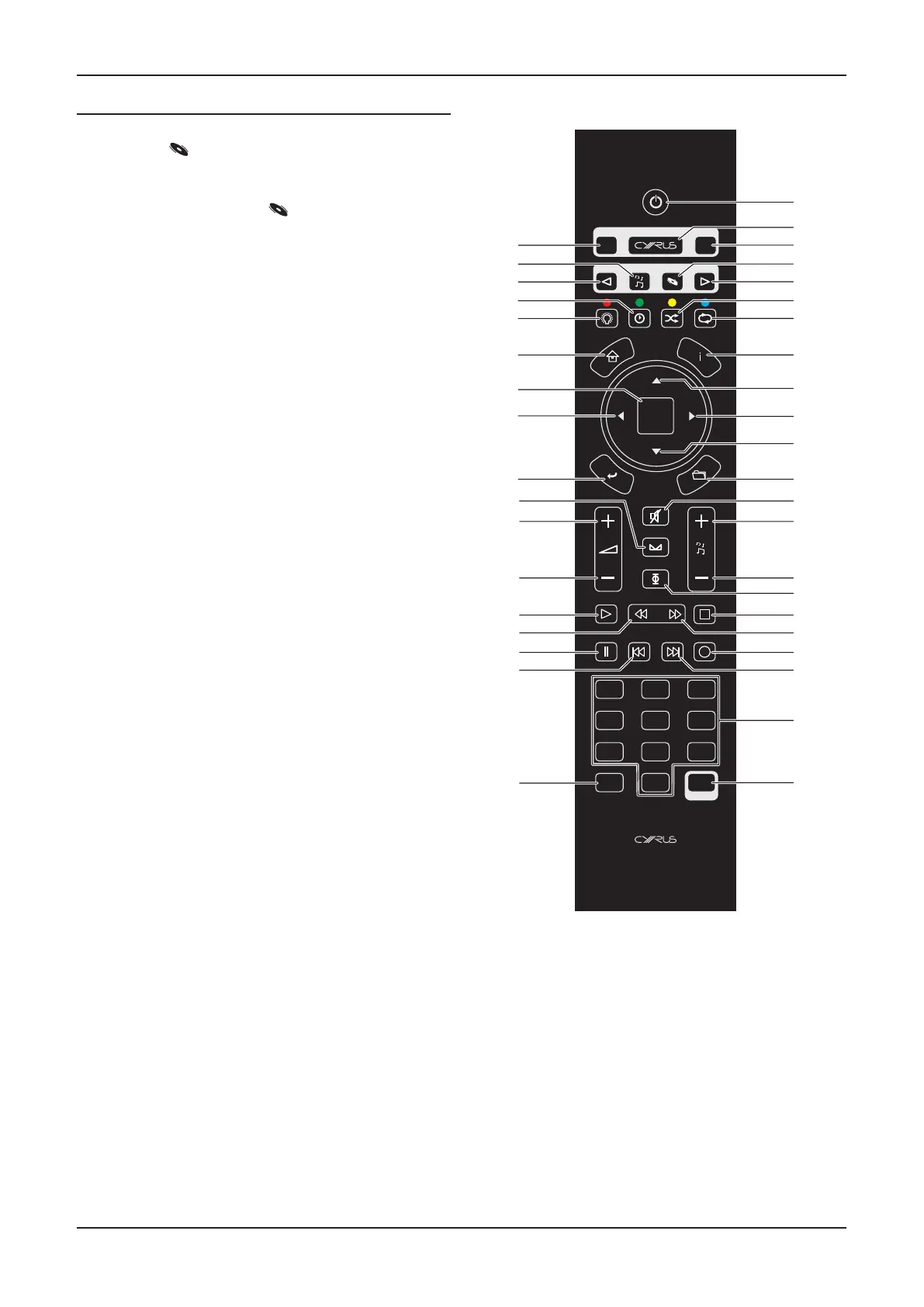
The CD mode commands available are listed below –
1. Set Cyrus ampliers, CD players and Audio streamers to
Standby.
2. Set the handset to send commands to an amplier.
3. Send commands to a Satellite receiver (or other device
programmed to use this key).
4. Set the handset to send commands to an amplier and
CD player.
5. Step to the next amplier input.
6. No command for a CD player.
7. CD player repeat.
8. No command for a CD player.
9. CD player next track.
10. CD player search forwards.
11. CD player previous track.
12. No command for a CD player.
13. Amplier mute.
14. No command for a CD player.
15. No command for a CD player.
16. CD player audio phase. Changes in phase are subtle and
are best established from the listening posion. When
the phase seng is changed, the display text area will
show the message ‘Phase Normal’ or ‘Phase Invert’. The
performance of the CD player is unaected whether the
signal is in normal or phase inverted mode.
17. CD player stop.
18. CD player search forwards.
19. No command for a CD player.
20. CD player next track.
21. CD player numeric keypad. Enter a one or two digit track
number to jump to a specic track.
22. Setup key for programming TV/SAT keys.
23. CD player memory store.
24. CD player previous track.
25. CD player pause.
26. CD player search back.
27. CD player play/pause.
28. Amplier volume down.
29. Amplier volume up.
30. Amplier balance.
31. No command for a CD player.
32. CD player search back.
33. No command for an CD player.
12
3
4
5
79
6
8
0/10
SATTV
STORE
MENU
ENTER
SELECT
LIST
CH
SETUP
abc
def
ghi jkl
mno
pqrs
tuv wxyz
GUIDE
INFO
TEXT
TV/AV
CONTROL
SOURCE
a
b
c
d
e
f
g
h
i
1)
1!
1@
1#
1$
1%
1^
1&
1*
1(
2)
2!
2@
2#
2$
2%
2&
2^
2*
2(
3)
3!
3@
3#
3$
3%
3^
3&
3*
3(
34. No command for a CD player.
35. CD player display o.
36. CD player display mode. Choose track elapsed me or
disc remaining me.
37. Step to the previous amplier input.
38. Set the handset to send commands to an amplier and
Audio streamer.
39. Send commands to a TV (or other device programmed
to use this key).



 To Next Page