Cyrus Pre
2
DAC User Instrucons
16
REMOTE CONTROL OPERATION
Remote control introducon
The iR14 remote control will send commands to Cyrus
ampliers, CD players, Audio streamers* and the Phono
Signature.
The remote control can also be programmed with the
commands from two other remote control handsets. These
will normally be for your TV and a Satellite or terrestrial TV
set-top box, programmed to the TV and SAT buons, but
could also be other audio components such as a Cyrus tuner
or DVD player etc.
*NOTE: It may be necessary to upgrade the rmware in
an Audio streamer to enable Infra-red remote control
operaon.
Remote control backlight
The remote control keypad includes a back-light. The back-
light will switch on automacally when moved or when a
command is sent.
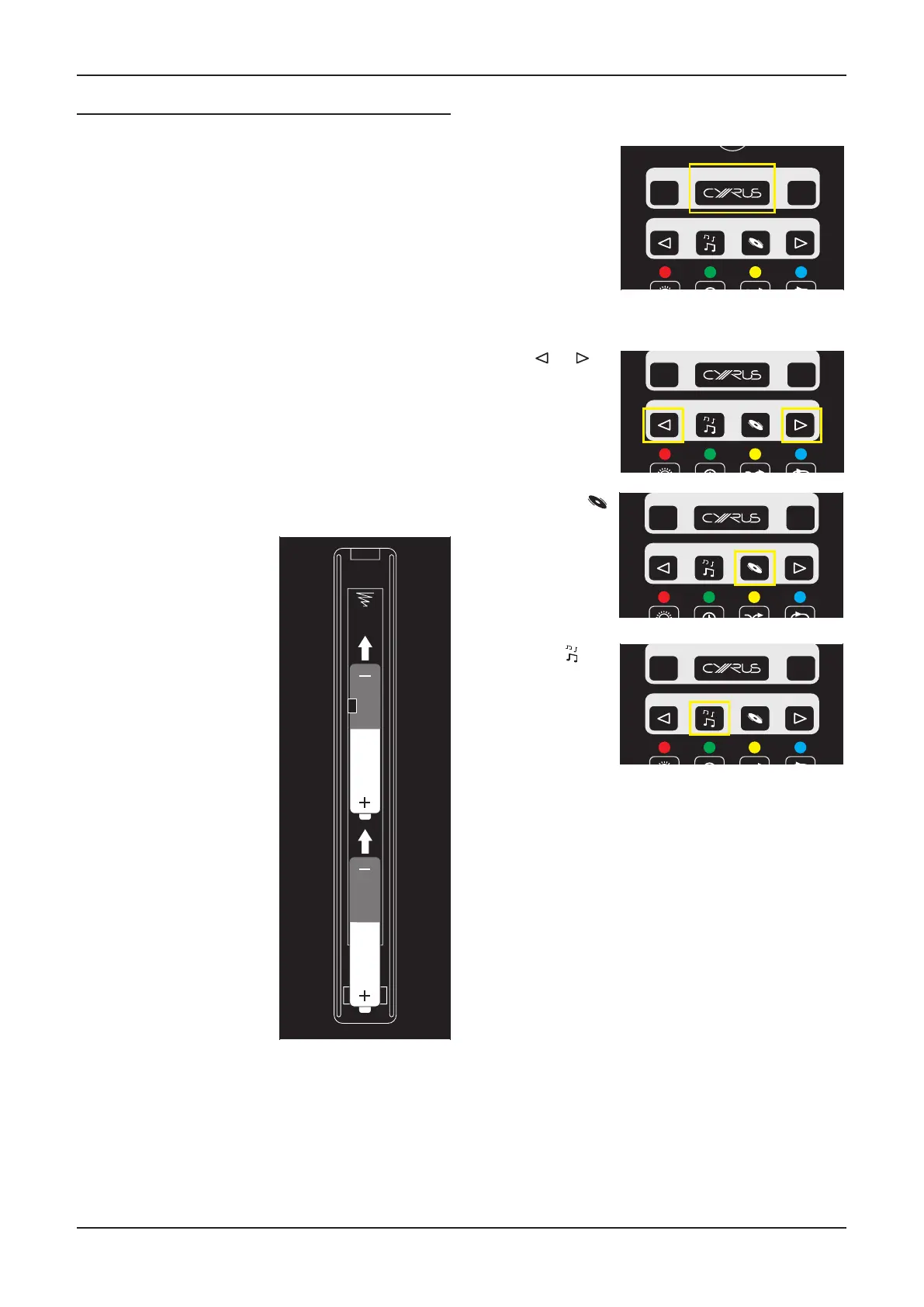
Fing baeries to the remote control
The baery compartment is on the back of the remote
control.
SATTV
STORE
MENU
ENTER
SELECT
LIST
CH
SETUP
abc
def
ghi jkl
mno
pqrs
tuv wxyz
GUIDE
INFO
TEXT
TV/AV
CONTROL
SOURCE
Switching on Cyrus components
Press one of the keys in the SOURCE group.
SATTV
STORE
MENU
ENTER
SELECT
LIST
CH
SETUP
abc
def
ghi jkl
mno
pqrs
tuv wxyz
GUIDE
INFO
TEXT
TV/AV
CONTROL
SOURCE
NOTE: If amplier inputs have been named CD and/or
Stream X, the correct amplier input will also be selected.
SATTV
STORE
MENU
ENTER
SELECT
LIST
CH
SETUP
abc
def
ghi jkl
mno
pqrs
tuv wxyz
GUIDE
INFO
TEXT
TV/AV
CONTROL
SOURCE
Sending commands to Cyrus components
AAA
AAA
a
b
1. Press the catch on the
baery cover and li o
the cover.
2. Slide a AAA baery under
the retaining hook in the
upper half of the baery
compartment as shown.
3. Fit a second AAA baery
into the remaining space.
4. Replace the baery
cov er.
Replace the handset baeries only with AAA baeries of the
same voltage and type.
Discard used baeries in accordance with recycling
regulaons in force in your area.
• Press the CYRUS
key to set the
remote control to
Cyrus mode.
SATTV
STORE
MENU
ENTER
SELECT
LIST
CH
SETUP
abc
def
ghi jkl
mno
pqrs
tuv wxyz
GUIDE
INFO
TEXT
TV/AV
CONTROL
SOURCE
• Press or to
switch on and
send commands
to a Cyrus
amplier.
• Press the
key to switch
on a Cyrus CD
player and send
commands to a
Cyrus CD player
and amplier.
• Press the
key
to switch on
a Cyrus Audio
streamer and
send commands
to a Cyrus Audio
streamer and
amplier.



 To Next Page