DES-3028 DES-3028P DES-3028G DES-3052 DES-3052P Layer 2 Fast Ethernet Managed Switch
Reauthenticate Port(s) for Port Based 802.1X
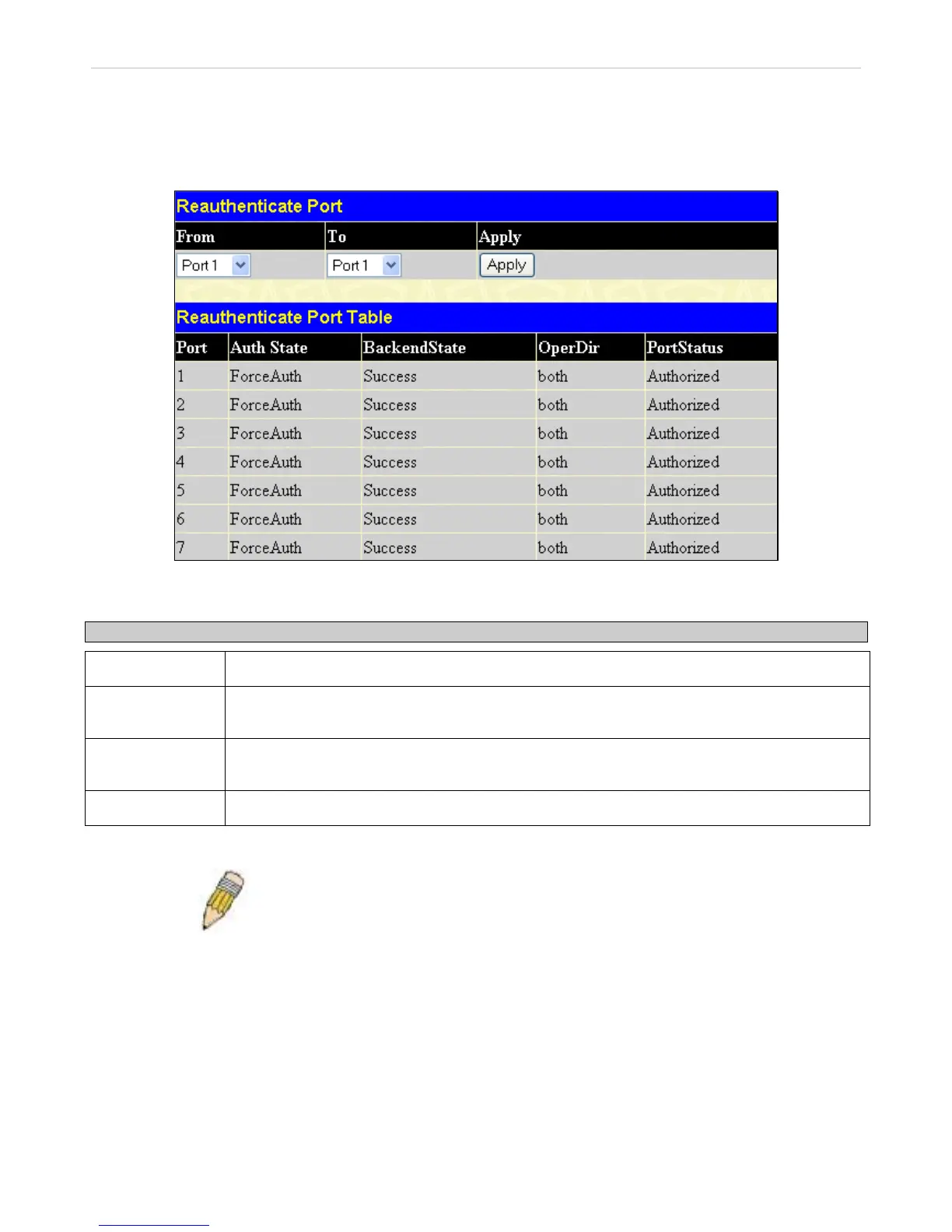
This window allows reauthentication of a port or group of ports by using the pull-down menus From and To and clicking Apply.
The Reauthenticate Port Table displays the current status of the reauthenticated port(s) once Apply has been clicked.
Click Security > 802.1X > Reauthenticate Port(s) to open the Reauthenticate Port(s) window:
Figure 10- 30. Reauthenticate Port and Reauthenticate Port Table window
This window displays the following information:
Parameter Description
Port
The port number of the reauthenticated port.
Auth State
The Authenticator State will display one of the following: Initialize, Disconnected, Connecting,
Authenticating, Authenticated, Aborting, Held, ForceAuth, ForceUnauth, and N/A.
BackendState
The Backend State will display one of the following: Request, Response, Success, Fail, Timeout,
Idle, Initialize, and N/A.
OperDir
The status of the administrative-controlled direction, either In or Both.
NOTE: The user must first globally enable 802.1X in the DES-30xx Web
Management Tool window before initializing ports. Information in the
Initialize Ports Table cannot be viewed before enabling 802.1X.
212














 To Next Page