xStack DES-3528 Series Layer 2 Stackable Fast Ethernet Managed Switch User Manual
110
Parameter Description
From Port/To
Port
Use the pull-down menu to select a range of ports to be configured.
Port Description
Use the drop-down menu to enable or disable port description.
System Name
Use the drop-down menu to enable or disable system name.
System
Description
Use the drop-down menu to enable or disable system description.
System
Capabilities
Use the drop-down menu to enable or disable system capabilities.
Click Apply to implement changes made.
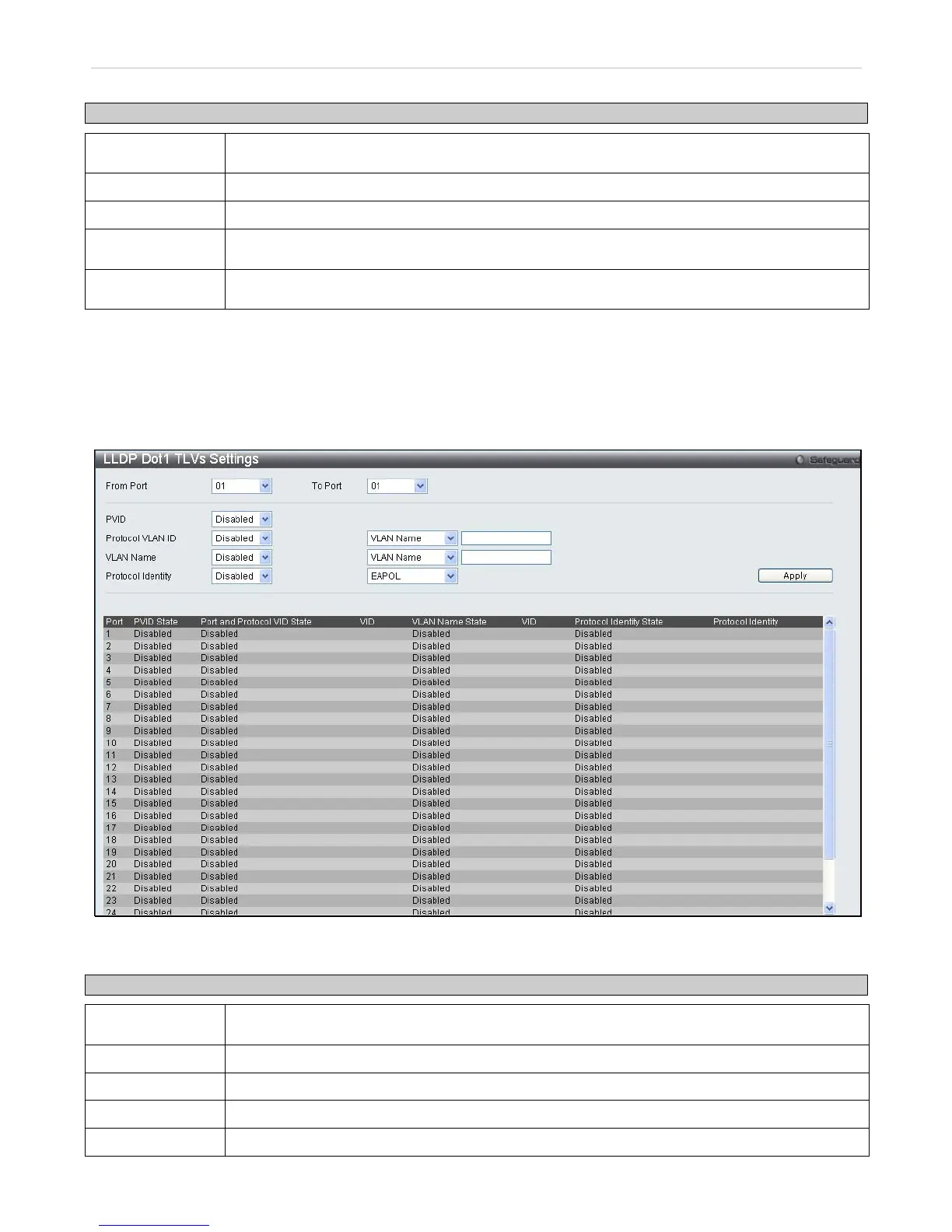
LLDP Dot1 TLVs Settings
To view this window, Click L2 Features > LLDP > LLDP Dot1 TLVs Settings
Figure 7- 50. LLDP Dot1 TLVs Settings window
The following parameters can be set:
Parameter Description
From Port/To
Port
Use the pull-down menu to select a range of ports to be configured.
PVID
Use the drop-down menu to enable or disable the advertise PVID.
Protocol VLAN ID
Use the drop-down menu to enable or disable the advertise Protocol VLAN ID.
VLAN Name
Use the drop-down menu to enable or disable the advertise VLAN Name.
Protocol Identity
Use the drop-down menu to enable or disable the advertise Protocol Identity.














 To Next Page