35D-Link DSL-3788 User Manual
Section 4 - Conguration
PPPoA
Select PPPoA if your ISP provides and requires you to enter a PPPoA username
and password in order to connect to the Internet. For ADSL connections only.
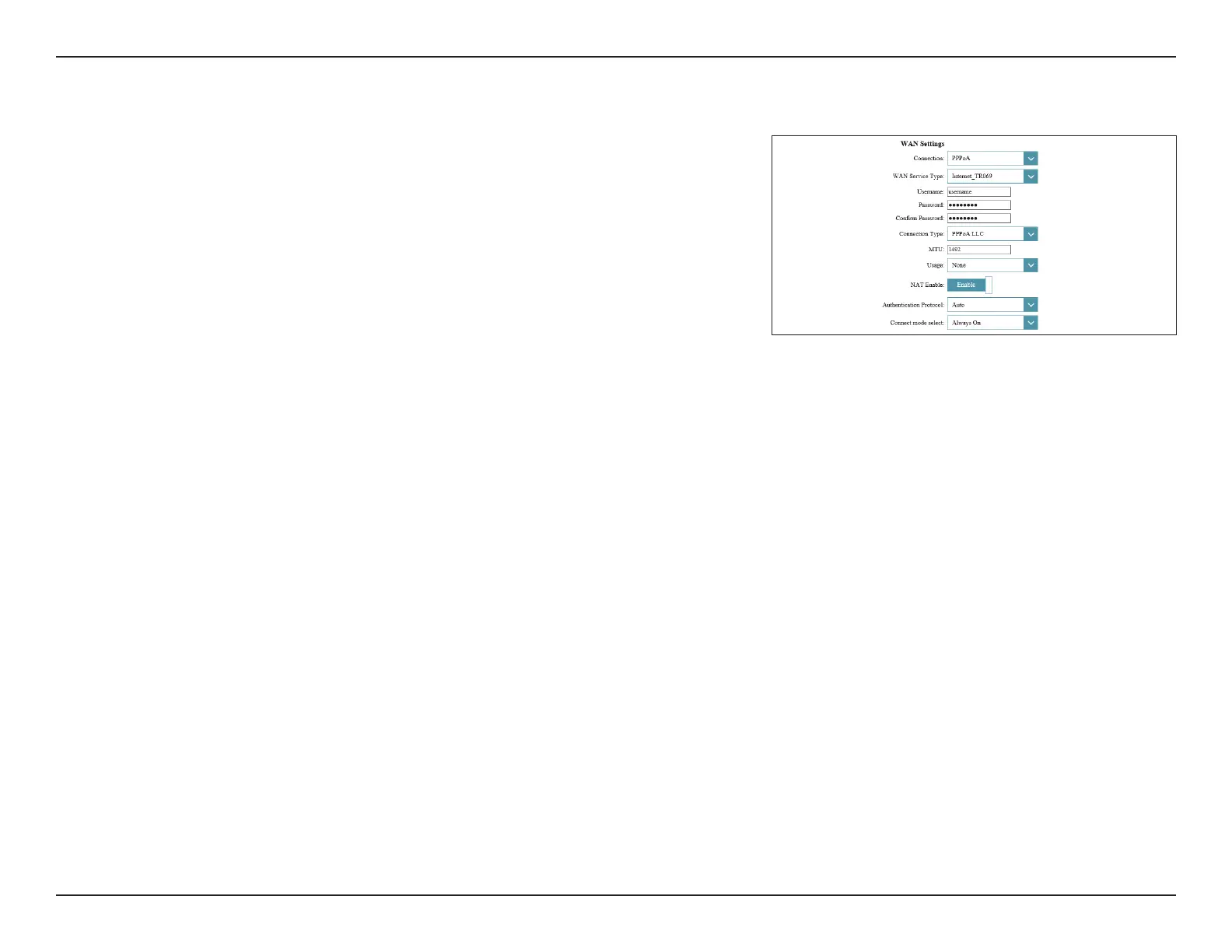
WAN Settings
Connection: Select PPPoA.
WAN Service Type: Select a service type from the list. Choose from INTERNET, TR069,
or TR069_INTERNET. This information should be provided by your
ISP. If you are conguring your connection manually and your ISP
has not specied this setting, selecting INTERNET is recommended.
Username: Enter the username provided by your ISP.
Password: Enter the password provided by your ISP.
Connection Type: Select PPPoA LLC or PPPoA VC-Mux.
MTU: Maximum Transmission Unit - you may need to change the MTU for
optimal performance with your ISP.
Usage: Select None or Default Route.
NAT Enable: Enable or disable Network Address Translation.
Authentication
Protocol:
Select the authentication protocol your ISP uses. The options are
Auto, PAP, or CHAP.
Connect mode
select:
Set the connection to be Always-on, Connect-On-Demand, or
Manual.



 To Next Page