SQLC-214-097
44
Items Setting and operation procedures Page
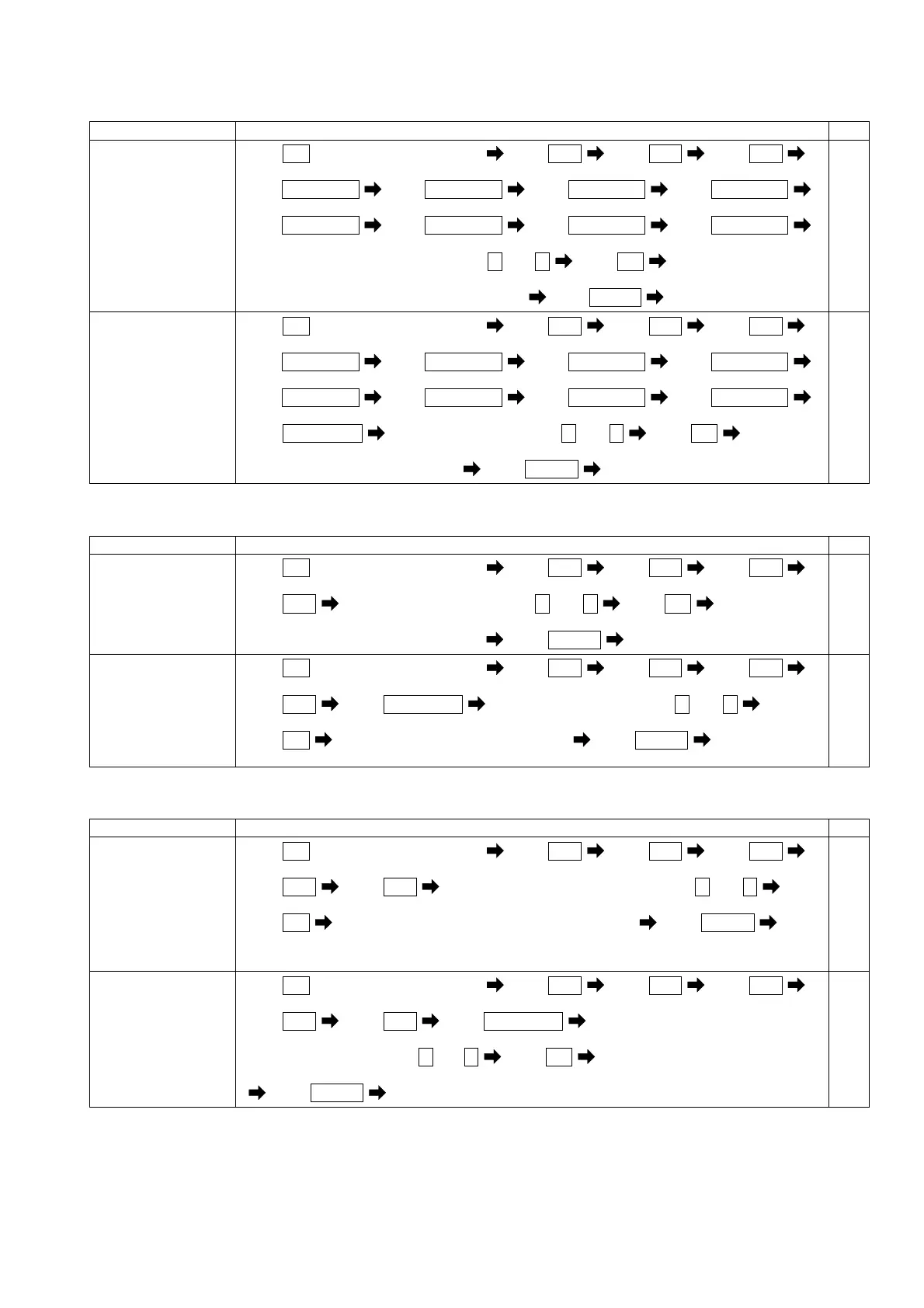
Set the detected
characteristics of
5th conversion
content.
(149)
Press
SET
for longer than 3 seconds Press
MODE
Press
MODE
Press
MODE
(111) (121AL) (131H) (141H)
Press
RESET/SHIFT
Press
RESET/SHIFT
Press
RESET/SHIFT
Press
RESET/SHIFT
(142H) (143) (144H) (145H)
Press
RESET/SHIFT
Press
RESET/SHIFT
Press
RESET/SHIFT
Press
RESET/SHIFT
(146H) (147) (148H) (149)
Select a detected characteristics by + and -
Press
SET
Selected detected characteristics is entered
Press
DISPLAY
Returns to display mode.
54,55
Set the average
time interval.
(14A)
Press
SET
for longer than 3 seconds Press
MODE
Press
MODE
Press
MODE
(111) (121AL) (131H) (141H)
Press
RESET/SHIFT
Press
RESET/SHIFT
Press
RESET/SHIFT
Press
RESET/SHIFT
(142H) (143) (144H) (145H)
Press
RESET/SHIFT
Press
RESET/SHIFT
Press
RESET/SHIFT
Press
RESET/SHIFT
(146H) (147) (148H) (149)
Press
RESET/SHIFT
Select a time interval by + and - Press
SET
(14A)
Selected time interval is entered
Press
DISPLAY
Returns to display mode.
54,55
(12) Instant measurement setting
Each parenthesized number shows a setting number and this number is displayed on the setting screen.
Items Setting and operation procedures Page
Set the high-alarm
value of instant
voltage.
(151H)
Press
SET
for longer than 3 seconds Press
MODE
Press
MODE
Press
MODE
(111) (121AL) (131H)
(141H)
Press
MODE
Select a high-alarm value by + and - Press
SET
(151H)
Selected high-alarm value is entered
Press
DISPLAY
Returns to display mode.
55
Set the low-alarm
value of instant
voltage.
(152L)
Press
SET
for longer than 3 seconds Press
MODE
Press
MODE
Press
MODE
(111) (121AL) (131H)
(141H)
Press
MODE
Press
RESET/SHIFT
Select a low-alarm value by + and -
(151H) (152L)
Press
SET
Selected low-alarm value is entered Press
DISPLAY
Returns to
display mode.
55
(13) Current-leakage measurement setting
Each parenthesized number shows a setting number and this number is displayed on the setting screen.
Items Setting and operation procedures Page
Set the rated
sensitivity current
value of current
leakage.
(161)
Press
SET
for longer than 3 seconds Press
MODE
Press
MODE
Press
MODE
(111) (121AL) (131H)
(141H)
Press
MODE
Press
MODE
Select a rated sensitivity current by + and -
(151H) (161)
Press
SET
Selected rated sensitivity current is entered Press
DISPLAY
Returns to display mode.
56
Set the detected
factor of current
leakage.
(162)
Press
SET
for longer than 3 seconds Press
MODE
Press
MODE
Press
MODE
(111) (121AL) (131H) (141H)
Press
MODE
Press
MODE
Press
RESET/SHIFT
(151H) (161) (162)
Select a detected factor by + and -
Press
SET
Selected detected factor is entered
Press
DISPLAY
Returns to display mode.
56


 To Next Page