Operation manual BRC2E52C7 / BRC3E52C7
25
4P368042-1 - 2014.02
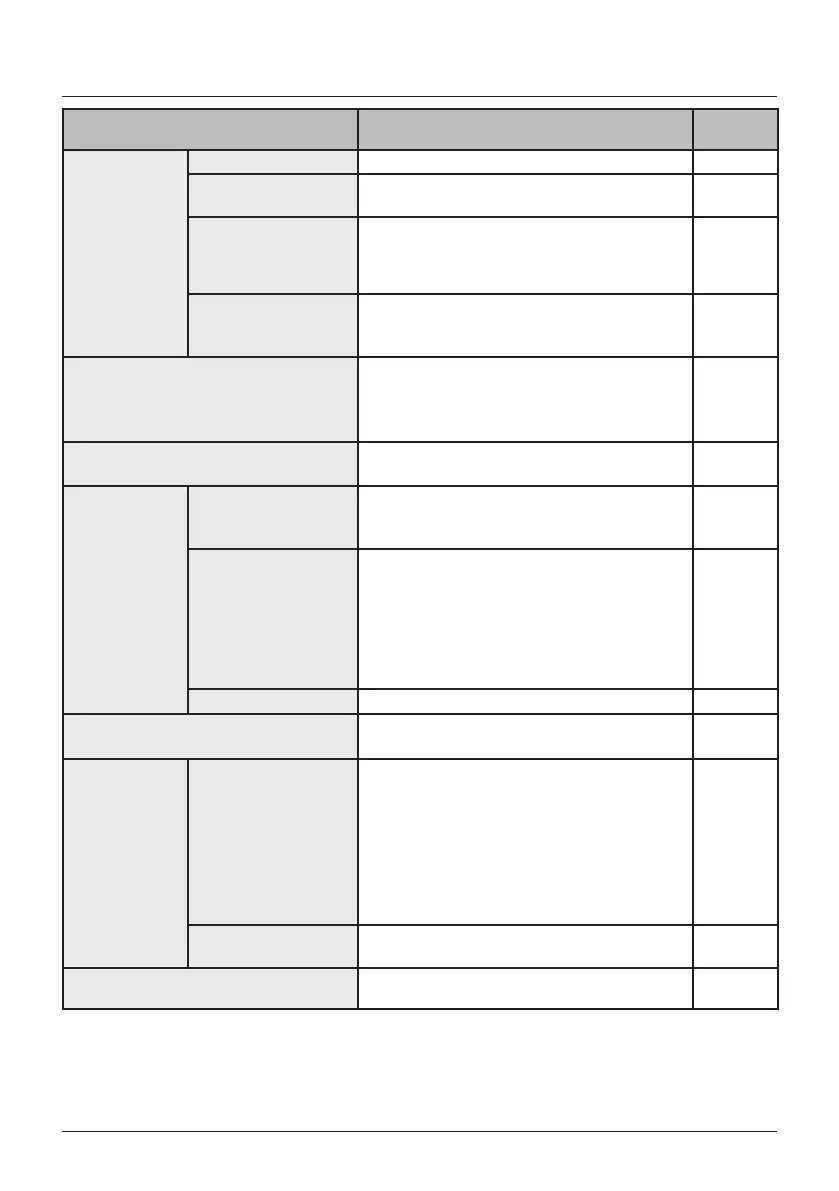
Quick Reference of Main Menu Items
Setting and display items Description
Reference
page
Schedule
(1)
Enable/Disable Enable or disable schedule function.
44
Schedule Number
Settings
Select the active schedule number (schedule
nr 1, 2 or 3).
45
Holidays Select the days of the week for which the
schedule will be disabled. This function is
used for when the schedule doesn't need to
be active, e.g. like when you are on holiday.
46
Settings Select when the operation modes start and/or
stop for each day of the week. Up to
5 actions can be set for each day.
47
Filter Auto Clean
Set the time when the lter needs to be
automatically cleaned. For detailed operation
refer to the Operation Manual of the self
cleaning decoration panel.
49
Maintenance Information
Display the service contact and model
information.
50
Conguration
Draft prevention
(
²
)
(only if the sensing
sensor is installed)
The draft prevention function can be enabled
or disabled.
51
Display
• Display:
Switch between Standard or Detailed
display.
• Detailed display settings:
Select if room temperature, outdoor
temperature, system or nothing is
displayed.
52
Contrast Adjustment Adjust the LCD contrast.
54
Current Settings
Display a list of the current settings of the
available items.
54
Clock &
Calendar
Date & Time Congure the date and time settings.
• The default time display is 24H.
• The clock will maintain accurate within
±30 seconds per month.
• If there is a power failure for a period not
exceeding 48 hours, the clock will continue
working with the built-in backup power
supply.
55
12H/24H Clock The time can be displayed in either a 12 hour
or 24 hour time format.
56
Language
Choose the language depending on the
language pack installed.
57
1)
The Schedule will not be available when a centralised controller or the BRP7A51 Digital Input Adapter is connected.
2) Not supported when SkyAir RR+RQ outdoor units are connected.
3) This function cannot be used when group control is active.
In case of a simultaneous operation system, the system is controlled by the sensing sensor mounted in the master indoor unit.



 To Next Page