2 Components
Service manual
39
ATXP20~35L2V1B + FTXP20~71L2V1B + ARXP20~35L2V1B +
RXP20~71L2V1B
Split Comfora R32
ESIE18-01 – 2019.02
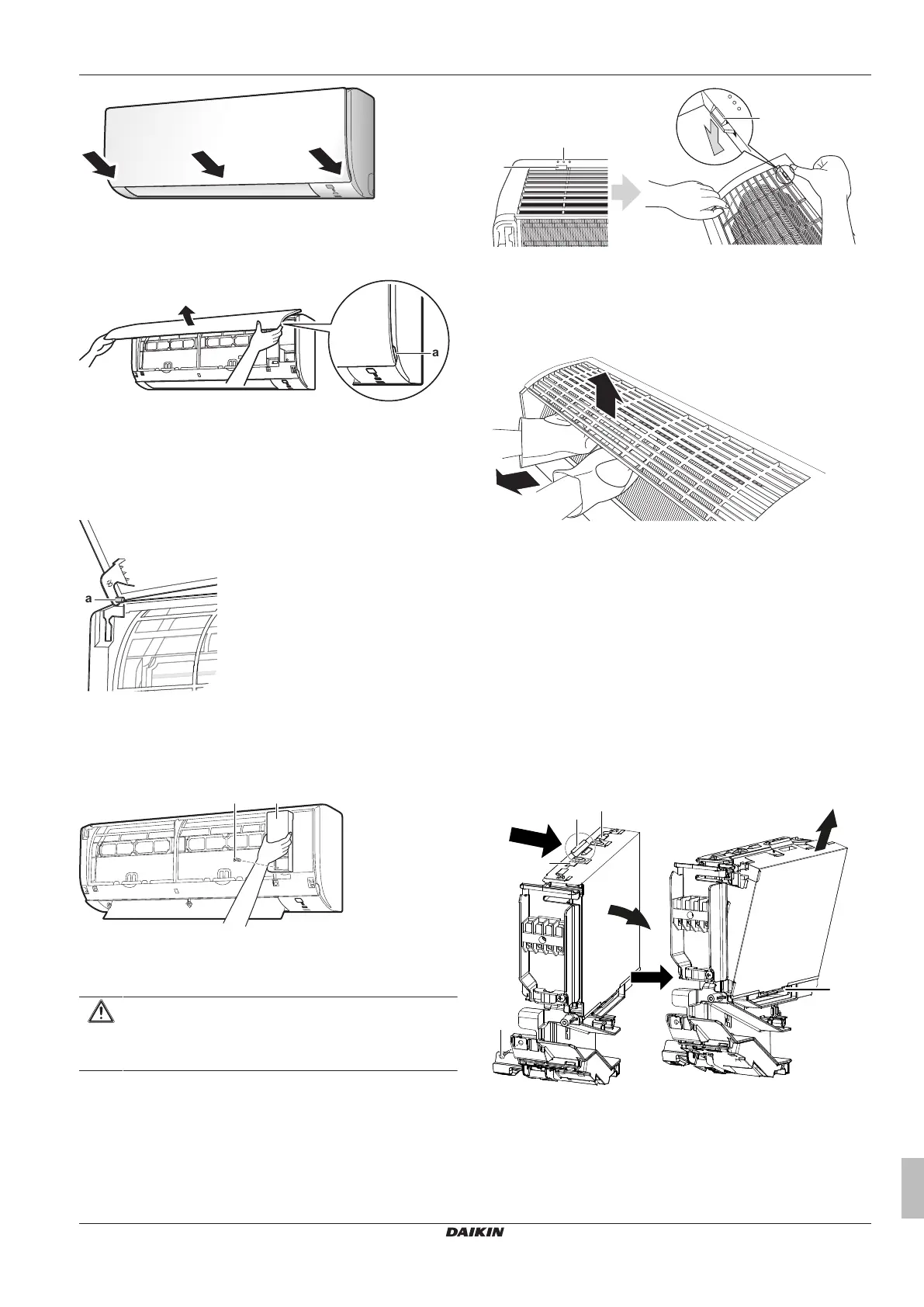
To remove the front panel
1 Hold the front panel by the panel tabs on both sides and open
it.
a Panel tabs
2 Remove the front panel by sliding it to the left or the right and
pulling it toward you.
Result: The front panel shaft on 1 side will be disconnected.
3 Disconnect the front panel shaft on the other side in the same
manner.
a Front panel shaft
To open the service cover
1 Remove 1 screw from the service cover.
2 Pull out the service cover horizontally away from the unit.
a Service cover screw
b Service cover
To remove the front grille
CAUTION
Wear adequate personal protective equipment (protective
gloves, safety glasses,…) when installing, maintaining or
servicing the system.
1 Remove the front panel to remove the air filter.
2 Remove 2 screws (class 20~35) or 3 screws (class 50~71) from
the front grille.
3 Push down the 3 upper hooks marked with a symbol with 3
circles.
a Upper hook
b Symbol with 3 circles
4 We recommend opening the flap before removing the front
grille.
5 Place both hands under the centre of the front grille, push it up
and then toward you.
To re-install the front grille
1 Install the front grille and firmly engage the 3 upper hooks.
2 Install 2 screws (class 20~35) or 3 screws (class 50~71) back
on the front grille.
3 Install the air filter and then mount the front panel.
To remove the electrical wiring box cover
1 Remove the front grille.
2 Remove 1 screw from the electrical wiring box.
3 Open the electrical wiring box cover by pulling the protruding
part on the top of the cover.
4 Unhook the tab on the bottom and remove the electrical wiring
box cover.
a Tab
b Protruding part on the top of the cover
c Screw
5 To re-install the cover, first hook the bottom tab onto the
electrical wiring box, and slide the cover into the 2 upper tabs.




 To Next Page