Connecting the Base Station
6Gryphon™ I GBT4100
Host Connection —
Verify before connection that the
reader’s cable type is compatible with your host equip-
ment.
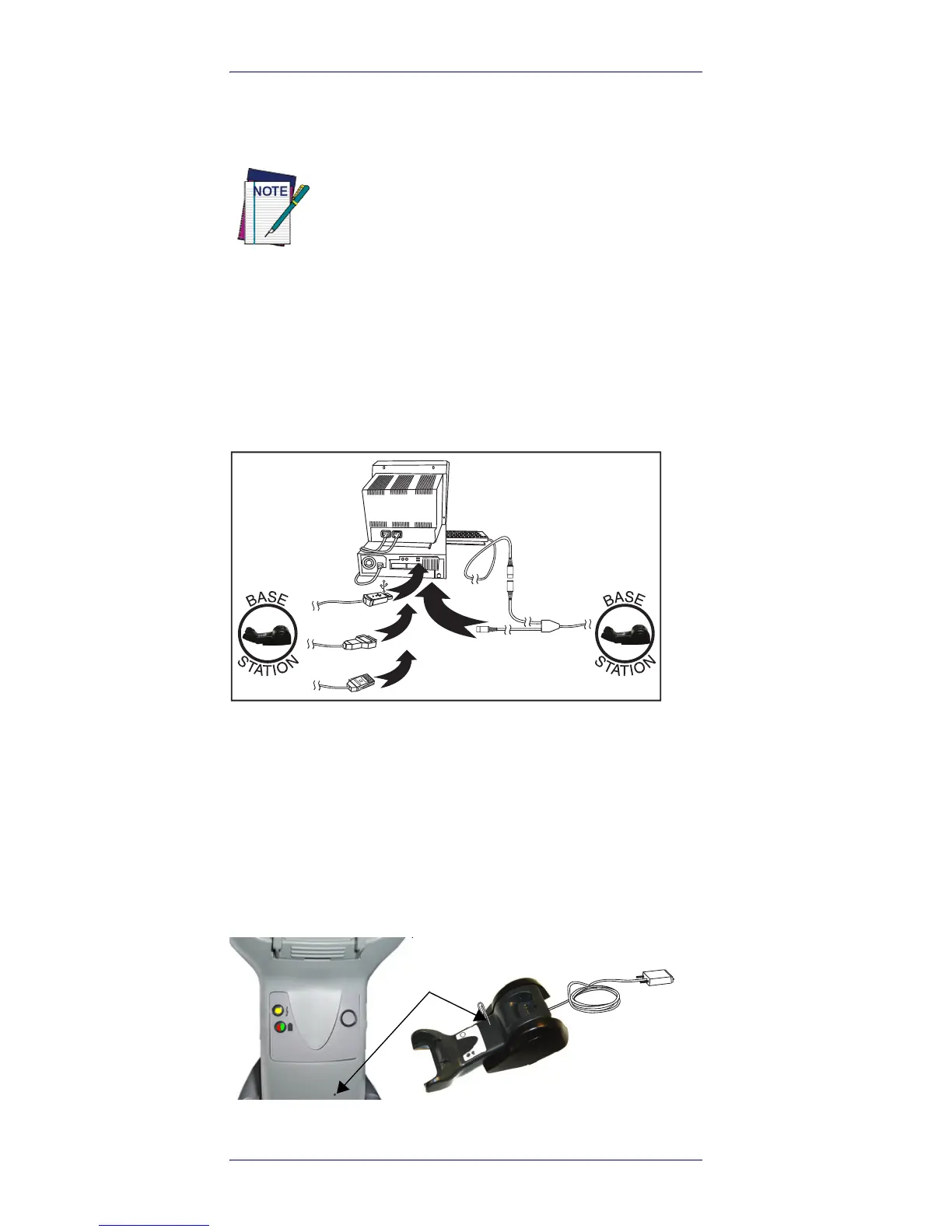
Most connections plug directly into the host device as
shown in Figure 4. Keyboard Wedge interface cables have
a ‘Y’ connection where its female end mates with the male
end of the cable from the keyboard, and the remaining end
at the keyboard port on the terminal/PC.
Figure 4. Connecting to the Host
Power Connection —
Plug the AC Adapter into an approved
AC wall socket with the cable facing downwards (as
shown in Figure 1) to prevent undue strain on the socket.
Disconnecting the Cable —
To detach the cable, insert a
paper clip or similar object into the hole on the base, as
shown in Figure 5.
Figure 5. Disconnecting the Cable
The Gryphon I GBT4100 can be set up to require a
PIN code when connecting to the host. If you are
adding new equipment to a system that uses a
custom security PIN, please see the PRG for
information before proceeding.










 To Next Page