AP25 Installation and Operating Guide Page 106
AP25 Installation & Operating Guide Document # 9301H79500 Ver. 1.00
Note: you will not see POWERON in the EVENTS screen. It can only be seen in the Macros
screen.
4.5.3 Automation Buttons
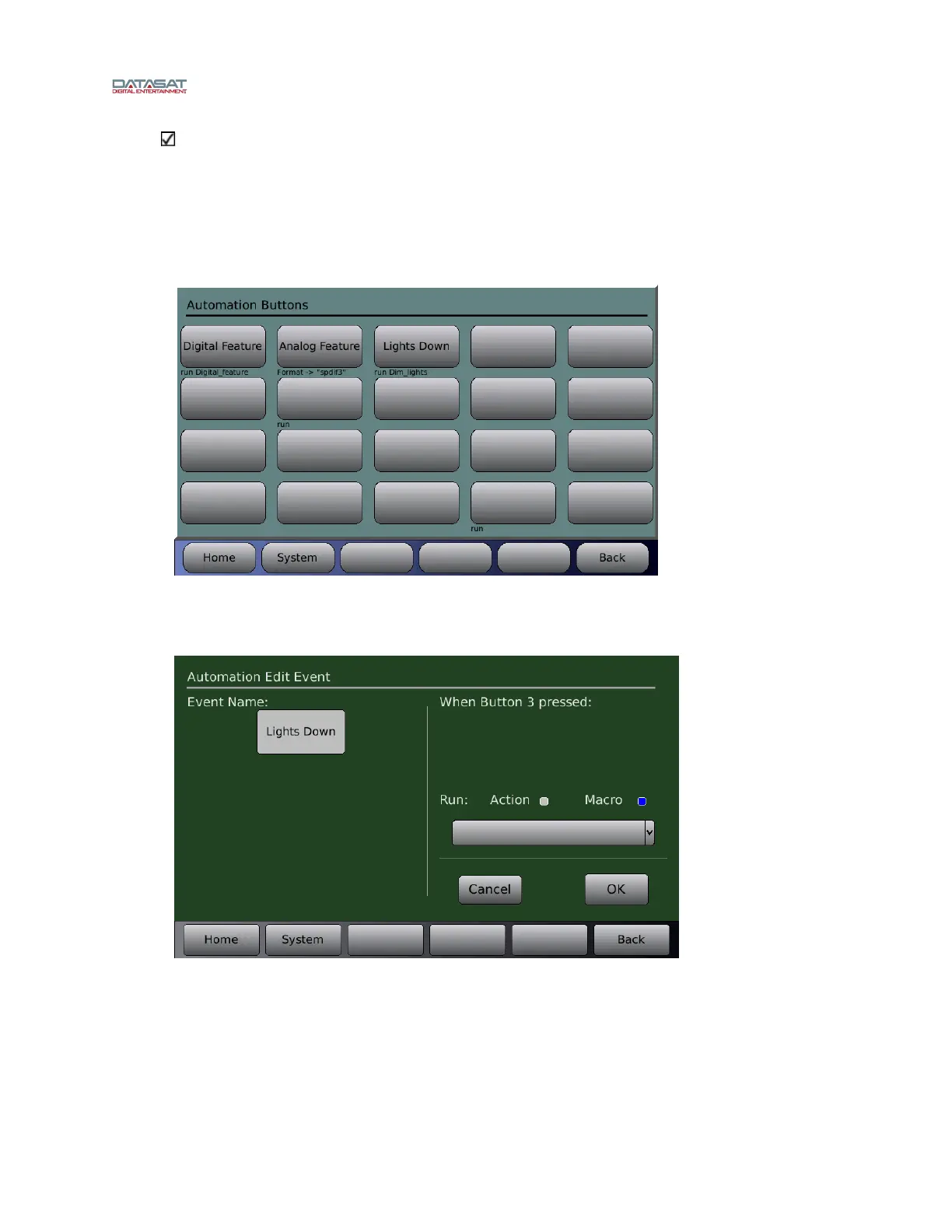
The Automation Buttons screen shows existing buttons assigned to an Event. Information on the
associated event appears below each configured button.
Menu (System) > Automation > Buttons
Figure 88. Automation Buttons
To configure a button, touch the button to select it.
A screen will open that allows both the button title and the event assignment to be configured.
Figure 89. Button Assignment
To enter or change the button title, touch the Event Name box to select. A keyboard
screen will open allowing you to type in a new title for this button.
To assign a macro to the button, select the Macro button, touch the Macro dropdown list
and select from the listing. Touch OK when finished, or touch Cancel to cancel this
task.



 To Next Page