AP25 Installation and Operating Guide Page 25
AP25 Installation & Operating Guide Document # 9301H79500 Ver. 1.00
2.2 Unpacking System Components
See the list of standard components for an AP25 shipment, on page 11. The exact contents may vary,
depending on the options you have ordered.
Note: Refer to the actual packing slip from your order to verify the contents of your shipment.
Contact Datasat Digital Entertainment immediately if items listed on your packing slip are
missing.
2.2.1 Preliminary Inspection
Note: Before installing the AP25 unit, take a complete inventory of system components to minimize
problems or questions during installation. Additionally, save all packing materials until installation is
complete in case you need to return parts to the factory.
2.3 Installation Overview
The AP25 chassis is the main component of the AP25 system. Installation procedures include:
Mounting the AP25 chassis in a rack
Connecting the AP25 unit to other equipment
Connecting the AP25 unit to a power supply
Device Disconnect: The power outlet shall be installed near the equipment and shall be
easily accessible, in order to quickly disconnect power.
2.4 AP25 Rear Panel Connections
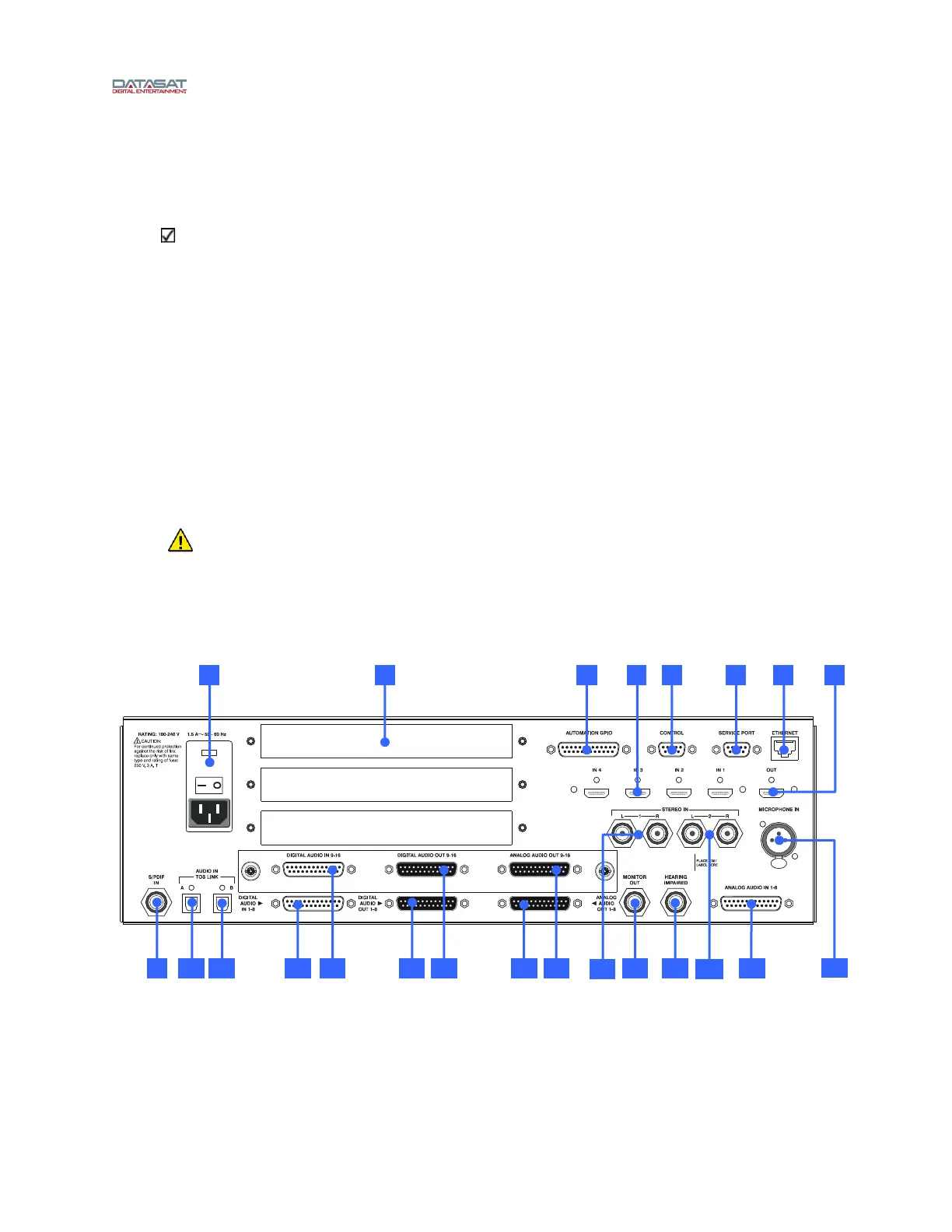
Figure 11 shows the rear panel of the AP25.
Figure 11. AP25 Rear Panel
22 9 11 12 10 13 14 15
23
1 2 3 5 6 84 7
21 18
20 1916 17



 To Next Page