Genesis II Select
™
User’s & Installation Manual
16/September/2015
17
Front Antenna Mounting
When mounting the front antenna bracket to the windshield use the
following bullet points to help in determining the proper location.
t .BLFTVSFUIBUZPVDo Not mount the antenna in the
deployment path of the air bag or where it will obstruct the
driver's vision.
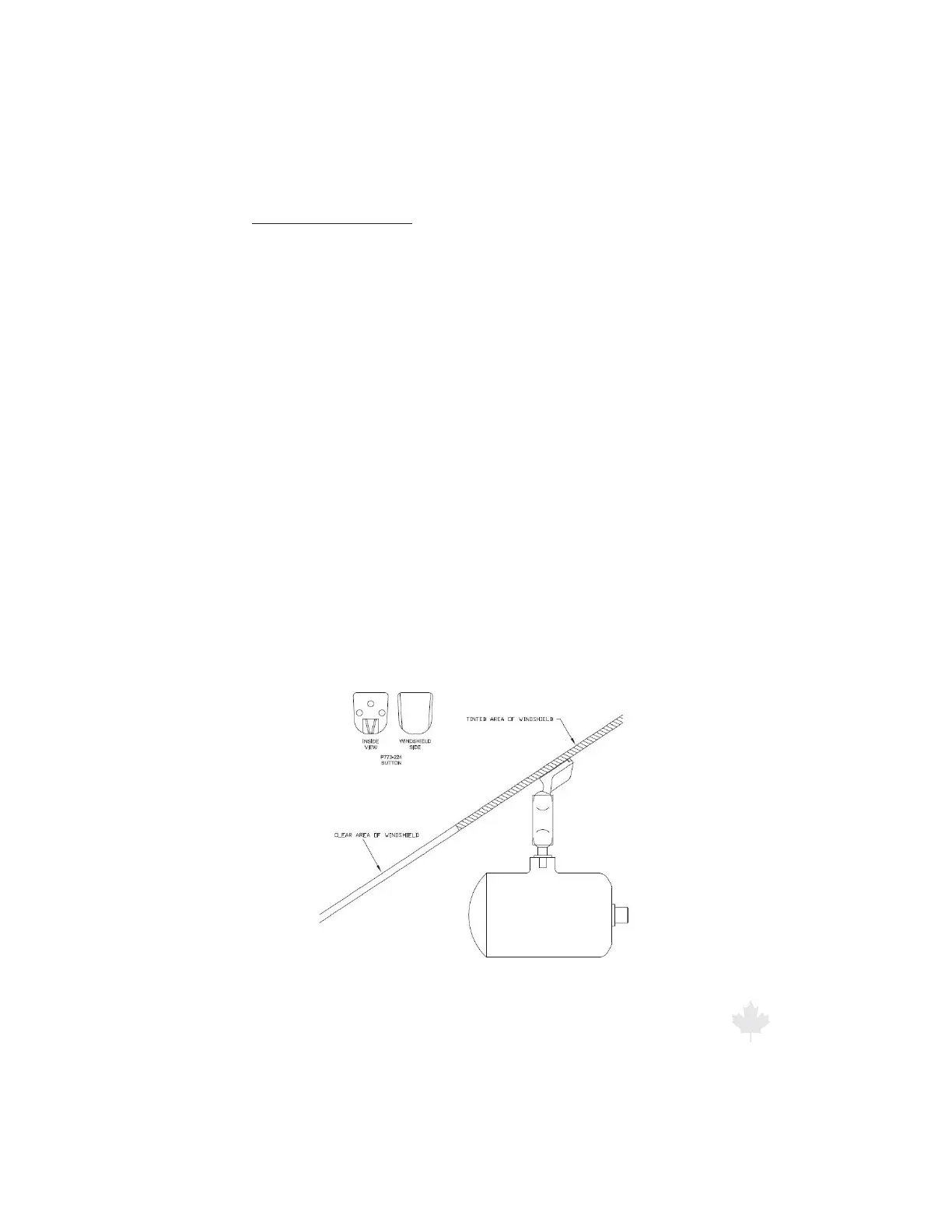
t (MVFUIFCVUUPOJOBMPDBUJPOTPUIBUUIFBOUFOOBXJMMCF
completely below the tinted area of the windshield as shown in
Figure 2.3d.
t 1SJPSUPHMVJOHUIFCVUUPOJOQMBDFUFTUUIFQPUFOUJBMBOUFOOB
location for good performance and for any fan interference.
Once the considerations listed above have been observed, follow the
instructions on the glue packet making sure that the windshield glass
is properly cleaned and prepared. Apply the glue to the button, as
described in the glue packet instructions. Make sure that the button's
orientation is correct (do not glue the button on upside down). Hold
the button in place for the length of time outlined in the instructions.
Allow the glue to fully cure before mounting the bracket and antenna
to the button.
Figure 2.3d
Proper antenna mounting.



 To Next Page