Genesis II Select
™
User’s & Installation Manual
16/September/2015
42
The Faster light illuminates when you press and hold the FAST button
on the hand-held remote.
When activated, the system simultaneously displays the strongest
target signal and the next strongest target signal going faster than
the target signal.
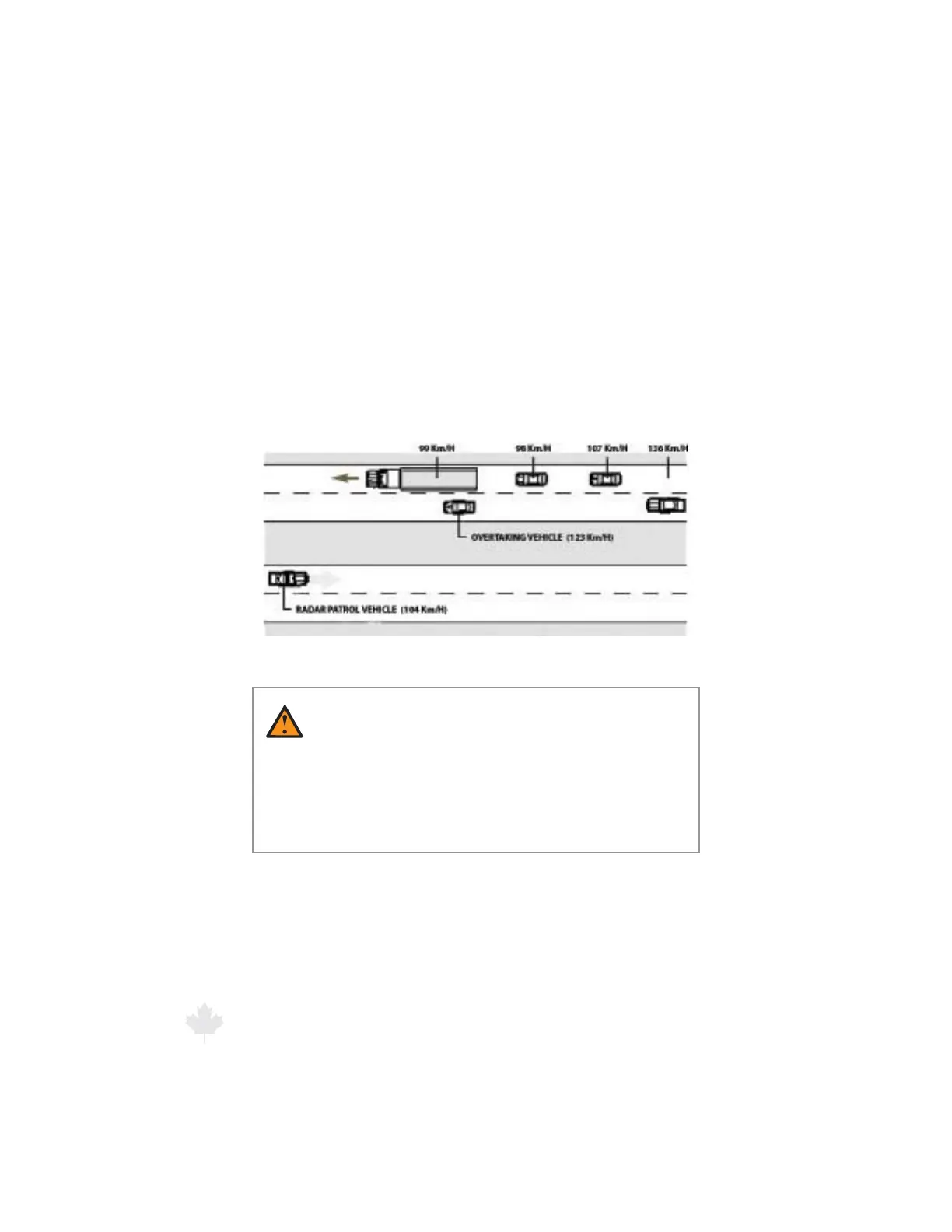
In the gure below, the 99 km/h motor vehicle is the strongest target
if the FAST button is activated, then the next stronger faster target,
namely the passenger motor vehicle at 123 km/h will be displayed.
Figure 6.6
Evaluating multiple targets in Faster Mode.
WARNING
t 8IFOJO4UBUJPOBSZ.PEFVTJOHOPOEJSFDUJPOBM
antennas or using directional antennas without the
directional feature active, it is possible that the faster
vehicle not traveling in the same direction is the
strongest vehicle.
6.7 Lock a Speed
The LOCK button transfers the target speed in the TARGET window
to the LOCKED window. After locking the speed, the radar unit
continues to process speeds and display target speeds in the TARGET
XJOEPXXIJDIXJMMCFTPMFMZUIFTUSPOHFTUSFøFDUFETJHOBM



 To Next Page