Genesis II Select
™
User’s & Installation Manual
16/September/2015
34
6.3.2 Using Directional Antennas
When using directional antennas, you can use Stationary Mode
to also select a specic direction of trac (towards or away) to
monitor.
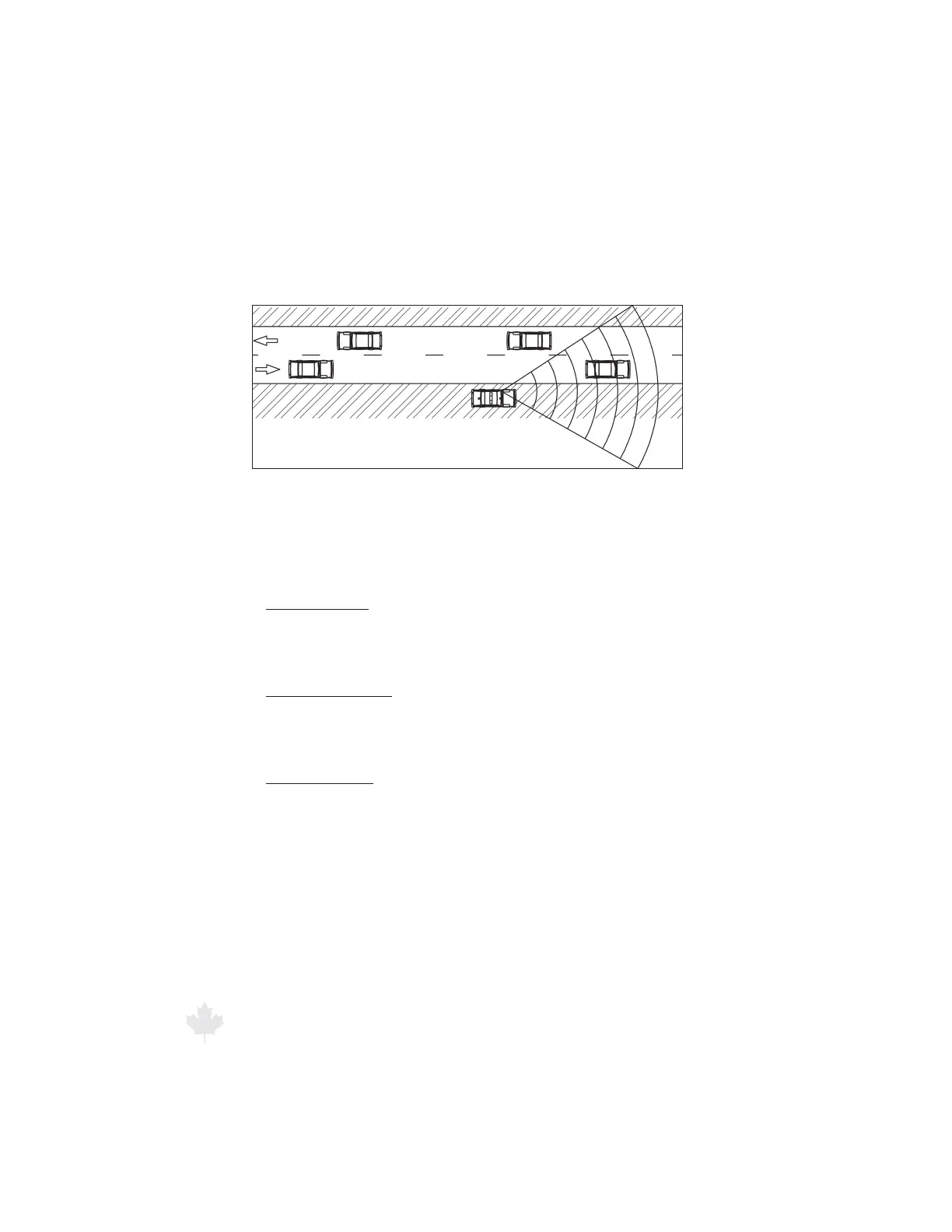
Figure 6.3.2a
Tracking a motor vehicle moving AWAY from a stationary patrol motor vehicle
with the radar in Stationary Mode using the FRONT antenna.
There are three selections for stationary mode:
Stationary Both
Tracks motor vehicles moving towards or away from the patrol
motor vehicle.
Stationary Towards
Only tracks motor vehicles moving toward the patrol motor
vehicle.
Stationary Away
Only tracks motor vehicles moving away from the patrol motor
vehicle.
To select Stationary Mode of operation, press and hold the
MODE button for two seconds. The “Stationary Both” mode will
be represented by two arrows on the left (one pointing up, one
pointing down) and a solid line on the right representing a parked
patrol motor vehicle. When targets are measured, the letter “T”
or “A” will be displayed along side of the solid line to indicate the
target is moving TOWARDS or AWAY from the patrol motor vehicle.



 To Next Page