EasyManua.ls Logo

Deif SGC 420 - User Manual

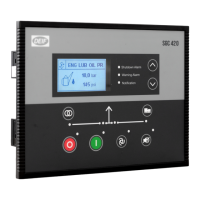
Deif SGC 420
86 pages
Print Icon
To Next Page IconTo Next Page
Loading...
User manual
Single Genset Controller
SGC 420/421
DEIF A/S · Frisenborgvej 33 · DK-7800 Skive · Tel.: +45 9614 9614 · Fax: +45 9614 9615 · info@deif.com · www.deif.com
Document no.: 4189341227A

Table of Contents

Questions and Answers

  • M
    Mr. Phillip BridgesSep 15, 2025
    What does it mean when Deif SGC 420 shows Error C03?
    • D
      David StewartSep 15, 2025
      Error C03 on the Deif Controller can occur if the controller is disconnected from the PC during a configuration. To resolve this: 1. Push and hold the Stop/Config button during a power cycle to reset the controller. 2. Re-send the configuration file.

  • T
    Teresa SmithAug 25, 2025
    Why does Deif SGC 420 show Emergency stop alarm when it is not activated?
    • P
      Paul PhillipsAug 25, 2025
      If the Emergency stop alarm is shown on the Deif Controller without the Emergency stop being activated, check if the Emergency stop switch is working OK, including the wiring. Also, enter the Configuration mode in the controller and verify the configuration of the Emergency stop polarity.
  • A
    adamsgeraldAug 25, 2025
    What to do if Deif SGC 420 Controller shows Charging Alt Fail alarm?
    • A
      Andrea RussellAug 26, 2025
      If the Deif Controller displays a Charging Alt Fail alarm, here are some steps to investigate: * To check if the controller's charging alternator terminal is working: Disconnect the charging alternator wiring to the controller's terminal 10. Short the terminal 10 to the ground through a DC ammeter. Crank-start the engine. The DC ammeter should indicate the current in the range of 200 to 400 mA for ~30 seconds. If yes, the controller's charging alternator terminal is working correctly. * Disconnect and re-connect the charging alternator ind connection to the controller's terminal 10. * Check if the charging alternator is working corrctly.
  • J
    joshua77Aug 26, 2025
    What to do if Deif SGC 420 Controller generates unnecessary shutdown alarms or warning alarms?
    • W
      Walter LewisAug 26, 2025
      If the Deif Controller generates unnecessary shutdown or warning alarms, take these actions: * Check the respective switch, sensor and wiring. * Go to the Configuration menu. Make sure the threshold values for the alarms and warnings are configured correctly.
  • M
    Michael SimonSep 16, 2025
    What to do if Deif Controller does not stop the engine when a remote stop command is sent from an external device?
    • T
      Travis RichardsSep 16, 2025
      If the Deif Controller does not stop the engine when a remote stop command is sent, check the following: * Check the wiring of the remote stop signal to the digital input on the controller. * Go to the Configuration menu on the controller. Make sure the digital input for the remote stop is configured correctly. * Make sure that the controller is in Auto mode.
  • T
    Tony McdanielSep 23, 2025
    Why the engine runs, but the Deif Controller shows genset to be OFF?
    • C
      Christine BrownSep 23, 2025
      If the engine runs, but the Deif Controller shows genset to be OFF: * Check the alternator voltage signal (L1 phase) is received by the controller terminal. * Check if the LOP and LLOP are working correctly. Check the wiring to the controller.
  • J
    joseph60Sep 7, 2025
    What to check if Deif Controller is not sending data via Modbus?
    • D
      david18Sep 8, 2025
      If the Deif Controller is not sending data via the Modbus communication, check if the Modbus communication is enabled in the controller. Also, check if the Modbus communication settings of slave match with the master, if the connections are done properly for the Modbus input (terminals 31 and 32), if the connections are interchanged and the 120 ? resistance between terminal A (terminal 31) and terminal B (terminal 32).
  • M
    monicadavidsonSep 8, 2025
    Why does Deif SGC 420 Controller send a Start command even if the Mains is present?
    • D
      Dana HutchinsonSep 8, 2025
      If, while in Auto mode, the Deif Controller sends a Start command even if the Mains is present, check the wiring of the mains L1, L2, and L3 phase to the controller's respective input terminal. Also, enter the Configuration mode in the controller and verify the configuration for the Mains monitoring.
  • M
    Melanie SaundersSep 2, 2025
    What should I do if the engine runs, but the Deif Controller shows genset to be OFF?
    • A
      Aaron CampbellSep 2, 2025
      If the engine runs, but the Deif Controller shows the genset to be OFF, check if the alternator voltage signal (L1 phase) is received by the controller terminal. Also, check if the LOP and LLOP are working OK, and verify the wiring to the controller.
  • M
    mejiakeithAug 31, 2025
    How to resolve Error C03 on Deif SGC 420?
    • Z
      zmorganAug 31, 2025
      Error C03 on the Deif Controller can occur if the controller is disconnected from the PC during a configuration. To resolve this: 1. Press and hold the Stop/Config button during a power cycle to reset the controller. 2. Re-send the configuration file.
Summary

Introduction

About SGC 420;421

General information about DEIF's SGC 420/421 genset controllers.

Key functions

Overview of the main features and capabilities of the SGC 420/421 controllers.

Product overview

Summary of the SGC 420/421 controller's features and specifications.

Passwords

Controller Buttons

Overview of controller buttons

Description and identification of the physical buttons on the controller.

Legal Information

Contains warranty, disclaimer, and copyright information.

Safety Instructions

General Safety Instructions

General guidelines and warnings for safe installation and maintenance.

Electrical Safety

Specific safety precautions related to electrical hazards and shock prevention.

In Operation Safety

Safety measures to follow during the operation of the controller and genset.

Technical Specifications

Terminals

Details on the types and specifications of terminal blocks used in the SGC 420/421.

Power Supply

Specifications related to the controller's power supply requirements and operation.

Genset Voltage and Frequency Measurements

Technical details for measuring genset voltage and frequency.

Genset Current Measurements

Technical specifications for measuring genset current.

Earth Leakage;Fan Current Monitoring

Specifications for earth leakage and fan current monitoring.

Mains Voltage and Frequency Measurement

Technical details for measuring mains voltage and frequency.

Digital Inputs

Specifications and configuration options for digital inputs.

Analogue Resistive Sensor Inputs

Details on analogue inputs for resistive sensors, including range and accuracy.

Analogue Inputs Used as Digital Inputs

Wiring diagrams showing how analogue inputs can function as digital inputs.

Analogue Voltage;Current Input

Specifications for analogue voltage and current sensing inputs.

Site Battery Inputs

Details on inputs for site battery monitoring and run hours.

Magnetic Pick-up (MPU) Input

Specifications for the magnetic pick-up input used for engine speed sensing.

Digital Outputs

Specifications for the controller's digital output terminals.

Actuator Outputs (SGC 421 only)

Details on actuator outputs for electronic governing applications on SGC 421.

D+ Charger Alternator

Specifications for the D+ terminal used for charging alternator control and monitoring.

Sensor Common Point

Description of the sensor common point terminal for analogue sensors.

Communication Ports

Details on USB, RS-485, and CAN communication ports.

Installation

Dimensions

Physical dimensions of the controller and panel cut-out requirements.

Mounting in Panel

Instructions and illustrations for mounting the controller into a panel.

Terminal Details

Detailed description of each terminal on the rear of the controller.

Typical Wiring Diagrams

Illustrative wiring diagrams for the SGC 420 controller.

Monitoring Mode

Monitoring Mode

Explanation of the monitoring mode and how display views shift.

Configuration Mode

Configuration Mode

Step-by-step guide to entering and navigating the controller's configuration mode.

Configurable Parameters

Overview of the parameters that can be configured on the controller.

Module

Configuration options related to the controller module settings.

Digital Inputs

Configuration options for digital inputs, including source, polarity, and action.

Analogue Inputs

Configuration details for analogue inputs, including sensor selection and calibration.

Outputs

Configuration of digital output sources and activation settings.

Timers

Configuration of various timers, including cranking and start/stop delays.

Generator

Configuration settings for the generator, including voltage and frequency monitoring.

Mains

Configuration for mains monitoring, including voltage, frequency, and phase reversal.

Engine

Configuration settings related to engine parameters and monitoring.

Maintenance

Settings related to maintenance alarms and due dates.

Password ID

Configuration of password IDs for controller access.

Rotary Actuator (SGC 421 only)

Configuration options specifically for the rotary actuator on SGC 421.

Digital Input Source Selection

Guide to selecting sources for digital inputs displayed on the controller.

Digital Output Source Selection

Guide to selecting sources for digital outputs.

Running Modes

Auto Mode

Detailed explanation of the Auto mode operation, including Site Battery Monitoring.

Manual Mode

How to operate the controller in Manual mode.

Start and Stop Sequences

Flowcharts and explanations of engine start and stop sequences.

Load Detection

Load Detection in Auto Mode

How the controller detects load in Auto mode using contactor outputs.

Load Detection in Manual Mode

Methods used by the controller to detect load in Manual mode.

Features

About Features

General information about controller features.

Auto Config Exit Mode

How the controller exits configuration mode automatically.

Load Histogram

Functionality for displaying engine running hours in load groups.

Alarms

Alarms

Explanation of alarm types, actions, causes, and handling.

Modbus Communication Protocol

About the Modbus Communication Protocol

Introduction to the Modbus protocol used by the SGC 420.

Modbus Connection Details

Information on how to connect the controller for Modbus communication.

Modbus Functions

Supported Modbus functions and their descriptions.

Modbus Communication Settings

Modbus Communication Settings

Configuration parameters for RS-485 Modbus communication.

Register Map (Function Code 03)

Mapping of registers for reading data using Modbus function code 03.

Register Map (Function Code 16)

Mapping of registers for writing data using Modbus function code 16.

Engine Communication

Introduction to Engine Communication

Overview of engine communication capabilities via CAN bus.

Default Settings

Information about default engine communication settings.

Supported Engines

List of engine manufacturers supported for J1939 communication.

Engine Values on the Display

How to configure the display to show ECU values.

Engine Communication Settings

Detailed steps for configuring engine communication using DEIF Smart Connect software.

Generic J1939

Information on using the generic J1939 protocol for engine communication.

CAN Communication

About the CAN Communication Protocol

Introduction to the CAN communication protocol supported by SGC 420/421.

CAN Communication Structure

Details on the structure of CAN communication data and commands.

CAN Packet Structure

Structure of command messages sent over CAN.

Troubleshooting

Troubleshooting

Common faults, their causes, and remedial actions for the controller.

Deif SGC 420 Specifications

General IconGeneral
Storage temperature-40°C to +85°C
ProtectionIP20
Protection ClassIP20
Input Voltage100 to 690 V AC
CommunicationRS485, Ethernet
Dimensions144 x 144 x 35 mm

Related product manuals