EasyManua.ls Logo

Deka DURATION DD5300 - Auto ID Assignment and DIP Configuration for LOW Voltage Single Cluster (Parallel Connection)

Deka DURATION DD5300
96 pages
Print Icon
To Next Page IconTo Next Page
To Previous Page IconTo Previous Page
Loading...
DEKA DURATION DD5300
36
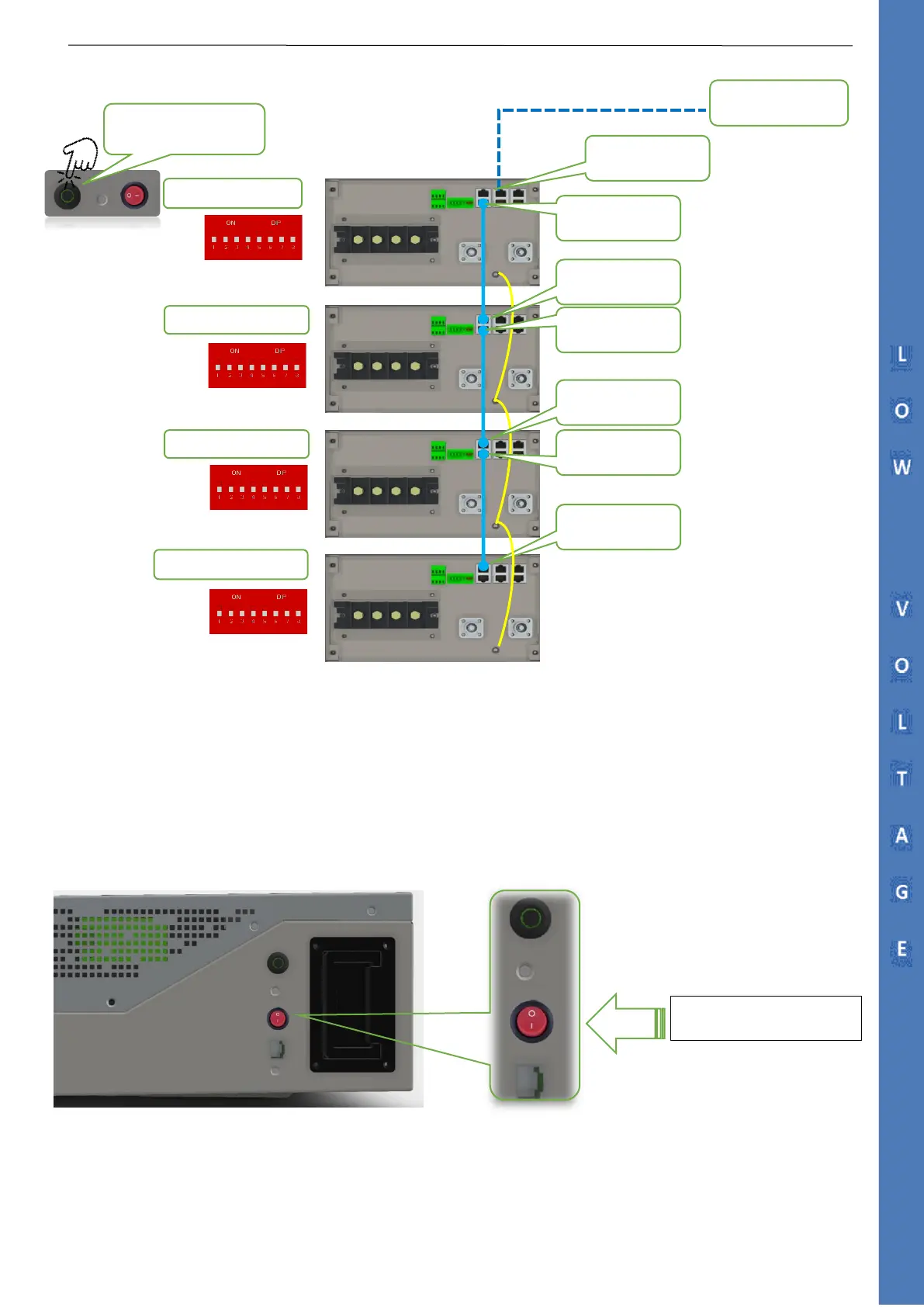
2.5.1 Auto ID Assignment and DIP Configuration for LOW Voltage Single Cluster (Parallel Connection)
STEP 1
ACTIVATING THE BMS FROM THE POWER SWITCH
It will be necessary to activate all the batteries by switching on the POWER SWITCH ( ON= position 1)
Port RS485B
MASTER
Port RS485A
Port RS485A
Port RS485A
Port RS485B
Port RS485B
SUB 2
15
th
/ or Last Module
SUB 1
CAN to Inverter
TURN ON THE POWER SWITCH
TO ENABLE THE BMS
To start up the system just
press the Master Run Button
CAN PORT 2A

Table of Contents

Related product manuals